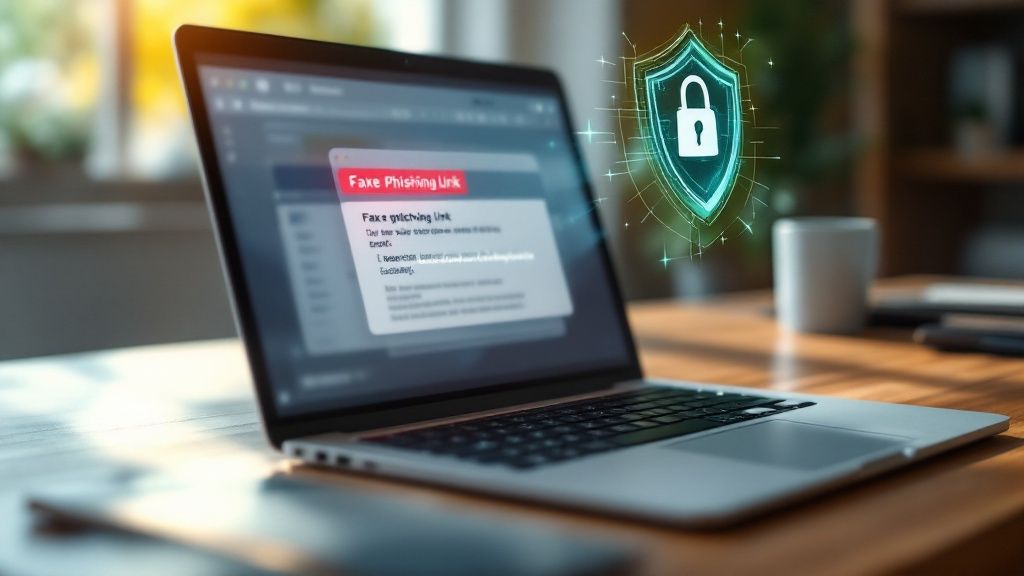
If you want to dodge phishing scams, you first have to know what you’re looking for. That means getting in the habit of checking sender details, being automatically suspicious of unexpected attachments, and always double-checking urgent requests through a separate channel.
Today's scams are slick. A little bit of healthy skepticism is your best first line of defense.
Understanding Modern Phishing Attacks
Get those old, poorly-written "Nigerian prince" emails out of your head. Modern phishing attacks are polished, personal, and scarily convincing. Scammers are now using perfect copies of legitimate websites and writing messages that hit you right where it hurts—playing on fear, curiosity, and a sense of urgency.
The numbers here are just wild. Phishing is a massive problem, with an estimated 3.4 billion malicious emails flying around the internet every single day. In the first quarter of 2025 alone, the Anti-Phishing Working Group (APWG) tracked over 1 million unique phishing attacks, the highest it’s been since 2023. You can dig into more of these trends over at Keepnetlabs.com.
The Psychology Behind the Scam
These scammers are experts at social engineering—basically, the art of manipulating people to get what they want. They're not just hacking your computer; they're hacking your brain. The whole point is to short-circuit your logical thinking and get you to react on pure emotion.
A classic move is creating fake urgency. Think about getting an email from your "bank" screaming that your account is compromised and you need to click a link right now to fix it. That manufactured panic is designed to make you act before you think. They’ll also try to tempt you with an offer that’s too good to be true or pique your curiosity with a fake "missed delivery" notification.
Key Takeaway: Phishing attacks want you to panic. When you're feeling rushed, pressured, or even overly excited, your critical thinking takes a nosedive. That's when you're most likely to click without thinking twice.
Common Types of Phishing Attacks
Email is still the most popular playground for scammers, but they're using every channel they can to get to you. Knowing the different flavors of phishing is key to building a solid defense. To truly avoid online scams and protect your data, you have to be ready for anything.
Here are the main types of attacks you'll probably run into:
- Spear Phishing: This is the sniper rifle of phishing. Instead of blasting out generic emails, attackers do their homework on a specific person or company. The email might use your name, your job title, or even mention a recent project to look 100% legit.
- Smishing (SMS Phishing): Phishing via text message. You get a text with a link, claiming to be from FedEx, your bank, or the IRS. They're usually short, demand immediate action, and are designed for you to tap on impulse.
- Vishing (Voice Phishing): This is the old-school phone call version. A scammer might pretend to be a tech support agent from Microsoft or a fraud specialist from your credit card company, trying to talk you into giving up sensitive info.
- Quishing (QR Code Phishing): A newer trick where scammers slap malicious QR codes on things like parking meters, restaurant menus, or emails. You scan it with your phone, and it takes you straight to a fake website or downloads malware.
This table breaks down the key components of a phishing email to help you spot red flags instantly.
The Anatomy of a Modern Phishing Attack
| Component | What to Look For | Example Red Flag |
|---|---|---|
| "From" Address | The display name might look right, but the actual email address is off. | Netflix Support <[email protected]> |
| Generic Greeting | Vague openings like "Dear Valued Customer" instead of your actual name. | "Hello Account Holder," |
| Urgent Language | Words designed to make you panic and act fast. | "Your account will be suspended within 24 hours!" |
| Suspicious Links | Hover over the link to see the real URL. It often won't match the company's actual website. | A link that says paypal.com but the preview shows paypal-security-update.xyz |
| Odd Attachments | Unexpected invoices, forms, or documents, especially .zip or .exe files. |
An email from a colleague with an attachment named Invoice_Details.zip that you weren't expecting. |
| Bad Grammar/Spelling | While less common now, mistakes can still be a giveaway. | "You're account has been temporary blocked." |
Once you know the psychological tricks and the different forms these attacks take, you're in a much better position to spot them. Knowing what you’re up against is the first real step in learning how to shut these scammers down.
How to Analyze Emails for Red Flags
Your inbox is the main battlefield where phishing attacks happen. Scammers know it’s your command center for business, personal accounts, and trusted contacts. The single best defense you can build is learning to dissect every suspicious email with a critical eye.
This isn't about being paranoid; it's about having a healthy dose of suspicion by default. Treat it like a game. Every unexpected email is a new puzzle, and you're the detective looking for the clues that give away the scammer's real plan.
Scrutinize the Sender Details
First stop: the "From" address. Scammers are absolute pros at faking their identity, often hiding behind a legitimate-looking display name to fool you at a glance. You might see "PayPal Support," but when you look closer, the actual email address is some garbage like [email protected].
Always, always expand the sender details to see the full email address. Keep an eye out for tiny misspellings, random numbers, or weird domain names (like .info or .xyz when you'd expect .com). An email from "Amaz0n" instead of "Amazon" is a dead giveaway you're dealing with a fraud.
Hover Before You Ever Click
If you only learn one habit from this guide, make it this one. Phishing emails are designed around one goal: getting you to click a link. They'll tell you to "verify your account," "claim your prize," or "view your invoice." These links are all traps.
Before your finger even gets near that mouse button, hover your cursor over the link. A small pop-up will show you the link's true destination. If the link text says YourBank.com/login, but the preview shows a sketchy URL like secure-update-yourbank.net, you just caught a scammer red-handed.
Pro Tip: The text of a link means nothing. It's just a label. The real story is in the underlying URL. On mobile, where you can't hover, just press and hold the link to see a preview of the destination address before you commit.
Watch for Unprofessional Language and Tone
Real companies spend a lot of time and money on their brand image. Their official emails are usually polished, professional, and free of obvious mistakes. Scammers? Not so much. Their sloppiness is often a huge red flag.
Be on the lookout for these tell-tale signs:
- Bad Grammar and Spelling: While some are getting smarter, many phishing emails are still full of typos and weirdly phrased sentences. Something like "You're account has been temporary blocked" should set off alarm bells immediately.
- Generic Greetings: If an email starts with "Dear Valued Customer" or "Hello Account Holder," be suspicious. Most legitimate companies will use your actual name.
- Urgent or Threatening Tone: This is a classic trick. Scammers create a fake sense of urgency to push you into panicking and acting without thinking. Phrases like "Immediate Action Required" or "Your Account Will Be Suspended" are designed to manipulate you.
The Danger of Unexpected Attachments
Getting an unexpected email attachment is like finding a random, unmarked package on your doorstep. You don't open it. Scammers love using attachments to sneak malware like ransomware or spyware onto your computer.
Be extra cautious with these common file types, which are often used for malicious purposes:
.zipor.rar(Can hide dangerous programs inside).exe(Executable files that run a program when opened).docmor.xlsm(Office files that can contain malicious macros).pdf(Can contain hidden scripts or links to malware sites)
If you get an invoice, receipt, or any document you didn't ask for, don't open it. Find the sender's official website or phone number and contact them directly to ask if they really sent you something. This same rule applies to managing any online account; for instance, when learning how to set up an OnlyFans account and get started, it's vital to only use official links from the platform itself, not from some random email.
Turning these checks into a quick mental routine for every weird email is how you build a powerful defense against scams. You'll start spotting these red flags instantly and keep your information safe.
Building Your Digital Defenses
Phishing attacks almost always start in your inbox, but that's not where they end. To really get a handle on how to dodge these scams, you need to think bigger. It's about building layers of security across your entire digital life.
When you create strong defenses on all your accounts and devices, you become a much tougher target. This proactive mindset flips the script—instead of just reacting to threats as they pop up, you’re cutting them off at the source.
Get a Password Manager—Seriously
Let’s be real: remembering a dozen unique, complex passwords is a nightmare. That's why so many of us fall into the trap of reusing the same one or two passwords everywhere. This is a massive security blind spot. If a scammer gets that one password, they could have the keys to your entire kingdom.
This is exactly why you need a password manager. These tools are lifesavers. They generate and safely store ridiculously strong, unique passwords for every site you use. All you have to remember is one single master password to access your secure vault.
Here's why they're non-negotiable:
- Stop the Domino Effect: If one site gets breached, your other accounts are still safe because they all have different passwords.
- Unbreakable Passwords: It can create passwords like
k$9!zP#vT&wRthat a human could never remember, but a hacker could never guess. - Safe Auto-fill: Most good password managers will auto-fill your login details, which stops you from accidentally typing your credentials into a fake phishing site.
Just by using this one tool, you massively boost your defenses against account takeovers—the number one goal of most phishing attacks.
Turn On Multi-Factor Authentication Everywhere
Think of your password as the lock on your front door. Multi-Factor Authentication (MFA) is the steel deadbolt. It's that extra step when you log in that asks for a second piece of proof that it’s really you. Even if a scammer nabs your password, they're stopped cold without that second factor.
A stolen password is the usual outcome of a successful phishing scam. But get this: enabling MFA is proven to block over 99.9% of automated cyberattacks. It completely neutralizes the threat, even if a scammer already has your password.
This second "factor" is usually something you physically have, like your phone. It could be a code sent via text, a push notification from an app, or even a physical USB key.
Your Best MFA Options:
- Authenticator App: Apps like Google Authenticator or Authy generate a fresh code every 30 seconds. This is way more secure than getting a text.
- SMS Codes: A code is sent to your phone via text. It’s better than nothing, but it's vulnerable to "SIM-swapping" attacks.
- Physical Keys: This is the gold standard. A small USB device (like a YubiKey) that you tap to approve logins. It’s virtually unphishable.
Go right now and enable MFA on your most important accounts: email, banking, and social media. It’s one of the single most powerful moves you can make.
Adopt Safer Browsing Habits
How you browse the web every day makes a huge difference. Scammers don't just rely on email; they create fake websites and lurk on insecure networks to trap people. A few simple habits can help you steer clear of danger.
First, always look for HTTPS in the website’s address bar. That little "S" means "secure," and it ensures the connection between you and the site is encrypted. Most browsers also show a padlock icon. If you see a "Not Secure" warning, that's your cue to leave immediately—never enter personal info there.
Also, be super cautious on public Wi-Fi at places like coffee shops, hotels, or airports. These networks are often wide open, making it easy for a snooper on the same network to spy on your traffic. If you absolutely have to use public Wi-Fi, fire up a Virtual Private Network (VPN) first to encrypt everything. Learning how to protect your privacy online with essential tips and tricks is a critical part of staying safe.
Spotting Advanced Social Engineering Tactics
Forget the old-school, generic phishing emails filled with typos. Today's scammers have seriously upped their game, using sophisticated and deeply personal social engineering tactics to get past your defenses. These aren't just random emails anymore; they're targeted attacks built with information about you, making them incredibly believable.
To keep yourself safe, you need to understand exactly what you're up against.
When Scammers Wear a Suit: Business Email Compromise (BEC)
One of the most dangerous and costly tactics out there is Business Email Compromise (BEC). Picture this: an email lands in your inbox, apparently from your boss, asking for an urgent wire transfer to a new supplier. The email address looks right, the signature is perfect, and the tone is spot-on. But it's a trap.
Attackers use BEC to impersonate high-level executives or trusted partners, tricking employees into sending money or sensitive data directly to them.
This isn't a small-time scam. The financial damage is staggering. A single data breach involving phishing costs a company around $4.9 million on average. Worse, consumer losses from email scams shot past $12.5 billion in 2024, and BEC wire transfer fraud alone jumped by 33% in the first quarter of 2025. You can get more details on these phishing stats over at AAG-IT.com.
QR Codes and Social Media Intel: The New Attack Vectors
Scammers are also stepping out of the inbox with a sneaky tactic called quishing—phishing with QR codes. You see a QR code on a parking meter, a poster, or even a restaurant menu. You scan it for convenience, but instead of the real website, it sends you to a malicious clone designed to swipe your login details or drop malware onto your phone.
Key Insight: Scammers are turning our love for convenience against us. QR codes are so quick and easy that we often don't think twice before scanning. Always be skeptical of QR codes in public or untrusted places.
They're also digging through your social media for ammunition. Scammers will crawl your public profiles for details about your job, friends, recent trips, or hobbies. With that intel, they craft a custom-made phishing email that feels too real to be fake.
For example, they might see you posted about attending a marketing conference. A few days later, you get an email pretending to be from the event organizers with a link to "download the presentation slides." Since it's tied to a real event you attended, your guard is down, and you're much more likely to click. This is a powerful reminder to be careful about what you share online. For more on this, check out our guide on how to protect personal information online.
Decoding the Social Engineering Playbook
To spot these advanced threats, you have to look past the email itself and see the psychological manipulation at play. Scammers aren't just sending links; they're crafting a story to exploit how we think and feel.
Watch out for these classic manipulation tactics:
- Impersonating Authority: They'll pose as your boss, the IRS, or a police officer to make you feel like you have to comply.
- Building Rapport: Using personal details they found about you to create a false sense of trust and familiarity.
- Exploiting Curiosity: Offering you something tempting, like exclusive files or juicy gossip relevant to your interests, to lure you into clicking.
To help you identify the specific type of attack you might be facing, here is a quick comparison of different phishing methods.
Common Phishing Types and Their Tell-Tale Signs
| Phishing Type | Primary Channel | Key Characteristic |
|---|---|---|
| Email Phishing | Generic, wide-net emails with urgent calls-to-action. | |
| Spear Phishing | Highly personalized and targeted at a specific individual or company. | |
| Whaling | A type of spear phishing aimed at high-level executives (the "big fish"). | |
| Business Email Compromise (BEC) | Impersonation of executives to trick employees into making payments. | |
| Smishing (SMS Phishing) | Text Message | Malicious links sent via text, often disguised as delivery alerts or bank notices. |
| Vishing (Voice Phishing) | Phone Call | Scammers call and create a sense of urgency to extract information. |
| Quishing (QR Code Phishing) | Physical/Digital QR Codes | Malicious QR codes that lead to fake websites designed to steal credentials. |
Recognizing these patterns is the first step toward protecting yourself.
This next chart breaks down three core security measures that can help you fight back.
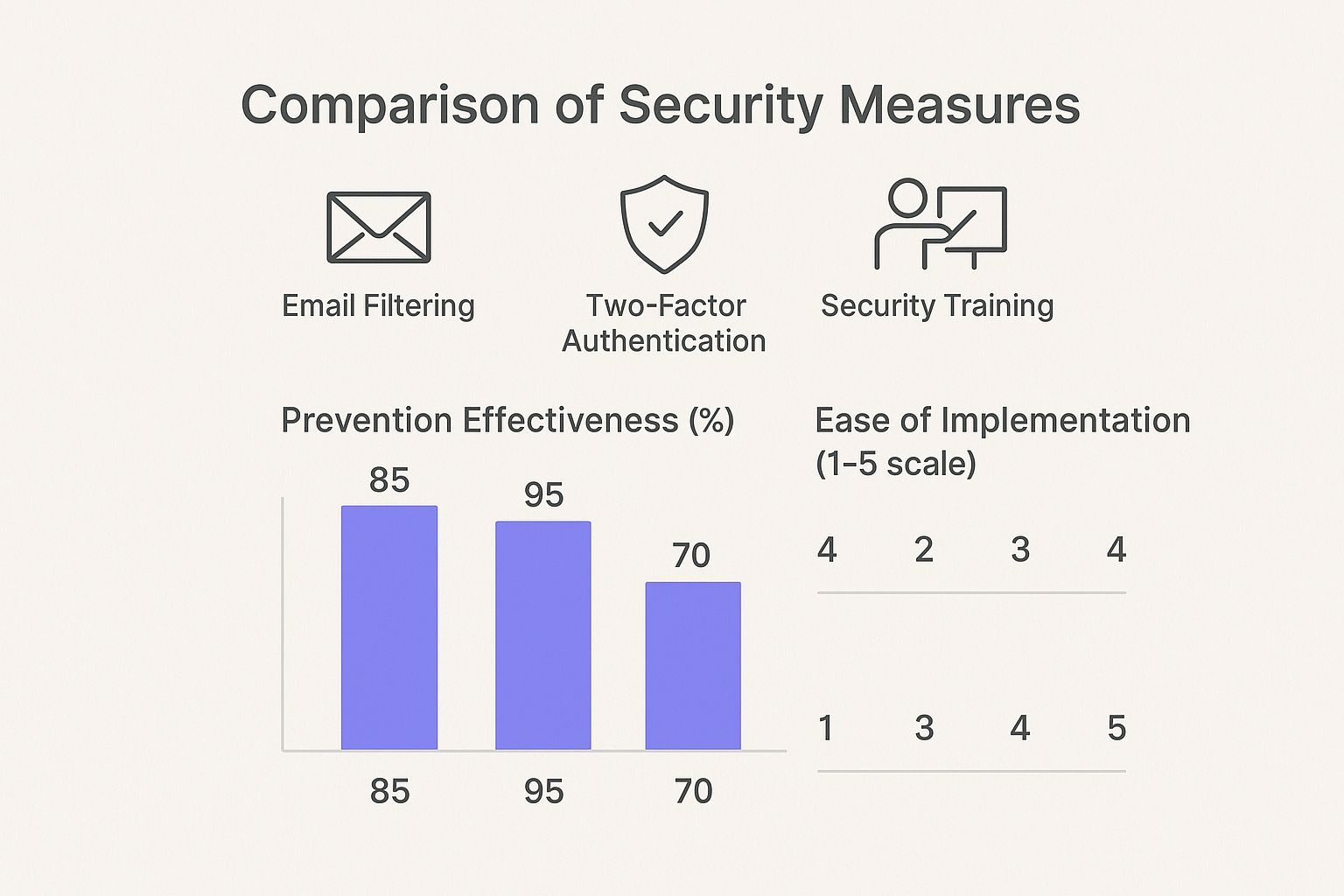
As you can see, Two-Factor Authentication is your most powerful tool. However, good security training is the easiest to roll out and still makes a massive difference.
At the end of the day, your best defense is a healthy dose of skepticism. Question every unexpected or urgent request, no matter how convincing it seems. That vigilance is what keeps you safe from these ever-evolving threats.
What To Do if You Suspect a Phishing Attack
We’ve all been there. An email pops up, your gut screams "scam," and that familiar sense of dread creeps in. What you do in the next few seconds is absolutely critical. A solid game plan can be the difference between a near-miss and a full-blown security nightmare.
The golden rule is dead simple: do not engage. Whatever you do, don't click a single link. Don't download attachments. And definitely don't reply—not even to tell them off. Replying confirms your email is active, landing you on even more scammer lists.
How to Handle a Suspicious Message
Your mission here is twofold: protect yourself and help prevent others from becoming victims. That means reporting the scam so that email providers and cybersecurity groups can shut it down.
Thankfully, most email clients like Gmail and Outlook have built-in reporting tools. Find the "Report Phishing" or "Report Junk" button. This does more than just clear your inbox; it feeds crucial data back to the provider, helping them fine-tune their filters to catch the next wave of attacks.
Want to go the extra mile? Forward the email to organizations that are actively fighting this stuff.
- Anti-Phishing Working Group (APWG): Send the email to
[email protected]. This global coalition uses the data to track and disrupt cybercrime. - Federal Trade Commission (FTC): For U.S.-based users, you can also forward it to
[email protected].
After you've reported it, delete the message for good. Get it out of your inbox, then immediately empty your trash or junk folder. Out of sight, out of mind—and out of clicking range.
Crucial Takeaway: When you spot a phish, it's time to act, not react. Scammers count on your panic. Instead, take a breath, report, and delete.
The "Oh No, I Clicked" Emergency Checklist
Okay, so the worst-case scenario happened. You were busy, the email looked real, and you clicked the link. Maybe you even typed in your password. It's a scary moment, but quick, decisive action can make a huge difference.
Run through this emergency checklist immediately.
Disconnect Your Device: First thing's first—get offline. Kill your Wi-Fi, unplug the ethernet cable. This can sever the connection between any malware and the scammer's server, preventing it from spreading or sending your data.
Change Your Passwords NOW: Open a new browser window and go directly to the official website of the compromised account. Change your password. And if you use that password anywhere else (we all do it), you need to change it on those accounts, too. Start with the most important ones: email, banking, and social media.
Run a Full Security Scan: Fire up your trusted antivirus and anti-malware software and run a deep, full scan of your device. Phishing links often try to sneak malicious code onto your system, and you need to find and destroy it before you go back online.
Alert Your Bank or Credit Card Company: If you entered any financial information, or if the account that was phished is tied to your bank, call them immediately. Let them know what happened. They can put a watch on your accounts or issue new cards if needed.
Following these steps helps you lock down your accounts and regain control. For a deeper dive into staying safe online, check out our guide on how to avoid online scams and protect your data.
Commonly Asked Questions About Phishing
Even after you’ve got a handle on the basics, there are always a few tricky "what if" scenarios that can throw you for a loop. Let's tackle some of the most common questions people have about phishing to make sure you're ready for anything.
Think of this as your advanced training. Knowing the answers to these questions before you're in a tough spot is what separates a potential victim from someone who spots a scam a mile away.
What if the Email Uses My Real Name?
It’s natural to lower your defenses when an email greets you by name. Scammers count on this. They often grab personal details like your name from public social media profiles or data breaches, making their attacks feel more personal and legitimate.
Just because they know your name does not make the email safe. This is a classic spear phishing move designed to build instant, unearned trust. Always go back to the basics: inspect the sender's full email address, hover over every link before clicking, and be skeptical of any unexpected request.
Can I Get Hacked Just by Opening a Phishing Email?
This is a huge source of anxiety, but here's the good news: generally, no. Simply opening a suspicious email is unlikely to infect your device. The real trap is sprung when you interact with what's inside.
The danger isn't in looking; it's in acting. The risk kicks in when you do one of these things:
- Click a malicious link. This is the number one goal—to get you to a fake login page or a site that sneakily downloads malware.
- Download and open an infected attachment. This is how ransomware, spyware, and other nasty viruses get onto your system.
- Reply to the email. Hitting "reply" confirms your email is active and that someone is reading it, which puts you on a "hot list" for more scams.
So, if you open an email and your gut tells you something's off, trust it. Just report it and delete it. Don't click a thing.
Is My Phone Safer Than My Computer?
We tend to feel safer on our phones, but they're just as much of a target. Scammers have adapted their tactics with smishing (phishing via SMS/text) and quishing (using malicious QR codes). They actually prefer mobile because the smaller screen makes it much harder to spot the usual red flags.
It's almost impossible to properly hover over a link on a touchscreen to see where it really goes.
Key Insight: Scammers prey on the fact that we're often distracted when using our phones. We're on the go, multitasking, and more likely to tap a link in a text without a second thought.
Treat suspicious texts with the same—or even more—caution as suspicious emails. If a text from "your bank" or "FedEx" seems weird, don't tap the link. Open your browser and go directly to their official website instead.
What’s the Difference Between Phishing and Spam?
Great question, as they both feel like junk cluttering up your inbox. The real difference comes down to intent. One is annoying; the other is actively trying to rob you.
Here’s how to tell them apart:
| Feature | Spam | Phishing |
|---|---|---|
| Primary Goal | Usually trying to sell you something or push an advertisement to a huge list of people. | Always trying to trick you into revealing sensitive info like passwords, credit cards, or logins. |
| Level of Threat | Mostly just a nuisance. Can occasionally contain bad links, but it's not the main goal. | Always malicious. It's designed for theft, fraud, and causing direct financial or personal harm. |
| Appearance | Tends to look like generic junk mail or a mass-market ad. | Often pretends to be a trusted brand, a government agency, or even someone you know. |
Basically, spam is like getting a flyer for a pizza place you'll never go to. Phishing is like someone sending you a fake bill disguised to look exactly like your real one. Knowing the difference helps you know what to just delete and what to report immediately.
Ready to discover your favorite performers without the guesswork? Fanclan provides a secure, intuitive platform to explore over 104,000 model profiles, complete with advanced filtering and verified information. Find exactly what you're looking for at https://fanclan.io.