Ever tried to find an OnlyFans creator in your local area and come up empty-handed? You’re not alone. The secret isn't on OnlyFans itself, but hiding in plain sight on other social media platforms and a few specialized search tools.
Since the platform intentionally leaves out a location filter, your best bet is to get creative. This means digging into platforms like Twitter, Instagram, and Reddit using location-specific hashtags or turning to third-party directories built specifically for these kinds of geographic searches.
The Hurdle: Why Location Searches on OnlyFans Don't Exist
It seems like a basic feature, right? Just type in a city and see a list of creators. But OnlyFans was built from the ground up to prioritize content categories and creator popularity, not geography. This is a deliberate choice, primarily to protect the privacy and safety of its creators. The result is that finding someone in your city can feel like searching for a needle in a global haystack.
The sheer scale of the platform makes it even tougher. As of early 2025, OnlyFans is home to roughly 4.19 million creators across the globe. Just to put that in perspective, in February 2025, there were around 179,522 applications to open creator accounts, although only about 36% of those were approved. This massive, worldwide talent pool means that who you see is almost entirely up to the platform's algorithm, not your physical location. For more deep dives into these numbers, ofstats.net is a great resource.
A Global Platform, Not a Local Directory
Think of OnlyFans as a worldwide marketplace. Its recommendation engine is designed to push popular accounts and trending content to the forefront. This means a creator from halfway around the world is just as likely to pop up on your feed as one who lives a few blocks away. It’s great for discovering a wide variety of content, but it’s a major roadblock for anyone looking for local connections.
The bottom line is that OnlyFans was never intended to be a local directory. Its purpose is to connect fans with creators based on shared interests, not physical proximity. Once you accept that, you can start exploring the workarounds that actually work.
This is where things get interesting. Despite the platform's global focus, the demand for local connections is huge. Take a look at this breakdown of what fans are actually looking for.
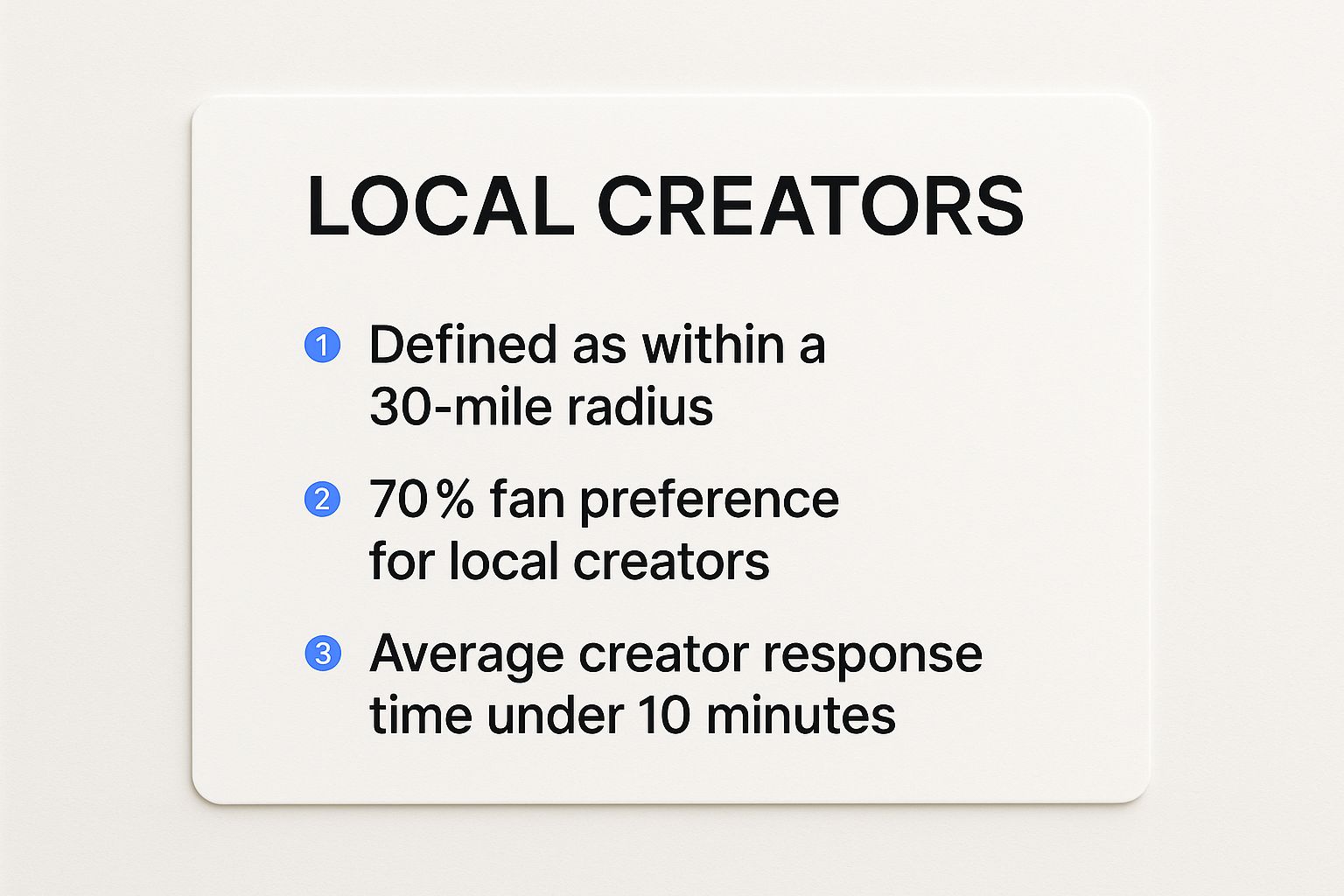
The data speaks for itself. There’s a clear preference among fans for local creators, which is exactly why knowing the right external tools and techniques is so crucial. If you're ready to dive deeper into the specific tools for the job, our guide on the 7 Best Tools to Find OnlyFans by Location in 2025 is the perfect next step.
Local Creator Discovery Methods at a Glance
Here’s a quick summary of the most effective strategies for finding local creators, which we'll explore in detail throughout this guide.
| Method | Primary Platform | Effectiveness Level | Key Requirement |
|---|---|---|---|
| Specialized Search Tools | Fanclan & other directories | High | Knowing the right platform to use |
| Social Media Hashtags | Twitter, Instagram | Medium | Patience & specific search terms |
| Location-Based Subreddits | Medium-High | Finding active, relevant communities | |
| Creator Collaborations | OnlyFans & Social Media | Low-Medium | Networking & observation |
Each of these methods offers a different path to the same goal. The key is knowing which one to use and when, depending on what you’re looking for.
Using Social Media to Pinpoint Local Talent

While OnlyFans itself doesn't offer a location search, creators almost always use other social media platforms to promote their pages. This makes those channels a goldmine for finding local talent, but you have to know how to look. It’s about shifting from aimless scrolling to searching with a clear purpose.
This whole strategy works because most creators aren't working with big marketing budgets. With average earnings often falling between $150 and $180 per month—and nearly half making under $100—they rely heavily on free promotion to find their audience. You can see more detailed creator earnings stats over on social-rise.com.
Because of this, you’ll find creators where they're most active and where promotion is free. That almost always means platforms like Twitter, Instagram, and Reddit.
Unlocking Twitter and Instagram Searches
On Twitter, the advanced search function is your best friend, especially when you pair it with location-specific hashtags. Instead of just typing a general term, get specific.
Try search queries that blend a city name with common OnlyFans-related terms, like:
- #ChicagoOF: This is a direct approach, combining the city with the "OF" abbreviation.
- #AustinCreators: A bit broader, but you'll often find OnlyFans creators in the mix.
- #MiamiAdult: This helps narrow the search to the specific industry within a city.
Instagram, on the other hand, is all about visual geography. The real trick is to use location tags. Many creators will tag their posts with the city or even the specific venue where a photo was taken. If you search for a major city under the "Places" tab, you can uncover profiles of creators who are actually active in that area.
A pro tip here is to look for consistency. If a creator is constantly tagging their posts in a single city, they’re almost certainly local. Someone who just uses a popular city tag once is likely just trying to get more eyes on their post.
Tapping into Reddit's Local Communities
Don't overlook Reddit. Its community-based structure makes it an incredibly powerful tool for this kind of search. The key is finding local NSFW (Not Safe For Work) subreddits where creators from a specific region share their profiles.
To find them, just search Reddit for terms like "[YourCity]NSFW" or "[YourState]GoneWild." These communities are usually moderated by users, which does a decent job of filtering out spam and fakes.
When you find a creator who looks promising, just click on their profile and check their post history. Someone who is active and regularly engages within a local subreddit is a very strong sign that they're genuinely based there. It's a much more direct way to find people who are actively trying to build a local fanbase.
Using Third-Party Search Tools and Directories
When scrolling through social media feels like searching for a needle in a haystack, it’s time to turn to a more specialized tool. Dedicated third-party directories are built from the ground up to help you find local OnlyFans creators. They work by pulling public info from creator bios and social profiles into one handy, searchable database.
The biggest win here is efficiency. Instead of wrestling with endless hashtags, you can just plug in a location and get a filtered list right away. It cuts down on the noise and saves you a ton of time.
Of course, you still need to be smart about it. These tools depend on publicly available data, which isn't always fresh. A creator might have moved or just forgotten to update the location in their bio, so you can run into some outdated listings.
How to Use a Directory Effectively
Let's walk through a real-world example. Say you're looking for creators based in Denver. On a good directory, you'd just type "Denver" into the search field or pick it from a drop-down menu. In seconds, you'll see a list of profiles that have publicly mentioned that city.
Now, your real work begins: vetting the results.
- Check for recent activity. Does their linked Twitter or Instagram have recent posts that feel local?
- Look for consistency. Is "Denver" mentioned everywhere, or just on one old profile they haven't touched in a year?
- Gauge the profile's health. A complete, well-maintained profile is usually a good sign of an active creator.
Think of these directories as your starting lineup, not the final score. They're fantastic for generating a list of leads, but it's on you to do a little digging on their social accounts to confirm they are who and where they say they are.
These platforms are an incredible shortcut for your initial search. If you want to get even more out of them, check out https://fanclan.io/blog/your-guide-to-using-an-onlyfans-model-finder for some advanced strategies. By pairing a directory's powerful search with your own due diligence, you’ll be connecting with local creators in no time.
How to Respectfully Connect with Local Creators

Finding a local creator you're excited about is just the starting line. The real key to a great experience—for both of you—is how you approach that initial conversation. Think of it this way: these creators are professionals running a business. Treat them like it, and you’ll set the stage for a positive connection from day one.
When you slide into their DMs, keep it polite and get straight to the point. Ditch any immediate demands or overly casual language. A simple, friendly introduction always works better than a message that comes off as aggressive or entitled.
Making That First Message Count
To make a good impression and show you respect their time and boundaries, keep a few things in mind when you reach out.
- Be a human, not a customer. Before you ask for anything, open with a genuine compliment about their work or profile.
- Do your homework. Read their bio first. Most creators lay out their rules, what they offer, and their boundaries right there. Mentioning that you've read it shows you're taking them seriously.
- Know the deal. You're a subscriber or a potential client, which means the relationship is professional. Keep your communication respectful and courteous.
The golden rule here is simple: treat creators with the same respect you'd expect in your own professional life. This approach doesn't just make the community better; it also makes it far more likely you'll get the positive response you're looking for.
Building a good rapport starts by remembering there's a real person behind the profile. This kind of respectful interaction is just as crucial as using the best OnlyFans accounts discovery tools to find them. By keeping these tips in mind, you’re helping create a safer, more professional space for everyone.
Common Mistakes to Avoid in Your Search
Finding local creators can feel like navigating a minefield if you aren't careful. A few common slip-ups can easily lead you down a rabbit hole of dead ends, wasted time, and even scam accounts. Knowing what to watch out for from the get-go is the secret to a much smarter, safer search.
One of the biggest mistakes people make is blindly trusting location tags on profiles or posts. A creator might plaster their content with tags for big cities like #NYC or #LosAngeles just to get more eyes on their page, even if they live hundreds of miles away. It's a common tactic for boosting visibility, so always dig deeper for more concrete proof of their location.
Falling for Fakes and Setting Unrealistic Goals
Another trap to avoid is getting duped by fake profiles and bots. These accounts are notorious for using stolen content and vague, generic bios to trick people into subscribing. The biggest red flag is a total lack of genuine interaction. Look for real conversations in their comments and a consistent, long-term posting history—authentic creators actually engage with their community.
It’s also really important to be realistic about who’s out there. In the first half of 2024, OnlyFans saw around 1.1 million applications from aspiring creators, but only about 396,272 actually got approved. That's a pretty strict 36% acceptance rate. This means the pool of active, local creators in any given area is probably smaller than you'd imagine.
The most effective search combines patience with a healthy dose of skepticism. Verify locations through multiple social media cues and prioritize profiles that show consistent, authentic engagement before you decide to subscribe.
Finally, one of the most critical errors is simply using the wrong search methods. If you're only relying on the built-in search functions on the platform itself, you're not going to get very far. The real magic happens when you use external strategies and tools designed for the job.
For a complete breakdown of the best techniques, check out our guide on how to use OnlyFans search tools the right way. Taking this approach will save you a ton of frustration and deliver much better results.
Got Questions? We've Got Answers
When you're trying to find creators in your area, a few questions always pop up. Let's tackle the most common ones I hear from people just starting their search.
Are Third-Party OnlyFans Search Sites Safe?
For the most part, yes—as long as you’re just using them for discovery. Reputable search directories simply pull together publicly available info from creator profiles and their social media pages. Think of them as a search engine for creators.
But you still need to be smart about it. If a site ever asks for your OnlyFans login details or wants you to pay just to browse, that’s a massive red flag. Back away immediately. Stick to well-known tools and treat them as the first step in your search, not the final word.
How Can I Tell if a Creator Is Actually Local?
Authenticity is everything. The best way to verify someone's location is to look for genuine, local clues sprinkled throughout their content.
Are they posting from recognizable spots around town? Do they mention local events or use regional slang that only a true local would know? Consistent geotags on Instagram or tweets about a neighborhood coffee shop are solid proof. Be wary of profiles that just spam broad city hashtags without any real context—that’s often just a tactic to get more eyeballs on their page.
Why Doesn't OnlyFans Just Add a Location Search?
It all comes down to creator privacy and safety. That’s the platform's top priority.
Think about it: a public, searchable map of creators could open the door to stalking, harassment, or other unwanted real-world attention. By keeping the focus on content and shared interests rather than physical location, OnlyFans creates a safer space for everyone.
If you want to master the platform's own tools, our guide on how to search for someone on OnlyFans breaks down what's possible within their system.
Ready to find exactly who you're looking for? Fanclan offers the most detailed search filters to help you discover creators by location, niche, and so much more. Start your search at https://fanclan.io today.