If you’ve ever tried finding new creators directly on OnlyFans, you know it’s basically impossible. The platform’s search function is intentionally bare-bones to protect creator privacy, which is great for them but frustrating for fans.
You can easily find someone if you already know their username, but discovering new talent? Forget about it. The whole system is designed for direct connections, not for browsing or discovery.
Why Finding Creators on OnlyFans Is So Hard

Ever typed something like "fitness models" or "cosplay" into the OnlyFans search bar and gotten zero results? You're not alone. The platform functions more like a private address book than a public search engine. This isn't a bug; it's a feature designed to keep creators safe from unwanted attention.
But this creates a huge headache for users who want to find new content. You’re left trying to find creators through their social media links or hoping for a recommendation from a friend—neither of which is very efficient.
The Creator Privacy Paradox
OnlyFans has absolutely exploded. As of 2025, the platform boasts over 305 million registered users and around 4.19 million active creators. It's a powerhouse in the creator economy, with nearly half of all traffic coming from the U.S. alone. (You can dig into more stats at OFStats.net).
With that much content available, the lack of a real search tool is a massive roadblock.
The privacy-first design means you simply can't search by basic criteria:
- Location: Good luck finding local talent. It’s not possible on the platform.
- Niche or Interest: You can't just browse categories like "cooking" or "gamers."
- Physical Traits: There are no filters for appearance, body type, or anything similar.
This built-in limitation is the exact reason tools like Fanclan were created. We bridge that discovery gap by organizing publicly available creator info into a powerful, searchable database.
OnlyFans Native Search vs Fanclan Discovery
To put it plainly, trying to discover creators on OnlyFans is like trying to find a specific book in a library with no catalog system. You might get lucky, but you'll waste a lot of time. Here’s a quick breakdown of the difference a dedicated tool makes.
| Challenge on OnlyFans Platform | How Fanclan Solves It |
|---|---|
| No niche or keyword search. | Search by hundreds of specific tags and categories. |
| No location-based filtering. | Filter creators by country or city to find local talent. |
| Cannot filter by price. | Sort by subscription price, find free pages, or locate deals. |
| Limited creator information. | See verified reviews, detailed stats, and sample content before subscribing. |
| Random, unhelpful suggestions. | Get smart recommendations based on your actual interests. |
Using a tool built for discovery just makes sense. You get the features you’d expect from any modern platform, turning a frustrating hunt into a simple, effective search.
How a Third-Party Tool Solves the Problem
Instead of fighting a system that wasn't built for you, a dedicated search tool gives you the power to explore. It eliminates the guesswork and the dead ends. Sometimes the native OnlyFans search just plain breaks, which is a whole other problem we cover in our guide to fixing the OnlyFans search function.
This is where a discovery platform like ours comes in. By gathering public bios, usernames, and promotional info, Fanclan creates a searchable directory that unlocks a world of content you’d never find otherwise—all while respecting creator privacy.
Using Advanced Filters to Pinpoint Your Search
A simple keyword search is fine for scratching the surface, but if you want to find OnlyFans creators who actually match what you're looking for, you need to get familiar with advanced filters. This is where the magic happens. It's how you go from endless scrolling to a laser-focused discovery mission, turning a massive ocean of profiles into a perfectly curated list.
Let's say you have something specific in mind—maybe a fitness model who offers a free subscription and is in her late twenties. Trying to find that combo manually is a nightmare. But with a tool like Fanclan, you can stack those criteria and get an instant, targeted list.
Combining Filters for Precision
The real power here isn't just using one filter; it's about layering them. I always recommend starting broad and then slowly adding more specific details to whittle down the results.
Here’s how a search like that might play out:
- Category: First, pick a general niche like "Fitness."
- Pricing: Immediately hit the "Free Subscription" filter. Boom, all the paid pages are gone.
- Age Range: Now, narrow it down by applying the "25-30" age filter.
- Location: Want to find someone local? You could even add a location filter like "United Kingdom."
In a few seconds, you've taken a search that would have been impossible on the main platform and turned it into a highly relevant list of creators. It saves a ton of time and, more importantly, gets you the results you want.
By layering filters, you're not just searching—you're curating. You're building your own personalized discovery engine that makes the whole process faster and way more rewarding.
Understanding Key Filter Types
Every filter has a specific job, helping you dial in your search with incredible detail. Some of the most powerful filters let you search by physical attributes, the types of content offered, and even very specific interests.
And that level of detail is crucial. There are over 1.5 million creators out there, and finding the one you’ll love takes more than just luck. Creators get 80% of their revenue, but the top 1% earn the vast majority of it. A targeted search helps you uncover those hidden gems who are putting in the work to grow their audience.
Let’s break down some of the most useful filter categories:
- Appearance and Body: These are your go-to filters for things like hair color, ethnicity, and body type to find a specific look.
- Content and Services: Looking for someone who does custom content or genuinely enjoys chatting? These filters are a game-changer.
- Interests and Niches: Go beyond the big categories. You can filter for super-specific interests like "Cosplay," "Cooking," or "Gaming."
Taking this granular approach is what makes your search for OnlyFans profiles successful. For a deeper look at the mechanics, our guide on how to use OnlyFans search is packed with more powerful strategies. When you combine these techniques, you stop being a casual browser and become an expert at finding exactly what you want, every single time.
Using Tags to Discover Niche Content
Sometimes you know exactly the type of content you’re after, but you don't have a specific creator in mind. This is where tags are an absolute game-changer. Moving beyond broad categories and getting specific with tags is how you find OnlyFans models who really nail the vibe you're looking for.
Think of it like this: Browsing the "Gaming" category is like walking into a giant, noisy convention. It's too much. But searching for a tag like #IndieHorrorGames is like finding the one booth that's dedicated to exactly what you love. You’re suddenly in the right place.
Think Like a Creator to Find Them
To really get good at searching with tags, you have to put yourself in a creator's shoes. What words would they use in their bios or on social media to attract their perfect audience?
A creator who's all about old-school gaming isn't just going to use "#gamer." They'll get specific with things like #RetroGaming, #SNES, or #PixelArt. By anticipating these niche tags, you'll uncover hidden gems you would have totally missed otherwise.
Tags are basically breadcrumbs that creators leave behind for their fans. If you learn how to follow them, you can cut through all the noise and go straight to the content you actually want to see.
Combine Tags for Pinpoint Accuracy
The real magic happens when you start layering multiple tags together. This lets you build a super-specific profile of the exact creator you're trying to find.
Let's say you're looking for a musician who does acoustic covers of 90s rock songs. One tag just won't do it.
Instead, you could stack a few related tags in your search:
#AcousticCover#90sMusic#SingerSongwriter#AlternativeRock
Each tag you add acts like a filter, narrowing the results until you're left with a curated list of creators who are a perfect match. This is way more powerful than just scrolling through a huge, generic "Music" category.
This is just one way to zero in on your search. If you're looking for more discovery tricks, check out our guide on the best tools for finding creators by category. Mastering tags is a skill that turns a frustrating hunt into a fun discovery mission.
How to Spot Fake Profiles and Avoid Scams

Okay, so you've found a creator who looks like a perfect match. That's the fun part. But before you hit that subscribe button, it’s crucial to make sure they’re the real deal.
Let's be real: where there's money, there are scammers. Catfishing accounts and fake profiles are an unfortunate part of the game, so learning to spot the red flags is a skill you need to develop.
Good news is, you don't have to guess. Most search tools, including Fanclan, give you direct links to a creator’s social media right in their profile preview. This is your first and best line of defense.
A legit creator almost always has a solid presence on sites like Twitter or Instagram. Think of it as their public resume—it builds trust and proves they are who they say they are.
Your Quick Verification Checklist
Before you commit, take a minute to play detective. It’s a small step that can save you a world of trouble. What you’re looking for is consistency. Do the name, the photos, and the general vibe feel the same across all their platforms?
A genuine profile has a history. A fake one often looks like it just popped up yesterday.
Here’s what to look for on their linked social media accounts:
- Recent Activity: Are they actually posting? An account that hasn't been touched in months is a massive red flag.
- Real Engagement: Check the comments and interactions. Are real people talking to them, or is it just a wall of bots and spam?
- Consistent Visuals: Do the pictures and videos match the person and style you saw on their OnlyFans preview? Stolen content often looks out of place or is noticeably lower quality.
A creator's social media is their digital handshake. If it feels weak, generic, or nonexistent, it’s best to be cautious and move on. Trust your gut.
Common Red Flags to Watch For
Beyond the social media deep dive, other telltale signs can give away a fake or poorly managed account. Scammers are lazy—they love using generic templates that are easy to copy and paste.
Pay close attention to their bio. Is it vague, littered with typos, or sound like something you've read a dozen times before? Real creators put effort into their profiles to attract their ideal fans.
Keep an eye out for these classic red flags:
- Generic or Empty Bios: A real creator will tell you about themselves and what you can expect. A fake profile might just say, "Subscribe to see more!"
- No Recent Posts: The "Last Seen" status is your best friend. If they haven't been active in a while, the account could be abandoned or a complete fake.
- Pressure to Go Off-Platform: This is a big one. Never agree to move the conversation to another app, especially if they’re asking for payment through a weird, unsecured method.
Staying sharp is the key to having a good time. To really level up your safety skills, check out our in-depth guide on how to avoid online scams and protect your data for more advanced tips.
Making smart choices doesn't just protect you—it also supports the real creators who work hard to build genuine communities.
Real-World Search Scenarios You Can Use
Knowing what the tools do is one thing, but seeing them in action is where the magic happens. Let's walk through a few common scenarios to show you how to layer filters, tags, and keywords like a pro. These are real-world examples that give you a practical blueprint for finding exactly who you're looking for on OnlyFans.
Mission 1: Find a Local Musician
Let's say you want to support an artist in your own backyard. Trying to do this on the platform itself is basically impossible. With the right tools, though, it's a piece of cake.
Your first move is to use the Location filter. Instead of leaving it blank, pop in your city, like "Austin, Texas." Just like that, you've cut down the millions of creators to a manageable list of locals.
From there, you'll want to add an Interest or Category filter. Select "Musician" or "Music" to make sure you're only seeing creators in that niche. Now you can easily scan the results, check out their bios for links to their music, and find a new favorite local artist to support.
This visual guide breaks down the basic flow for stacking filters to get targeted results.
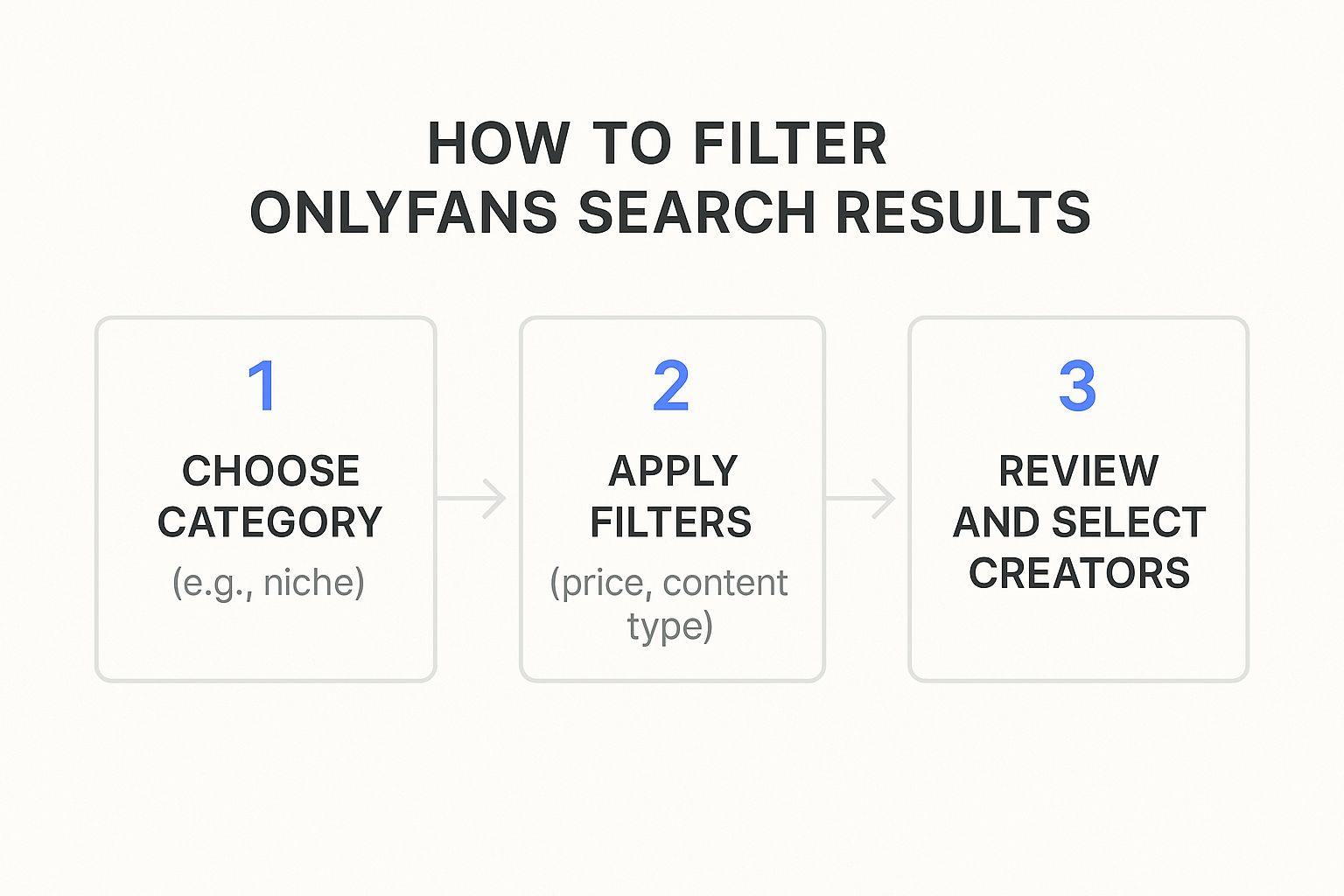
Starting broad and then getting more specific with each filter is always the most efficient path.
Mission 2: Discover a Vegan Chef
Okay, let's get a bit more specific. You're on the hunt for a creator who shares vegan recipes and cooking content. Just searching for "Chef" will give you way too many results to sift through.
This is where bio keywords and tags really come into play. You need to think like the creator you're trying to find. What words would they use to describe themselves?
Try searching for a combination of these terms:
vegan recipesplant-based#VeganChefcruelty-free cooking
By using these hyper-specific phrases, you're telling the search engine to skip anyone who doesn't explicitly mention them. You're not just browsing anymore; you're actively targeting a niche, which means your results will be way more relevant.
The trick is to use the creator's own language against them. The more specific your keywords are, the faster you'll find what you're looking for.
Mission 3: Locate a Free Cosplay Account
For our final mission, we have two goals: find a cosplayer who focuses on a specific character, and do it all on a free page. This means we'll need to combine a pricing filter with some very specific tags.
The first step is a no-brainer: apply the "Free Subscription" filter. This immediately weeds out all the paid accounts, saving you a ton of clicking and disappointment.
Next, you get into the tags. If you have a specific character in mind—say, "Zelda" from The Legend of Zelda—you'd search for tags like #ZeldaCosplay, #LegendOfZelda, or even just #Zelda.
Combining these tags with the free filter gives you a super-focused list of creators who meet both criteria perfectly. It’s the ultimate way to find exactly what you want without having to compromise.
To make it even clearer, here’s a quick-reference table that breaks down how you can approach different search goals using the tools we’ve discussed.
Sample Search Strategy Breakdown
| Search Goal | Primary Tool Used | Secondary Tool Used | Example Search Term/Filter |
|---|---|---|---|
| Finding creators in a specific city | Location Filter | Category Filter | Austin, TX + "Fitness" |
| Locating a niche hobbyist | Keyword/Bio Search | Tag Search | "pottery tutorials" or #pottery |
| Discovering free accounts in a genre | Pricing Filter | Tag Search | "Free" + #gamergirl |
| Finding a specific type of artist | Category Filter | Keyword/Bio Search | "Artist" + "oil painting" |
This table shows how layering different tools helps you narrow down millions of profiles to find the handful that match your exact interests. It's all about combining the right features for the job.
Common Questions About Finding Creators
Jumping into a new tool always brings up a few questions. When you're trying to find specific OnlyFans creators, it’s best to get the common concerns out of the way so you can search like a pro. Let's tackle some of the most frequent queries we get.
One of the first things people ask is about safety. Is it actually secure to use a third-party search platform? The answer is a hard yes, provided you're using a trusted and well-built tool.
A discovery platform like Fanclan is basically a specialized search engine. It never stores private content or your personal data from OnlyFans. What it does is index only the publicly available information that creators have already shared in their bios or on social media. We then organize that info into a database you can actually search. Think of us as a directory that points you straight to the official creator page.
Can I Find Creators in a Specific City or Country?
You absolutely can. This is easily one of our most requested features and a huge reason people use discovery tools in the first place. The native platform gives you zero options for finding local talent, which is a major roadblock if you want to support or connect with creators in your area.
Using a location filter couldn't be easier. If you’re looking for creators in Los Angeles, for instance, you just type "Los Angeles" into the location search. The platform instantly filters everyone else out, leaving you with a clean list of creators based in that city. It's a game-changer for finding nearby talent.
Using a search tool isn't about invading privacy—it’s about making public information easier to find. A good platform always respects creator boundaries while helping you find the content you’re actually looking for.
What if My Search Comes Up Empty?
It happens. You have a very specific creator in mind, you hit "search," and... crickets. Don't sweat it. An empty search result usually just means your strategy needs a small tweak.
First things first, check for typos. A simple spelling mistake in a username or keyword is the most common reason a search fails, and luckily, it's the easiest to fix.
If your spelling is on point, you might be getting a little too specific too soon. A search for something like "blonde fitness model who loves indie horror games" is probably too narrow to start with. Try casting a wider net.
- Start Broad: Kick things off with a general category like "Fitness" or a tag like "#Gamer."
- Layer Filters Gradually: Once you have some results, start adding more specific filters one at a time, like "Blonde" or a city.
- Explore Related Tags: If one tag isn't delivering, try a synonym. Instead of "#IndieHorrorGames," you could search for "#SurvivalHorror" or "#HorrorStreamer."
Taking it step-by-step like this prevents you from accidentally filtering out everyone and dramatically improves your chances of finding those hidden gems. For a deeper dive, our guide on how to search for someone on OnlyFans has even more strategies to try.
Ready to stop scrolling and start discovering? Fanclan gives you the powerful filters and specific tags you need to find exactly the creators you're looking for. Start your search on Fanclan.io today.