So, you're trying to find OnlyFans creators in your area? The best way to do it is with a specialized search engine like Fanclan that has dedicated location-based filters. It’s a direct approach that cuts through the noise of social media and gets you right to the local profiles you’re looking for.
Your Guide to Finding Local Creators
Finding creators in your own city should be easy, but it’s usually a massive headache. The main platform just isn't built for local discovery, which sends most people down a rabbit hole of scrolling through social media tags and forums with pretty mixed results.
That’s exactly why specialized search tools exist. Instead of guessing hashtags or manually sifting through thousands of profiles, a dedicated directory gives you a straight shot. These platforms gather creator data and give you powerful filters to zero in on a specific city, state, or even a mileage radius from your zip code.
Why a Specialized Search Engine Is Your Best Bet
The problem is simple: the official platform is made for following creators you already know, not for finding new ones based on where they live. This missing feature has made third-party tools an absolute must-have for anyone who wants to connect with local talent.
Just think about the alternatives. Searching Instagram or X for a creator in "Miami" will throw thousands of posts at you, but good luck finding one that’s relevant or even active. A tool like Fanclan, on the other hand, was built for one thing: making that search fast and accurate. If you want to dive deeper, check out the best tools for finding OnlyFans by location.
The key advantage here is precision. You’re no longer just hoping to stumble upon a local profile; you're actively filtering for them. It saves a ton of time and connects you directly with active creators in the area you care about.
Let's quickly compare the common ways people try to find local creators.
Comparing Methods for Finding Local Creators
Here's a quick look at why a specialized search tool is far more effective than the usual alternatives.
| Method | Effectiveness | Time Required | Key Challenge |
|---|---|---|---|
| Specialized Search (Fanclan) | High | Low | None; designed for this purpose |
| Social Media (#hashtags) | Low | High | Irrelevant results, outdated profiles |
| Reddit/Forums | Medium | High | Requires manual sifting, often unreliable |
| Google Search | Low | Medium | Buried results, lacks specific filters |
As you can see, cutting straight to a purpose-built tool is the most efficient path.
The sheer size of the platform makes trying to search manually almost impossible. Globally, OnlyFans gets over 400 million visits every single month—a number that shows just how massive its online presence is. The creators are definitely out there, but you need the right tool to find them in that crowd. This guide is all about showing you how to use a specialized interface to do just that.
Navigating the Fanclan Location Search

Before you can start finding local creators, you’ve got to get a feel for the tool itself. Fanclan’s search page is your command center for discovery. It’s built to be pretty straightforward, but a little inside knowledge on what each button does will make your hunt for nearby OnlyFans models way more successful.
When you first hit the search page, you’ll see the main search bar and a handful of filters. This isn't your average search engine; every single option is there to help you cut through the noise and zero in on exactly who you’re looking for.
Understanding the Interface Layout
The most critical part for our mission is the location filter. It’s usually labeled something obvious like "Location," "City," or "Near You." This is where you always want to start. Seriously, don’t even look at the other filters yet. Mastering the location search first is the secret sauce.
For instance, someone in Los Angeles might be tempted to jump right in and search for "fitness." Bad move. That’s going to pull up thousands of profiles from all over the world. A much smarter play is to first anchor your search geographically by typing "Los Angeles" into the location field. This immediately slashes the potential results from the entire platform down to just that metro area.
The golden rule here is to filter by location first, then by interest. Sticking to this order stops you from getting buried in irrelevant profiles and makes sure every other filter you apply actually matters.
Preparing Your Location Data
To get the best, most accurate results, you need to feed the system the right info. The good news is that it’s flexible, so you can tailor your search to how specific you want to be.
Here are the best ways to punch in your location:
- City and State: The classic approach. Think "Miami, Florida."
- ZIP Code: Perfect for pinpointing a specific neighborhood, especially in a huge city.
- Full Address: Use this for hyper-local searches. The tool uses it to find creators within a certain radius without ever revealing your exact spot.
Once you’ve set your location, you’re all set to layer on more specific filters, which we’ll get into next. Nailing this first step is everything if you’re trying to find OnlyFans in your area without spinning your wheels.
If you’re curious about bigger-picture strategies, our guide on how to use an OnlyFans model finder dives even deeper. Getting this foundation right transforms a frustrating search into a quick, targeted win.
Using Location Filters for Pinpoint Accuracy
This is where you stop scrolling aimlessly and start finding exactly who you’re looking for. Getting the hang of Fanclan’s location filters is the secret to discovering OnlyFans creators in your area with almost surgical precision. It goes way beyond just typing in a city name—this is about drawing your own map.
The best tool for this job, hands down, is the radius search. It lets you set a search zone by mileage from any central point, like your zip code. So, instead of a vague list of creators "in Chicago," you can find every single person within a 20-mile radius of your specific neighborhood. That’s how you get a truly local list.
Refining Your Geographic Search
Let's put this into practice. If you're in a massive city like Chicago, you might only want to find creators in a northern suburb like Evanston, not the whole metro area. Just pop in an Evanston zip code, set a tight 5-mile radius, and poof—all the noise from downtown vanishes.
On the flip side, if you live out in a more rural area, the radius search is still your best friend. If searching your small town comes up empty, just widen the net. Expand the radius to 50 or even 100 miles to pull in creators from the nearest major city. You'll often find people who live closer than you think but list a larger city for privacy.
As you search, always keep a few key safety tips in mind. This graphic breaks down the essentials.
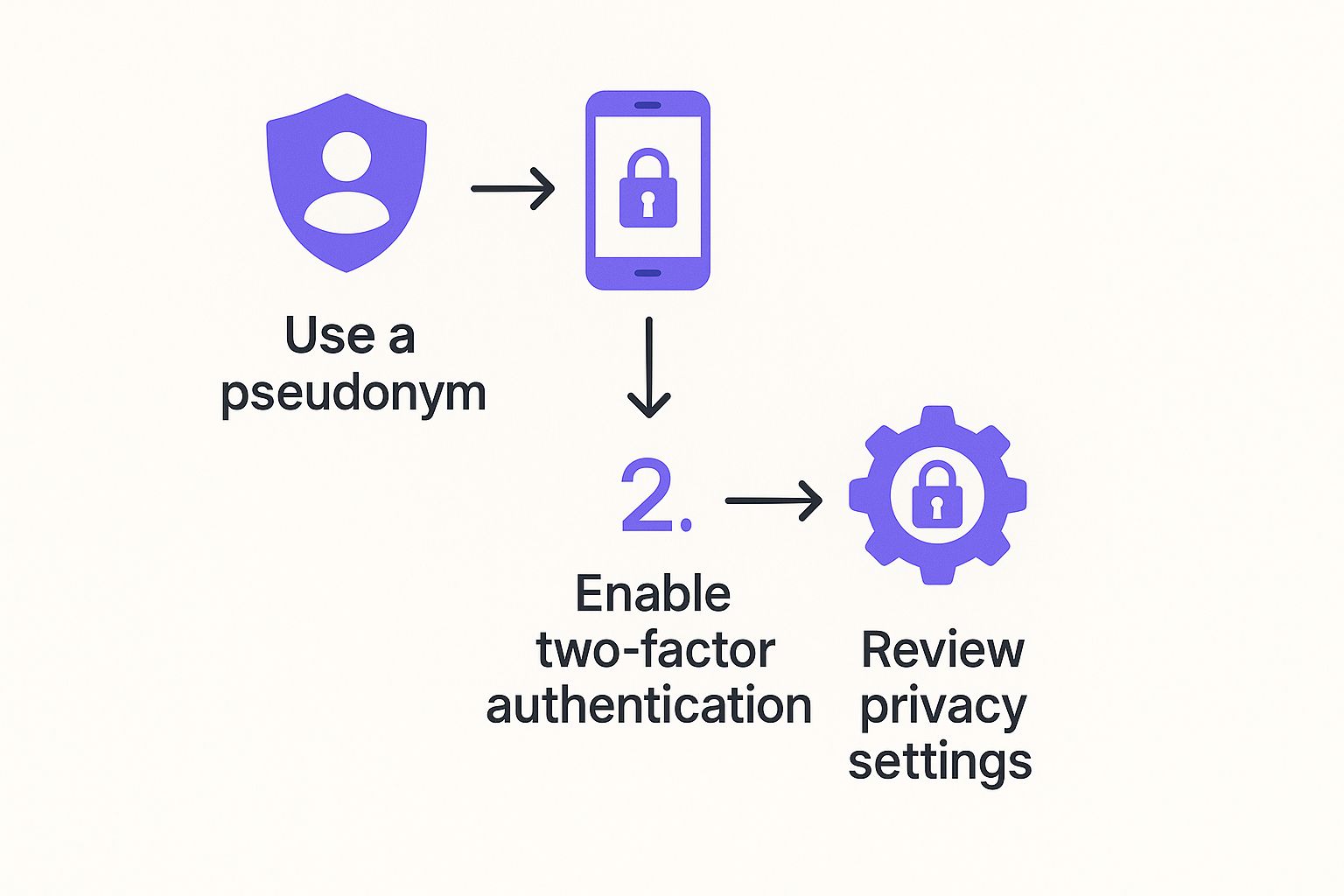
As you can see, simple steps like using a pseudonym, enabling two-factor authentication, and double-checking your privacy settings are crucial for keeping your search secure.
And don't stop with the radius. Fanclan gives you other powerful geographic tools. You can filter by state, county, and in many big cities, even by well-known neighborhoods. Every filter you add gives you another layer of control.
The real magic happens when you start combining these filters. A search stops being "New York" and becomes "creators within 10 miles of Brooklyn who also post fitness content." This multi-layered approach is what turns up hyper-targeted results.
Combining Filters for Hyper-Targeted Results
Let’s walk through a real-world scenario. Say you’re looking for a creator in the "cosplay" niche somewhere in the Dallas-Fort Worth metroplex.
Here’s how your filtering process on Fanclan should go:
- Set the Location: First, plug "Dallas, TX" into the location field.
- Define the Radius: Next, apply a 30-mile radius to make sure you’re covering the entire DFW area.
- Add a Keyword: Finally, type "cosplay" into the keyword or tag search bar.
Without that location filter, a search for "cosplay" would dump thousands of global profiles on you. By locking in the geography first, you’ve instantly shrunk the pool to only relevant, local creators who fit your niche. Honestly, it's the most efficient way to find what you're looking for.
If you want to get even better at this, check out our guide on easy tips and methods for searching on OnlyFans. It’s packed with strategies that will help you move from hopeful scrolling to confident, precise discovery every single time.
Combining Keywords and Tags with Your Search

Nailing down your geographic area is a great first step, but the real magic happens when you start layering your interests on top. This is how you stop finding creators who are just near you and start finding the ones making the exact content you want.
It all comes down to combining keywords and tags with your location search.
Creators use tags as little signposts for their niche—think "fitness," "cosplay," or "musician." Using these same terms is how you turn a casual browse into a targeted mission.
How to Layer Keywords on Local Searches
Let's say you've already set your search to a 25-mile radius around Denver. You’ve just shrunk the massive pool of creators down to just those in your local area. Nice.
But now, you want someone who creates fitness content.
Instead of endlessly scrolling, just pop "fitness" into the keyword search bar. Instantly, the platform filters your local results, kicking out anyone who hasn't tagged their profile with that term. Just like that, your list goes from hundreds of random profiles to a handful of highly relevant local fitness creators.
This strategy works for any interest. Just swap out "fitness" for whatever you’re after:
- "Gamer" to find streamers in your city.
- "Artist" for creators who share their process.
- "Chef" to connect with local foodies.
This is, hands down, the most powerful way to find OnlyFans creators in your area who actually match your tastes.
Identifying Popular Local Tags
Not sure what keyword to use? No problem. Do a little recon first.
Run a wide location search and just glance at the top profiles that pop up. What tags do you see over and over? You might stumble upon popular local niches you never even thought of.
This is especially effective in big cities. The United States drives nearly half—48.82%—of all traffic to the platform, meaning the local scenes in US cities are buzzing with diverse creators. This high concentration makes it way easier to spot trending tags and find people catering to very specific interests. You can dig into more of this user data over at OFStats.net.
When you mix a location filter with a specific tag, you're telling the search engine: "Only show me creators inside this circle who also make content about this."
This simple two-step process—location first, interest second—is the secret to smart discovery. It saves a ton of time and serves up results that feel like they were picked just for you. It’s the difference between looking for a needle in a haystack and having a magnet pull it right out for you.
How to Interpret Search Results and Profiles
Alright, so Fanclan has served up a fresh list of local creators. Now comes the fun part: figuring out who’s actually worth subscribing to. This is where you switch gears from just searching to doing a little detective work, learning to spot the clues that separate the great profiles from the duds.
Think of each result as a creator’s digital business card. It’s a snapshot, and every little detail matters. Don't just blaze through the list. Pause and really look at the profile pic, the bio, and the sub price. A well-written bio can tell you a lot about their niche and personality, while the price often gives you a hint about their experience level or how much content they offer.
Decoding Key Profile Elements
The first thing I always check is the "last seen" status. Seriously, this is your number one clue to finding an active creator. If they were online in the last day or so, that's a fantastic sign they’re actually interacting with fans and posting regularly. A profile that’s been dead for weeks? Probably not worth your time.
Next up, dig into their stats. Fanclan usually shows you the number of posts, photos, and videos a creator has. A huge number of posts is a good indicator that you’re getting a massive library of content the second you subscribe, which means great value right off the bat.
When you're sizing up a profile, keep an eye on these key details:
- Profile Picture and Banner: Do they look professional? Do they match the vibe the creator is going for? High-quality, clear images usually mean they take their page seriously.
- Bio Snippet: Is it crystal clear what they offer? A vague bio can be a red flag that they aren't focused on a specific niche.
- Subscription Price: How does it stack up against others in the same category? A price that's way too high or suspiciously low might be worth a second thought.
Getting this part right is a huge piece of the puzzle when you're trying to how to find OnlyFans in your area and not just waste money on inactive accounts.
Vetting for Authenticity and Local Clues
Now, let's talk about making sure they're actually local. Creators who are genuinely in your area often drop little breadcrumbs in their profiles. Scan their bio or any pinned posts for mentions of local spots, sports teams, or even complaints about that one highway that's always jammed. These are the kinds of details that are tough to fake.
When a creator mentions grabbing a coffee in the Arts District or talks about the local farmer's market, they're doing more than just sharing—they're giving you solid proof of their location.
Also, check out their other socials if they’ve linked them. A quick scroll through their public Twitter or Instagram might reveal even more local flavor, like photos or posts that confirm they’re in the area. Spending an extra couple of minutes on this step means you can subscribe with confidence, knowing you found someone who’s exactly what you were looking for.
This turns a basic search into a smart vetting process. For a deeper dive into search strategies, check out our complete guide on how to use OnlyFans search tools to find creators.
Common Questions About Finding Local Creators
When you first dive into finding OnlyFans creators in your area, some questions always seem to surface. It's totally normal to wonder about safety, or what to do if you're in a small town that feels like a dead end.
Let's tackle some of the most common uncertainties head-on. Getting these answers sorted out will help you search with more confidence and, ultimately, get much better results.
Is It Safe to Search for OnlyFans Creators in My Area?
Yes, using a dedicated search tool like Fanclan is designed from the ground up with your privacy and safety in mind. The platform works by gathering publicly available info that creators have already chosen to share. It never exposes your personal location or identity to anyone.
The whole process is completely discreet. You can browse profiles of local creators without them ever knowing you were looking. That said, always stick to smart online safety habits—never share sensitive personal info and be mindful of platform rules.
What if I Live in a Small Town with No Results?
This is a classic problem, but it has an easy fix. If your search for your tiny hometown comes up empty, the best move is to gradually expand your search radius. Think of it like casting a wider net.
Start by bumping up the mileage filter in Fanclan to include the next town over, or even the nearest major city. Creators often list a larger nearby city as their location for privacy, so they might be closer than you think. You can also try a broader search by county or state to see who's active in your general region.
The key is flexibility. A small-town search might require you to think regionally, not just hyper-locally. Expanding your radius from 10 miles to 50 miles can often uncover dozens of nearby creators you would have completely missed.
Can I Search for Specific Niches Within a Location?
Absolutely, and this is where a tool like Fanclan really shines. Layering location filters with keyword searches is the most effective way to find exactly who you're looking for.
Once you’ve set your location—let's say "Austin, TX" with a 15-mile radius—you can then pop niche terms into the keyword search bar. It's a powerful one-two punch for refining your results.
Here’s how it works in practice:
- Location + "cosplay" finds creators in your area who specialize in character costumes.
- Location + "fitness" pinpoints local creators focused on workout content.
- Location + "musician" helps you discover artists and performers nearby.
This combo ensures you find creators who aren't just local but also make the specific content you love. For more pro tips on refining your search, check out the best ways to find local OnlyFans creators in our detailed guide.
Why Can’t I Search by Location on OnlyFans Directly?
Anyone who's tried knows the native OnlyFans platform has a notoriously basic search function. It’s really just built for finding creators you already know by their exact username.
The site simply doesn't have the geographic filters needed to browse for creators by location. This huge gap is precisely why specialized search engines like Fanclan exist—to provide the essential discovery tools that fans need to connect with new creators in their own backyard.
Ready to stop searching and start finding? Fanclan provides the most powerful location filters to help you discover top creators in your city, state, or neighborhood. Find local talent today at Fanclan.