Keeping your personal information safe online isn't about one single action; it's about building a solid defense through a series of smart, consistent habits. Think of it as creating layers of protection, from using strong, unique passwords and enabling two-factor authentication to being wary of public Wi-Fi and locking down your social media settings.
Why Online Privacy Matters Now More Than Ever
Every time you click, share, or sign up for something online, you leave a trail. This digital footprint is what leads to those eerily specific ads and, more seriously, puts you at risk in the event of a data breach. It's completely normal to feel a bit overwhelmed by it all.
You're not alone in wanting better security. Research shows that 85% of adults worldwide want to do more to protect their online privacy. But there's a huge gap between wanting to do something and knowing how to do it.
For instance, while 92% of Americans express concern about their internet privacy, a tiny 3% feel they actually understand the laws meant to protect them. This tells us one thing loud and clear: people need practical, straightforward guidance, not just vague warnings.
That's exactly what this guide is for. We're going to walk through manageable strategies you can use to build a more private digital life, one step at a time. The goal is to give you the confidence and the tools to take back control, not to cause more anxiety. A great place to start is with these essential tips and tricks to protect your privacy online.
1. It’s Time to Rethink Your Password Strategy
Let’s be honest: your passwords are the gatekeepers to your entire digital life. But the old advice to just swap an 'a' for an '@' and add a '1' at the end just doesn't cut it anymore. What you really need is a passphrase.
Think of a short, quirky sentence that’s easy for you to remember but a nightmare for brute-force software to guess. Instead of P@ssw0rd1!, try something like Four-Green-Frogs-Jumped-High!. It's longer and exponentially more complex for a computer to crack, yet it's something you can actually recall without a cheat sheet.
The secret is stringing together a few unrelated words. This simple trick dramatically increases the character count—a critical factor in password strength. A long passphrase made of simple words is often far more secure than a short, complicated one.
Why You Absolutely Need a Password Manager
Okay, so now you have a great passphrase. But creating a unique one for every single online account? That's just not realistic. This is where a password manager becomes an absolute must-have.
Think of it as a fortified digital vault. It not only generates incredibly strong, unique passwords for every site you use but also stores them securely. All you have to do is remember one single, strong master password to unlock it. This completely solves the problem of password reuse, a dangerous habit that can cause a domino effect if just one of your accounts is compromised in a data breach.
If a hacker gets one of your reused passwords from a data breach, they have the key to unlock your entire digital life. A password manager ensures every account has a unique lock, so a breach on one site doesn't compromise all the others.
To help you understand the different layers of protection, I've put together a quick comparison of common security methods. This table lays out the pros and cons of each, from simple passwords to more robust multi-factor options.
Comparing Password Security Methods
| Security Level | Method Example | Vulnerability | Best For |
|---|---|---|---|
| Low | password123 |
Brute-force attacks, dictionary attacks | Nothing. Never use this. |
| Medium | P@ssw0rd!# |
Still susceptible to modern cracking tools | Legacy systems with strict, outdated rules |
| High | Four-Green-Frogs-Jumped-High! |
Social engineering, phishing | Individual accounts where MFA isn't available |
| Very High | Password + SMS Code | SIM swapping, SMS interception | Most online accounts (a good baseline) |
| Highest | Passphrase + Authenticator App | Phishing (if not careful), device theft | Critical accounts (email, banking, crypto) |
As you can see, relying on memory alone isn't enough for high-stakes accounts. That's why the best approach always involves more than just a password.
Add a Second, Unbreakable Lock with 2FA
Even the strongest password can be phished or stolen. That’s why two-factor authentication (2FA) is so important—it adds a second, crucial layer of security. It’s like having a safe that requires both your key (the password) and a temporary, secret code to open. A thief might steal the key, but without that second piece, they're still locked out.
The image below shows just how simple it is to set up 2FA, often just by scanning a QR code with your phone.
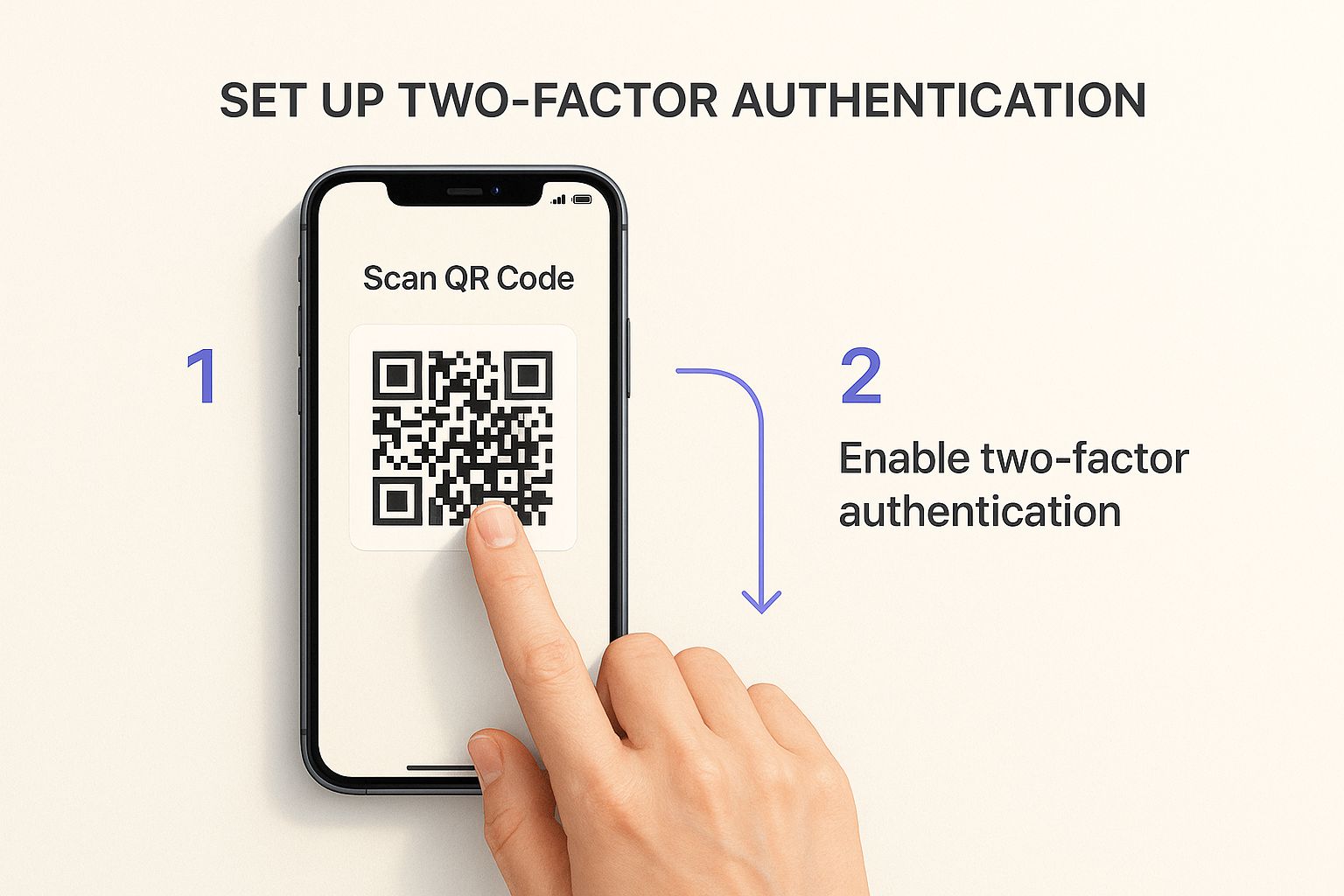
This step physically ties your account access to a device in your pocket. Almost every major service offers 2FA these days, and turning it on is single-handedly one of the most powerful things you can do to protect your personal information online.
Building Safer Browsing Habits
Every time you go online, you leave a trail. Think of it as a series of digital breadcrumbs that, over time, paint a surprisingly detailed picture of your life. This makes your daily browsing habits your first and most important line of defense. The good news? A few small, mindful adjustments can make a world of difference.
Before you do anything else on a website, glance up at the address bar. Look for the little padlock icon and make sure the address starts with "https." This simple check confirms the site uses an encrypted connection, scrambling the data you send and receive.
An "http" site is like sending a postcard—anyone who gets their hands on it can read it. An "https" site is like a sealed, private letter. It's a fundamental security check you should never skip.
Spotting Scams and Phishing Attempts
Cybercriminals are social engineers. They play on emotions like urgency and fear to trick you into making a mistake. Phishing attacks, where they pose as a company you trust, are one of their most effective tools. The numbers are pretty sobering: by 2025, the average cost of a data breach is expected to hit $4.88 million. A whopping 68% of those breaches involve a human element, like someone clicking on a bad link. You can see more on these trends over at DeepStrike.io.
To stay out of those statistics, you need to learn to spot the classic warning signs:
- Panic-Inducing Language: Phrases like "Your Account Will Be Suspended" or "Suspicious Login Attempt" are designed to rush you into a bad decision.
- Mismatched Links: Always hover your mouse over a link before you click. A little pop-up will show you the real destination. If it looks sketchy or doesn't match where you expect to go, don't click it.
- Vague Greetings: Real companies usually address you by name. If you see an email that starts with "Dear Valued Customer," your guard should immediately go up.
We’ve all seen the classic Netflix scam. You get an email claiming your payment failed and you need to "click here to update your billing info" or lose your account. But that link goes to a perfect replica of the Netflix login page, designed for one purpose: to steal your username and password.
Taking Control of Your Browser Settings
Your web browser knows a lot about you, but it also gives you the keys to lock things down. It's worth taking a few minutes to dig into your browser's privacy and security settings.
A great first step is to block third-party cookies and trackers. These are tiny files that advertisers use to follow you from site to site, building a profile of your interests. Disabling them is a huge win for your privacy.
While you're in there, make it a habit to regularly clear your browsing history, cache, and cookies. This wipes the slate clean and removes old data that could be exposed. For families, it’s also a good idea to learn about content filtering. Here's a solid guide on how to block adult websites on any device to create a safer environment for kids.
Auditing Your Social Media Footprint
Let's be honest, your social media accounts are probably the leakiest part of your digital life. Without even realizing it, you might be broadcasting personal details to a much wider audience than you think. It's time to go beyond the basic settings and give your profiles a real, deep privacy audit.
This isn't just about flipping a few switches; it's about understanding what those settings actually mean in the real world. That seemingly harmless location tag on your vacation photo doesn't just show off your trip—it tells everyone your house is empty. Tagging your favorite coffee shop every morning? You've just shared your daily routine.
Taking Back Control of Your Data
The first, most crucial move is locking down who sees your posts. Most platforms default to sharing everything publicly, which is great for them but not so great for you. Dig into your settings and switch your audience to "Friends" or a custom list of people you genuinely trust.
Next up: those third-party app connections. Remember that fun little quiz you took five years ago that needed access to your profile? It probably still has it. These apps can often see your friends list, posts, and personal info. Make a habit of regularly reviewing these connections and kicking out any services you no longer use.
Protecting your personal information online means treating every piece of shared data as a potential puzzle piece for someone else. When combined, your birthdate from one site and your pet's name from another can be used to guess security questions.
Another quick but powerful fix is to check if your profile can be found through search engines. Most platforms have a setting that lets you prevent your profile from showing up when someone Googles your name. Disabling this makes it significantly harder for strangers to stumble across your personal life.
This screenshot gives you an idea of what these controls look like. The power is in your hands to define who gets a window into your world.
Switching these settings from "Public" to more restrictive options is one of the most effective things you can do to shrink your digital footprint.
Ultimately, cleaning up your social media is all about being more intentional. For a closer look at keeping your family's online world safe, you might want to read our guide on what content filtering is and how it protects online safety.
Proactively Minimizing Your Data Exposure
The best defense isn't just reacting to threats—it's actively shrinking your "attack surface." Think about it: every old account you've forgotten is like a digital backdoor to your life, just sitting there, waiting for the next big data breach. It's time to become a digital minimalist.
Remember all those one-off services you've tried over the years? That photo editor from 2015? The gaming forum you visited once? That e-commerce site you used for a single purchase? These accounts are digital ghosts, and they often haunt you by holding onto sensitive data like old passwords, your email, or even credit card details.
Pruning Your Old Accounts
A good starting point is to play detective in your own email inbox. Try searching for terms like “welcome to,” “confirm your account,” or “your new account.” You’ll be surprised what you dig up.
Once you’ve found a digital fossil:
- Go straight to the source. Log in and hunt for the deletion option, which is usually buried in "Account Settings" or "Privacy."
- Scrub it clean first. Before hitting that delete button, manually remove any personal information you can—addresses, phone numbers, and especially saved payment methods.
- Can't delete it? Anonymize it. If there’s no delete option, just replace your real info with junk data. Change the name to something generic and the email to a throwaway address.
This digital cleanup isn't just busywork. It dramatically cuts down on the amount of personal data floating around online, ready to be scooped up by bad actors.
Proactive data minimization is a mindset shift. You stop just reacting to threats and start removing them before they even become a problem. It’s the difference between locking your doors and getting rid of the doors that lead nowhere.
Beyond the accounts you've made, there's a whole shadowy industry of data brokers that exists to buy and sell your information, often without you ever knowing. These companies scrape public records, social media, and your purchase history to build incredibly detailed profiles about you.
You actually have the right to tell them to stop. While it can be a pain to send individual opt-out requests to sites like Spokeo or Whitepages, it’s one of the most powerful moves you can make for your privacy. This is a crucial strategy to avoid online scams and protect your data. When you shrink your digital footprint, you leave far less for criminals and trackers to find.
Got Questions About Staying Private Online?
Even when you're doing everything right, you'll still have questions. It's totally normal. Let's tackle some of the most common things people wonder about as they work to lock down their personal info.
Is a VPN Really All I Need to Be Anonymous?
A good VPN is a powerhouse for privacy, but it's not a magic bullet for total anonymity. Think of it this way: a VPN encrypts your connection and hides your real IP address. That's fantastic for stopping your internet provider from tracking your every move and for keeping you safe on sketchy public Wi-Fi.
But it doesn't make you invisible. Websites can still track you with cookies, and once you log into an account like Google or Facebook, they know exactly who you are. So, while a VPN is a massive step up for everyday privacy, it’s one important tool in a larger toolkit, not the whole solution.
How Do I Spot a Phishing Email?
Phishing emails have gotten dangerously convincing, but there are almost always giveaways if you know what to look for.
First, always check the sender’s full email address. Scammers will often use addresses that are just one letter off from the real thing (e.g., "[email protected]" with a capital 'i' instead of an 'l'). Also, hover your mouse over any links before you even think about clicking. The little pop-up will show you the actual web address it's sending you to. If it looks weird, delete the email.
Phishing scams thrive on urgency. If an email screams "Your Account Will Be DELETED!" or "Suspicious Activity Detected - ACT NOW!", it's probably a trick. They want you to panic so you don't think straight.
Remember, a legitimate company will never ask you to email them your password or full credit card number.
Do I Seriously Need a Different Password for Every Single Website?
Yes. One hundred percent, yes. Reusing passwords is like using the same key for your house, your car, and your safe deposit box. It’s convenient until a thief gets a copy.
When a website you use gets breached—and it happens all the time—hackers take that list of emails and passwords and try them everywhere else. This attack is called credential stuffing, and it’s how they turn a leak from a small forum into access to your bank account.
Of course, no one can remember 50+ unique, complex passwords. That’s why a password manager isn't just a nice-to-have; it's essential for modern online life. If you're curious about how easily data points can be connected, our guide on how to search for someone on OnlyFans provides a good real-world example of how identities are tracked across the web.