Taking control of your online privacy isn't about a single magic bullet. It's more like building a fortress, layer by layer, using the right tools and habits to shrink your digital footprint. The core of this strategy comes down to a few key actions: locking down your browser, using a VPN to hide your traffic, and creating unique, rock-solid passwords for everything.
These aren't just technical chores; they're the foundational steps that stop trackers, your own internet provider, and opportunistic hackers from easily getting their hands on your personal information.
Why Your Digital Footprint Is a Bigger Deal Than You Think
Every single time you connect to the internet, you're leaving a trail. This "digital footprint" isn't just your search history. It’s every social media post you "like," every product you click on in an online shop, and even your physical location when you use certain apps.
Imagine leaving tiny, digital breadcrumbs scattered across the web. Individually, they seem harmless. But when they're all gathered up, they paint an incredibly detailed and often intimate picture of who you are.
This data isn't just sitting there, either. It’s a hot commodity, actively scooped up, analyzed, and sold by companies called data brokers. These are firms that build shockingly comprehensive profiles on millions of people, almost always without them ever knowing or agreeing to it. This is the engine behind hyper-targeted advertising—the reason an ad for something you just talked about with a friend can pop up on your screen moments later, feeling a little too spot-on.
How Data Collection Affects Your Real Life
The consequences of all this tracking go way beyond creepy ads. The information harvested from your online life can have a real-world impact, influencing everything from the interest rate you're offered on a loan to the job postings you’re shown. Even seemingly innocent data, like the political articles you read, can be used to box you into an echo chamber or feed you targeted misinformation.
And then there's the security risk. Every bit of your data stored by a company is a target. Data breaches are happening all the time, and when a service you use gets hacked, your personal info—from your email to your credit card number—can be packaged up and sold on the dark web. This makes learning how to protect yourself online less of a "nice-to-have" and more of a modern-day necessity.
Your digital footprint isn't just a record of what you've done. It’s a blueprint that companies use to predict and shape what you'll do next. Taking back control starts with understanding what you’re giving away without even realizing it.
People Want Their Digital Control Back
If you’re feeling uneasy about all this, you're definitely not alone. There's a growing global movement of people demanding more control over their personal data. In fact, a whopping 85% of adults worldwide want to do more to protect their privacy online.
Despite this strong sentiment, the reality is different. Less than a quarter of American smartphone users actually feel they have control over their data. This reveals a huge gap between what people want and what they know how to do. You can dig deeper into these data privacy trends and consumer attitudes to see the full picture.
This guide is here to close that gap. Once you understand how you're being tracked and the real risks involved, you can start using practical, powerful strategies to protect your digital life. The next sections will give you the actionable steps you need to turn your online setup into a solid defense system.
Building Your Personal Security Foundation
Before we even get into the weeds with VPNs and fancy browser extensions, we have to talk about the fundamentals. Think of it like building a house—you wouldn't put up walls before you've poured a solid foundation. If your core accounts and connections aren't secure, any other privacy tools you use are just window dressing.
The single biggest mistake people make? Reusing passwords. I see it all the time. A shocking 73% of users recycle the same password across multiple sites. This is a massive security risk, turning a single data breach into a full-blown identity crisis.
This is exactly why a password manager is non-negotiable. It’s the first tool I recommend to anyone serious about their online security.
Services like 1Password or the open-source option Bitwarden are digital vaults. They don't just store your passwords; they generate incredibly long, random, and unique passwords for every single site you use. The moment you set this up, you've contained the damage from future data breaches. If a hacker gets your password for one site, that's where it stops—they can't use it to get into your email or bank account.
Upgrading Your Authentication Game
Got your passwords sorted? Great. The next layer is two-factor authentication (2FA). It’s like adding a deadbolt to your front door. Even if a thief steals your key (your password), they still can't get in without the second code.
But here’s something most people don’t realize: not all 2FA is created equal. You've got two main choices, and one is significantly safer than the other.
- SMS-Based 2FA: This is when a site texts a code to your phone. It’s better than nothing, but it has a known vulnerability called "SIM swapping." A scammer can trick your mobile provider into moving your phone number to their device, letting them intercept all your codes. It happens more often than you'd think.
- App-Based 2FA: This method uses an authenticator app on your phone, like Google Authenticator or Authy. The app generates codes directly on your device, completely offline. Because the code never travels over a network, it's immune to SIM swapping.
The takeaway here is simple: always choose app-based authentication when it's offered. It’s a small change that massively boosts your security against common account takeovers.
Securing your accounts isn't just about preventing financial loss. It's about protecting your identity and preventing the kind of digital intrusion that can lead to harassment, reputational damage, and significant personal stress.
Securing Your Home Wi-Fi Network
Your home network is the Grand Central Station for all your online activity, yet it's often the weakest link in the chain. An unsecured Wi-Fi router is an open invitation for neighbors or anyone lurking nearby to snoop on your traffic, access your shared files, or launch attacks on your devices.
Locking down your Wi-Fi is a crucial first step in protecting your privacy online. It carves out a truly private digital space inside your home.
First things first, log into your router's admin panel. If you’re still using the default username and password printed on the sticker, change it right now. Those defaults are public knowledge and make your router an easy target.
Next, look for the encryption setting. You want to be using WPA3, which is the current security standard. If your router is a bit older and doesn't offer WPA3, the next best thing is WPA2 (specifically WPA2-AES). Under no circumstances should you use WEP or WPA—they are hopelessly outdated and can be cracked in minutes.
Understanding these basics is essential for spotting and dodging digital threats. You can learn more about this in our guide on how to avoid online scams and protect your data.
By getting these three core areas right—passwords, authentication, and your home network—you build a resilient foundation that makes every other privacy measure you take that much more effective.
Transforming Your Browser into a Privacy Shield
Your web browser is your window to the internet, but by default, most are built for convenience, not privacy. They often act like two-way mirrors, letting countless trackers watch your every click. The good news is, you can flip that script and turn your browser from a data sieve into a solid privacy shield.
This is about more than just clearing your history. It’s about proactively blocking the surveillance that happens quietly in the background, and your choice of browser is the single most important decision you can make.
Choosing Your Privacy Advocate Browser
Let's be clear: not all browsers are created equal when it comes to your data. While Google Chrome is the market leader, its entire business model revolves around collecting user data for targeted ads. That creates a fundamental conflict of interest when you want to lock things down.
For a real defense, you need a browser built with privacy at its core.
- Brave: This is my go-to recommendation for a set-it-and-forget-it solution. It comes with a powerful ad and tracker blocker called Brave Shields baked right in. It automatically blocks third-party cookies and fights browser fingerprinting from the moment you install it.
- Firefox: Developed by the non-profit Mozilla, Firefox has been a privacy champion for years. Its Enhanced Tracking Protection is incredibly flexible, letting you dial in the exact level of protection you want to balance security with website compatibility.
Switching from Chrome to Brave or Firefox is one of the most powerful changes you can make. It immediately chokes off a massive stream of data being collected about your browsing habits.
And this matters more than ever. While a staggering 92% of Americans say they're concerned about their online privacy, there's a huge gap between that sentiment and how digital systems actually operate. You can dive deeper into this disconnect with these current data privacy statistics.
A Closer Look: Privacy Browser Feature Comparison
To help you decide, here’s a quick rundown of how these browsers handle key privacy features right out of the box.
| Feature | Brave | Firefox | Google Chrome |
|---|---|---|---|
| Default Ad/Tracker Blocking | Yes (Brave Shields) | Yes (Enhanced Tracking Protection) | No (Requires extensions) |
| Third-Party Cookie Blocking | Yes | Yes | Phasing Out (Limited protections) |
| Fingerprinting Protection | Yes (Randomization) | Yes (Canvas blocking & more) | No (Limited, experimental features) |
| For-Profit Data Model | No | No (Non-profit) | Yes (Core business is ad data) |
As you can see, browsers like Brave and Firefox are designed from the ground up to protect you, whereas Chrome requires you to bolt on protections yourself—often fighting against its own data collection mechanisms.
Essential Extensions for a Fortified Browser
Even with a great privacy browser, a couple of well-chosen extensions can add powerful layers of defense. Think of them as your browser's specialized security team, working together to make you a much harder target.
These two are must-haves—they're free, open-source, and incredibly effective:
- uBlock Origin: Don't mistake this for a simple ad blocker. It’s a wide-spectrum content blocker that stops ads, yes, but more importantly, it blocks the domains used by trackers, malware, and other nasty scripts. The side effect? A much faster browsing experience.
- Privacy Badger: Built by the digital rights group Electronic Frontier Foundation (EFF), Privacy Badger is a smart tracker blocker. It learns to identify and shut down third-party domains that follow you across different websites without your consent.
Installing these two extensions gives you a robust defense against the most pervasive forms of online tracking. Of course, for families, managing content is another key part of safety. If you need broader controls, our guide on how to block adult websites on any device has you covered.
The goal isn't just to hide your activity after the fact. It's to prevent the tracking from ever happening in the first place. A combination of a private browser and targeted extensions creates a powerful shield that works for you automatically on every site you visit.
Understanding and Fighting Browser Fingerprinting
One of the sneakiest tracking methods out there is called browser fingerprinting. This is how companies can identify you even if you block cookies or use a VPN. They do it by creating a unique profile of your device based on a whole bunch of settings.
This "fingerprint" is pieced together from dozens of data points:
- Your browser type and version
- Your operating system
- Screen resolution and color depth
- Installed fonts and browser extensions
- Time zone and language settings
Individually, these details mean nothing. But when combined, they can create a profile so unique it can reliably pick you out from millions of others. This is where browsers like Brave and Firefox really shine—they have built-in protections to make your fingerprint look more generic, helping you blend into the crowd.
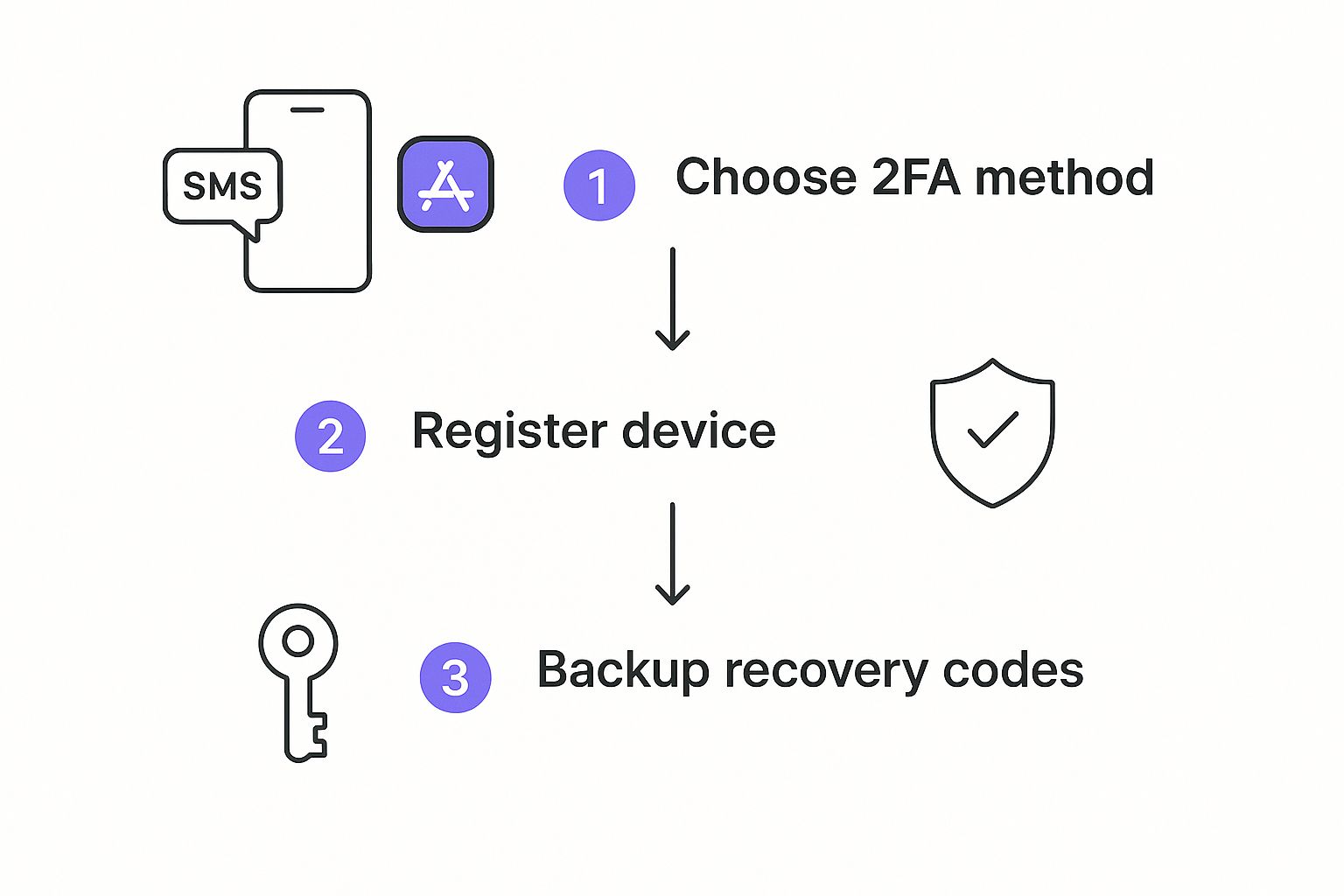
Just as the image above shows the simple but crucial steps for two-factor authentication, your online security is all about layers. Protecting the accounts you access is just as vital as securing the browser you use to get to them.
How to Choose and Use a VPN Effectively
If you're serious about your online privacy, a Virtual Private Network (VPN) is one of the most fundamental tools in your arsenal. At its heart, a VPN creates a secure, encrypted tunnel for all your internet traffic, and that simple act does two incredibly important things.
First, it stops your Internet Service Provider (ISP) from seeing and logging every website you visit. Second, it hides your real IP address from the websites and advertisers you interact with, making it much harder for them to track your location or follow you around the web.
Think of it like this: browsing without a VPN is like living in a house with glass walls. With a VPN, you’ve just drawn the blinds. This is absolutely critical when you're on public Wi-Fi at an airport or coffee shop, as those networks are notorious hotspots for snoops and data thieves.
Decoding the No-Logs Policy
When you start comparing VPNs, the single most important feature is a strict no-logs policy. This isn't just a marketing buzzword; it's a promise from the provider that they won't collect, store, or share any information about what you do online. That means no browsing history, no connection times, no IP addresses. Nothing.
A truly reputable VPN provider will go a step further and have their no-logs policy independently audited by a third-party cybersecurity firm. This is your proof that they aren’t just making empty promises. Without that audit, you’re simply taking them at their word, which is a big risk to take with your personal data.
A VPN is only as trustworthy as its logging policy. If the service is logging your data, it's simply shifting the surveillance from your ISP to the VPN provider, defeating the entire purpose of using one.
The Red Flags of Free VPNs
I get it, the allure of a "free" VPN is strong. But it's a classic case of "if you're not paying for the product, you are the product." Running a global network of secure servers costs a ton of money. Free providers have to pay those bills somehow.
More often than not, they cover their costs by:
- Selling your data: Many free VPNs track your browsing habits and sell that valuable data to advertisers and data brokers.
- Injecting ads: Some will force their own ads into your browser, which can be annoying at best and malicious at worst.
- Using weak security: Free services often rely on outdated encryption, giving you a false sense of security while leaving you vulnerable.
- Limiting speed and data: They almost always come with severe speed throttling and data caps, making them nearly unusable for streaming or even regular browsing.
A reliable, paid VPN only costs a few dollars a month. Think of that small fee as an investment in your own privacy and peace of mind.
Beyond the Basics: Essential VPN Features
Once you've confirmed a VPN has an audited no-logs policy, a few other features separate the good services from the great ones. These are the details that create a truly robust security shield.
A kill switch is an absolute must-have. This is a failsafe that automatically blocks your internet access if the VPN connection drops for any reason. It's a simple feature that prevents your real IP address from being accidentally exposed, even for a split second.
Also, pay attention to where the VPN company is based. You'll want one headquartered in a privacy-friendly jurisdiction—think places like Panama or the British Virgin Islands, which don't have mandatory data retention laws. This adds a powerful legal layer of protection for your data.
While a VPN is a powerhouse for encrypting your traffic, it's just one piece of a much larger privacy puzzle. To learn more about managing what information gets through, especially for families, understanding what content filtering is and how it protects online safety provides some excellent context. Combining tools like VPNs with smart content management practices helps you build a much stronger defense.
Take a Hard Look at Your Social Media and App Permissions
The apps and social media accounts we use daily are often the weakest links in our digital privacy. We tap "allow" without a second thought, rarely considering the sheer volume of data we're handing over. Taking some time to do a personal privacy audit is one of the most powerful things you can do to take back control.
Think of it like cleaning out a messy digital closet. Over the years, you've probably installed dozens of apps and connected countless services to your social media accounts. Each one is a potential backdoor to your personal info, and you've likely forgotten most of them even exist.
Tighten Up Your Social Media Settings
Big platforms like Facebook, Instagram, and X (formerly Twitter) have notoriously complex privacy settings, and they're almost always set up to be as public as possible by default. It's on you to go in there and lock things down. The main goal is to limit who sees your stuff and what data the platform can use to follow you around the web.
Start with the basics: your post visibility. Does every random thought or family photo need to be broadcast to the entire world? Just changing your default audience to "Friends" is a huge first step. From there, you need to dive into the ad settings. This is where you can tell them to stop using your activity on other websites to show you ads, which cuts down on a surprising amount of tracking.
Here’s a quick-and-dirty checklist for auditing any social platform:
- Who Sees Your Posts? Switch your default audience from "Public" to something more private.
- Who Can Tag You? Get a handle on your tagging permissions so you control what photos and posts you’re associated with.
- Kill the Ad Tracking: Dig into the ad settings and turn off any tracking based on your off-platform activity.
- Clean Out Connected Apps: This is a big one. Go through the list of third-party apps and games you've given access to and revoke permission for anything you don't recognize or use anymore.
Your social media profile is a goldmine for data brokers. Every public post, check-in, and page you "like" helps them build a shockingly detailed profile of you. Locking down your visibility is your first line of defense.
Be Ruthless with Mobile App Permissions
Your smartphone is a vault of sensitive information, from your exact location history to your private conversations. Every app you install is hungry for that data, and most of them ask for way more than they actually need to do their job.
This is especially true with free apps. It's a bit staggering, but 72.6% of iOS apps track private data, and free apps are a whopping four times more likely to do so than paid ones. It really drives home the old saying: if you’re not paying for the product, you are the product. You can see more stats on how tech companies handle user data at explodingtopics.com.
You have to be a strict gatekeeper for your phone's permissions. A simple puzzle game has absolutely no reason to access your contacts or listen through your microphone. A photo editor doesn't need to know your precise location 24/7. It's just common sense.
How to Take Back Control
Thankfully, both iOS and Android give you a pretty clear dashboard to see and manage these permissions for every single app. Carve out 15 minutes, go through your list, and for each permission, ask yourself: does this app really need this to function?
On an iPhone (iOS):
- Head over to Settings > Privacy & Security.
- Tap on a permission category, like Location Services or Microphone.
- You'll get a full list of every app that has requested access.
- Go through it. Change permissions from "Always" to "While Using the App," or even better, "Never."
On an Android phone:
- Open up your Settings app.
- Tap on Apps, then look for the Permission manager.
- Pick a permission type, like Camera or Contacts.
- Tap on any app in the list and just choose "Don't allow" to shut it down.
This simple process puts you back in the driver's seat, stopping data leaks from your most personal device. For anyone trying to manage online access for their whole family, looking into an adult website blocker can add another crucial layer of safety. By regularly auditing both your app permissions and your network, you start to build a really solid defense, turning your devices from data-harvesting tools back into the private, useful gadgets they were meant to be.
Common Online Privacy Questions Answered
Trying to get a straight answer on digital privacy can feel like a full-time job. With so much conflicting advice out there, it’s easy to get lost. I'm here to cut through that noise and tackle some of the most common questions I hear about protecting yourself online.
Think of this as a no-nonsense guide with clear, practical answers you can use right away. Let's bust some myths.
Is Incognito or Private Browsing Mode Enough to Protect My Privacy?
This is probably one of the biggest misconceptions in online privacy. The short answer? No, not even close. Private browsing modes were built for a very narrow purpose.
All they really do is stop your local device from saving your browsing history, cookies, and form data. It’s useful for hiding your online tracks from someone who might physically use your computer after you, but that’s where the protection ends.
Your Internet Service Provider (ISP), your boss, your school, and every website you visit can still see exactly what you’re doing and where you’re coming from (your IP address). Real privacy requires layers. A VPN is what actually hides your IP and encrypts your traffic, making private mode just one small piece of a much bigger puzzle.
Do I Really Need a Paid VPN, or Is a Free One Okay?
I get this question all the time, and I always strongly recommend a reputable, paid VPN. The truth is, running a global network of secure servers is incredibly expensive. If a service is free, you have to ask yourself how they're paying the bills. More often than not, you are the product.
Here’s how most free VPNs make their money:
- They collect and sell your browsing data to advertisers and data brokers—the very thing you're trying to prevent.
- They use weaker security protocols, giving you a false sense of safety.
- They hit you with strict data caps and slow speeds, making them almost unusable for things like streaming or downloading.
A trusted, paid VPN operates under a strict, independently audited no-logs policy. This is your verifiable proof that your online activity remains private and secure, something a free service can rarely guarantee.
How Can I Find Out if My Data Has Been in a Breach?
It’s a chilling thought, but let's be realistic: your information has probably been exposed in a data breach at some point. The good news is that there are excellent free tools to check.
The gold standard for this is a service called "Have I Been Pwned?". You just pop your email address or phone number into their site, and it scans a massive database of known breaches to see if your info has been compromised.
If you find a hit, the first thing you need to do is immediately change the password for that account. Even more important, you need to change that same password on every other site you've reused it on. This is a perfect example of why a password manager is non-negotiable for creating unique, strong passwords everywhere.
How Much Personal Information Is Too Much to Share?
This really comes down to personal judgment, but I've learned a lot from watching professional content creators who manage their public lives for a living. They've mastered the art of mindful sharing. Before they post, they always ask if a tiny detail—like a favorite coffee shop or a glimpse of their street sign—could be used to pinpoint their physical location.
Even casual conversations can reveal more than you think. A smart habit to get into is to "dox" yourself by searching your name online periodically. This helps you find and scrub old accounts or posts that might have sensitive details you've forgotten about. For anyone interested in how creators manage their public-facing profiles, you can learn more by checking out a guide on an effective OnlyFans lookup to find creators easily.
Adopting this mindset helps you build a solid wall between your public digital persona and your private life. It’s all about sharing what you want, while keeping the truly critical details offline and locked down.