
Ever tried to find a specific creator on OnlyFans and felt like you were hitting a wall? You're not alone. The platform's search function is notoriously tricky because you can't just search for someone on OnlyFans the way you would on Instagram or Twitter. It’s built that way on purpose to protect creators, meaning you either need their exact username or you have to find them through other channels.
Why You Can't Just Search on OnlyFans
If finding a creator on OnlyFans feels like looking for a needle in a haystack, that’s by design. The entire platform is built around direct connections and creator privacy, not public discovery. Think of it less like an open social network and more like a private club where you need an invitation.
This privacy-first approach means OnlyFans is set up for creators who already have an audience from other platforms. The native search bar is really just for finding people you're already subscribed to, not for discovering new accounts.
The key thing to remember is that OnlyFans isn't a discovery engine. It's a monetization platform, and its design gives creators complete control over how—and if—they get found.
The Scale of the Problem
The sheer numbers also highlight why a casual search just doesn't work. There's a huge imbalance between fans and creators. As of early 2025, OnlyFans has over 305 million fan accounts but only around 4.19 million creator accounts worldwide. Trying to find one specific person in that sea of fans is practically impossible without a direct link. You can dive deeper into these numbers over at ofstats.net.
This whole setup basically turns fans into digital detectives. Finding someone successfully depends entirely on knowing where else to look, which is almost always off-platform.
Here's the bottom line:
- Username is Key: The only direct way to search is by knowing their exact username.
- Privacy First: Creators have the option to stay completely anonymous.
- No Public Directory: There’s no official, searchable master list of all creators.
So, if your searches are coming up empty, it's not you—it's the platform. For more help, check out our detailed guide on what to do when the OnlyFans search is not working. Understanding why the system is built this way is the first step toward using smarter methods that actually get results.
Finding Creators with the Direct Username Method
If you already know a creator's exact username, the hard part is over. This is hands-down the most reliable way to find someone on OnlyFans, letting you sidestep the platform's often frustrating search function and go straight to their profile.
It all comes down to OnlyFans' simple URL structure. Every creator has a unique profile link that follows the same pattern: onlyfans.com/username. All you have to do is swap out "username" with the exact handle you're looking for.
Using the URL for a Direct Search
Forget the on-site search bar. Just open up your web browser—Chrome, Safari, whatever you use—and type the creator's URL directly into the address bar.
For example, if you were looking for a creator whose username is "JaneDoe123," you'd simply type onlyfans.com/janedoe123 into the address bar and press Enter. It's that straightforward.
This image shows just how easy it is to do this on your phone.
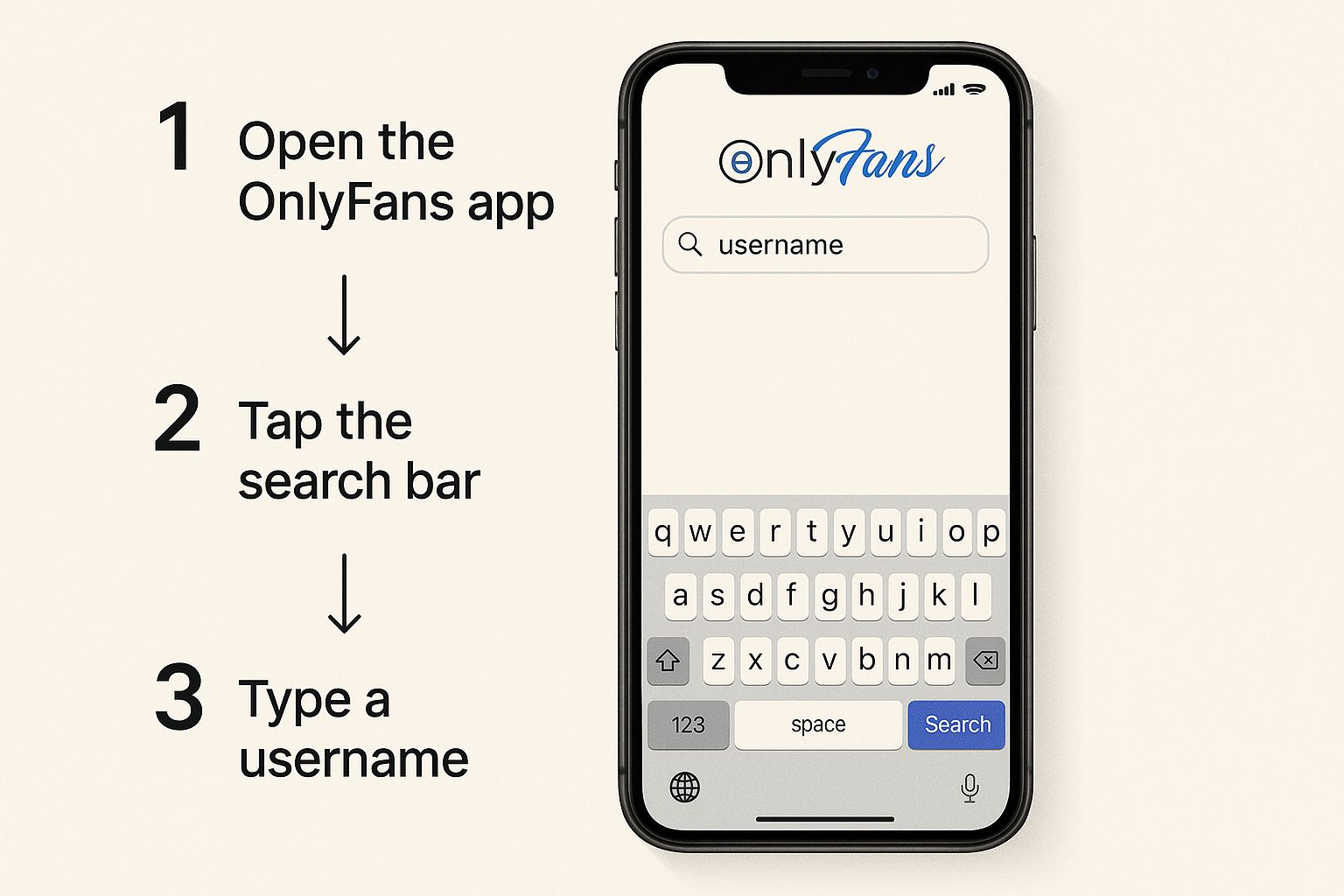
As you can see, going directly through the browser is often much quicker and more precise than trying to hunt them down within the platform itself.
Key Takeaway: If the URL works, you'll land on their profile. If not, you'll probably get a "404 - Page Not Found" error. That's your clue that the username is misspelled, wrong, or the account doesn't exist anymore.
When you use the direct search method, you'll get one of a few results. This table breaks down what each outcome means and what you should do next.
Direct Search Results What They Mean
| Search Outcome | What It Means | Next Step |
|---|---|---|
| Profile Loads | Success! You found the correct creator profile. | You can now subscribe or view their public content. |
| "404 Page Not Found" Error | The username is incorrect, or the account has been deleted. | Double-check the spelling for any typos or mistakes. |
| "User not found" Message | This is another OnlyFans error indicating the account doesn't exist. | Try searching for alternative usernames the creator might use. |
| Redirect to Homepage | The URL might be incomplete or have a typo, causing a redirect. | Carefully re-type the full onlyfans.com/username URL. |
Ultimately, a successful direct search is all about having the exact username. Any small error will lead you to a dead end.
Common Slip-Ups and How to Fix Them
I've seen people get tripped up by a few common mistakes time and time again. Here’s what to watch out for:
- Username vs. Display Name: A creator might have a public display name like "Jane D," but their unique username is something totally different, like
janedoe123. The direct URL method only works with the unique username. - Lookalike Characters: It's so easy to mix up the letter 'O' and the number '0', or the lowercase letter 'l' and the number '1'. If a search fails, take a second look for these common swaps.
- Simple Typos: Honestly, a simple typo is the #1 reason a direct search doesn't work. Read the username back to yourself slowly and make sure every character is spot-on.
Getting the hang of these little details will make your direct searches successful almost every time. While this approach is your best bet when you have the username, you can learn about other approaches in our guide covering more easy tips and methods for searching on OnlyFans.
Using Social Media to Uncover OnlyFans Profiles
Since OnlyFans is basically a closed-off platform with no real search function, your best bet is to look where creators are already trying to get your attention. Think about it: most creators want to be found. They’re actively using places like X (formerly Twitter), Instagram, and Reddit to pull in new subscribers. This means you just have to do a little digital detective work.
This is where you'll have the most luck. You'll often find creators using link aggregator services like Linktree, AllMyLinks, or Beacons right in their social media bios. These tools act as a simple landing page for all their links, making it dead simple to find their OnlyFans page in one click.
Smart Social Search Tactics
You have to tailor your search strategy to the platform you're on. Each social network has its own vibe, search quirks, and community rules.
Here are a few pointers from experience:
- X (Twitter): This is ground zero for promotion. Start by searching for terms like
[Creator's Alias] OnlyFansor[Username] OF. More often than not, they’ll have a tweet with their link pinned right to the top of their profile. - Instagram: The bio is the first place to check for a direct link or a Linktree. Don't forget to tap through their Stories and check the Story Highlights—promotional links are almost always shared there.
- Reddit: A lot of creators are active in niche subreddits that fit their content. Searching their username on Reddit can lead you straight to a post or comment where they’ve dropped their profile link.
This multi-platform approach is so important because the user-to-creator ratio on OnlyFans is a staggering 74:1. With such a massive subscriber base, top creators are easy to spot, but newer or smaller accounts depend almost entirely on external promotion to stand out. You can dig into more OnlyFans audience demographics on Statista if you're curious.
Pro Tip: Don't just search for their real name. Think bigger. Try searching for common online aliases or gamertags they use elsewhere. People often keep their branding consistent across the internet, and that can be the key to finding their profile.
Let's say you know someone streams on Twitch as "GamerPro123." Your next logical move is to search GamerPro123 OnlyFans on X or Google. The promotional breadcrumbs they leave on one platform almost always lead to another. If you start thinking like a promoter trying to be found, your odds of finding them go way up.
Turning to Third-Party OnlyFans Search Tools
So, you've tried digging through social media and guessing URLs with no luck. What's next? This is where third-party search tools come into play. A whole ecosystem of websites has sprung up to solve the exact problem you're facing: OnlyFans' lack of a built-in public search feature.
Think of these sites as specialized search engines for OnlyFans. They work by gathering publicly available information that creators share on social media to promote their pages. They then index all that data, building a database you can search using a name, location, or even keywords about the creator's niche. For a deep dive into the most reliable options, check out our guide on the 7 best OnlyFans finder tools for 2025.
This screenshot shows the official Wikipedia entry for OnlyFans, which explains its history and business model.
It's precisely this subscription-first, privacy-focused structure that made external search tools necessary for fans in the first place.
The Good and The Bad
While these search engines can feel like a godsend, you need to go in with your eyes open. They aren't officially affiliated with OnlyFans, and the quality can be all over the map.
Here’s a realistic breakdown of what to expect:
- The Upside: They actually let you search! You can look for creators using filters that OnlyFans simply doesn't offer.
- The Downside: The information isn't always fresh. You might find a profile on a search site only to discover the creator has since deleted their account.
- The Upside: You can stumble upon smaller, under-the-radar creators who haven't quite mastered the social media promotion game yet.
- The Downside: Be prepared for a mess. Many of these sites are plastered with aggressive ads, pop-ups, and links that lead nowhere.
Here’s the most important takeaway: Never, ever pay for a search. Any tool asking for money to find a creator is a red flag. The legitimate services make their money from ad revenue, not by charging you.
These tools are best used as a final option when you've exhausted all other avenues. Just be smart. Stick to the more reputable search engines, remember that the data might be out of date, and never give out personal information or payment details. They're a useful but imperfect tool for finding what you're looking for.
Smarter Searches and Common Mistakes to Avoid
So, your first few attempts came up empty. Don't give up just yet. It's time to start thinking like a creator who's trying to stand out while staying connected to their other social media accounts.
Many creators use slight variations of their main social media handle for their OnlyFans username. It's a common trick. Try adding things like underscores, a few numbers, or even the word "official" to their known alias.
For example, if you know someone's X handle is "CreatorJane," their OnlyFans page could easily be "Creator_Jane," "CreatorJane123," or even "TheRealCreatorJane." Cycling through these simple, logical variations is often the final piece of the puzzle.
Using Google to Your Advantage
You can also make Google do the heavy lifting by using what are called "search operators." This is a fantastic way to cut through all the internet clutter and pinpoint posts where a creator has likely dropped a link to their OnlyFans page.
Try this simple query: site:twitter.com "creator name" onlyfans. This little command tells Google to search only on Twitter for any posts that mention both the creator's name and the word "OnlyFans." It's surprisingly effective for digging up direct promotional links. You can also narrow your search by location, which we cover in detail in our guide on the 7 best tools for finding OnlyFans creators by location.
A Word of Warning: The single biggest mistake you can make is falling for a "finder" service that asks for money. These are almost always scams. They take your cash and give you nothing in return. Legitimate ways to search will never ask for payment.
Pitfalls to Watch Out For
Besides steering clear of those scammy paid services, keep an eye out for these common missteps that can send your search off track:
- Mistaking Fan Pages for the Real Deal: Always double-check that the profile you've found belongs to the actual creator. Impersonators and fan-run accounts are everywhere.
- Forgetting About Username Variations: It sounds simple, but people often forget to try the basics. A single underscore or number can be the only thing separating you from a dead end and finding the right profile.
- Being Too Aggressive: Remember to respect creators' privacy. If someone has made their profile hard to find, there might be a good reason. Never resort to pestering them or being intrusive.
Common Questions When Searching for People on OnlyFans
Even with the best game plan, a few questions always seem to come up when you're trying to track down a specific creator. Let's tackle some of the most common hurdles you might run into so you can get back to your search.
Can I Just Search by Their Real Name or Email?
I get this question all the time, and the short answer is no. OnlyFans was designed from the ground up with creator privacy in mind. That means you can't just pop in a real name or an email address and expect to find someone.
It's a core security feature of the platform. The only reliable way in is by knowing their exact OnlyFans username, which you'll almost always find plastered on their other social media pages like Twitter or Instagram.
Are Those Third-Party Search Websites Legit?
This is where you need to be careful. The internet is littered with websites claiming they can find any OnlyFans profile for you, but their quality is all over the map. Some might offer a decent, if outdated, directory, but many are just a mess of broken links, potential scams, and sketchy privacy policies.
My advice? Tread very, very lightly.
Pro Tip: Never, ever give your personal details or credit card information to a third-party search site. And if a site asks you to pay for a search service, run. They're almost always scams designed to take your money and deliver nothing.
If you're looking for safer alternatives, you might want to check out our guide to using an OnlyFans model finder, where we break down more reliable discovery tools.
What if I Find the Profile but It’s Geo-Blocked?
So you finally track down the right profile, but you hit a wall: an error message saying the content isn't available in your country. That's geo-blocking, a setting creators can switch on themselves to restrict access from certain regions.
If a creator has decided to block your country, there's no official way around it. You might be tempted to fire up a VPN, but doing so could be a violation of OnlyFans' terms of service. It's a risky move that could get your own account suspended. Honestly, the best and safest approach is to simply respect the creator's settings.