
Ever tried to find a specific type of creator on OnlyFans, only to be met with a search bar that doesn't seem to do much? You're not alone. The easiest way, by far, is to pop in an exact username (like @username). You'll usually find these on a creator's other social media pages, like Twitter or Instagram.
But what if you don't have a name and just want to browse? That's where things get tricky, and you'll need to get a bit more creative or look beyond the platform itself.
Navigating the OnlyFans Search Maze
Here's something you need to understand right off the bat: OnlyFans' search isn't like Google or even Instagram's explore page. It was intentionally designed to be basic. It's built for people who already know exactly who they’re looking for, not for those hoping to discover new talent. This is a common point of frustration for users who just want to find creators based on interests, location, or other details.
Because of this, the platform really pushes you to find creators elsewhere and follow their direct links. Once you wrap your head around this design choice, it's easier to set realistic expectations for what the native search bar can actually do for you.
Why a Targeted Search Matters
The platform is enormous. We're talking over 305 million users and around 4.5 million creators. That's a staggering user-to-creator ratio of about 74:1. With numbers like that, just randomly searching for something is like trying to find a specific book in a library without a catalog.
And while a lot of the content is what you'd expect, there are fast-growing niches in areas like fitness, cooking, and music that are almost impossible to find without knowing who you're looking for. You can see more on the platform's user base and how it's evolving at Social-Rise.com.
Key Takeaway: The platform’s search is built for precision, not exploration. The best way to learn how to search on OnlyFans is to start with a creator’s exact username or display name.
This infographic really drives home how much time you can save by using a filtered, targeted search approach compared to a broad, unfiltered one.
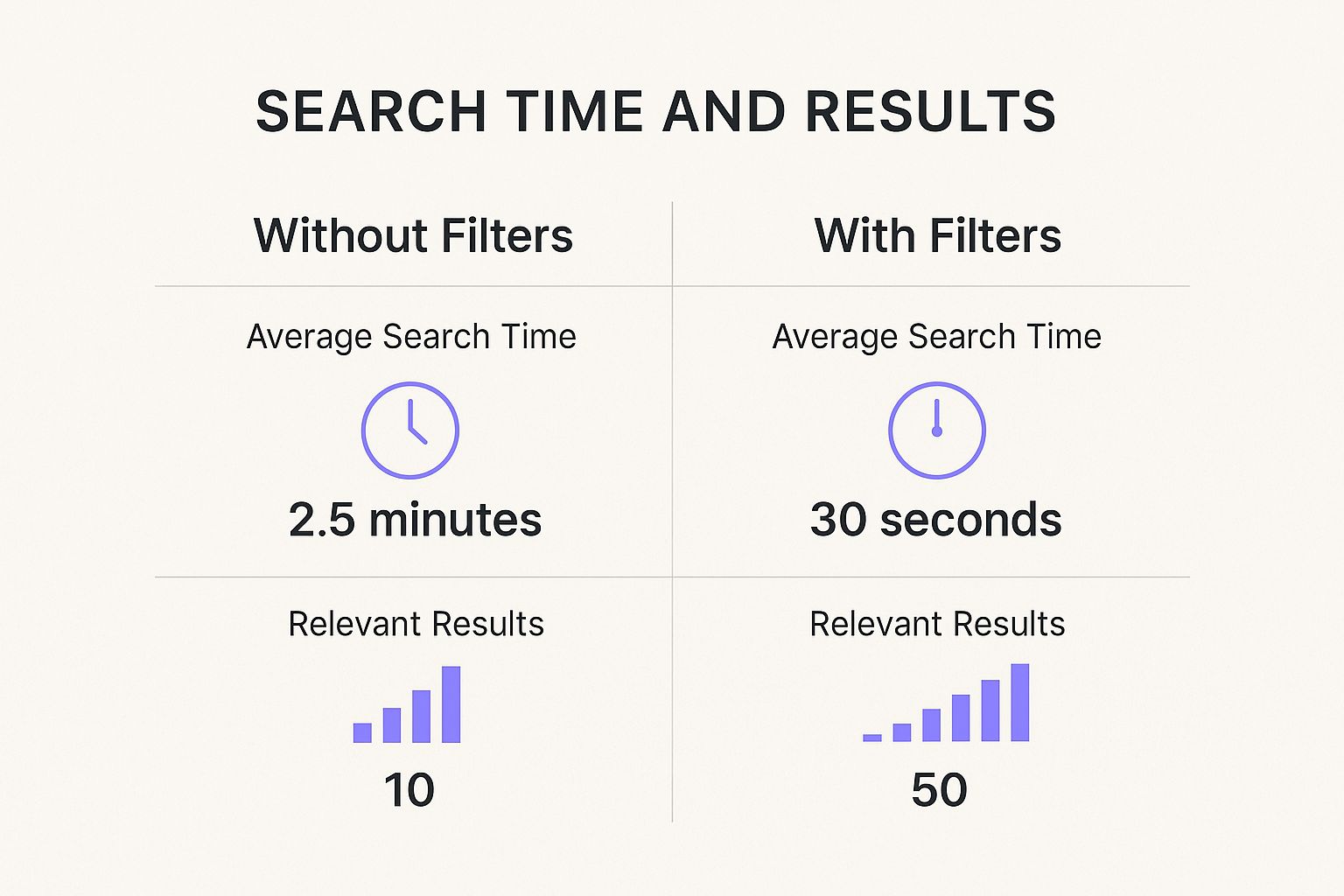
As you can see, a specific search doesn't just save you time—it dramatically increases the relevance of the results. You go from minutes of frustrating scrolling to finding what you want in seconds.
Of course, a direct search isn't your only option. For anyone on the hunt for a good deal or a trial subscription, check out our guide on 7 ways to find free OnlyFans content in 2025. It's another fantastic way to discover new creators who might become your next favorite.
Getting the Most Out of the Native Search Bar

When you're trying to track down a specific creator on OnlyFans, the built-in search bar is your starting point. It's a bit basic, I'll admit, but you can definitely make it work for you if you know its quirks. The most reliable way to find someone is by typing in their exact username—the one with the "@" symbol, like @janedoe123—or their display name.
That’s great if you already have it, but what if you don't? This is where a little outside-the-box thinking comes in. Most creators are constantly promoting their OnlyFans on other social media accounts.
Think about where you first saw them. Was it on X (formerly Twitter) or Instagram? Head back to their profile there. You’ll often find their OnlyFans handle right in their bio or tucked inside a link-in-bio page from services like Linktree or Beacons. This is usually the quickest way to get the exact information you need.
Using Suggestions to Your Advantage
Don't just type and hit enter. The search bar’s "Suggestions" feature is more useful than it looks. As you start typing, a list of profiles will pop up, and this can be a goldmine if you only have a piece of the puzzle.
Let’s say you remember a creator's first name but can't recall the full username. Start typing what you know and then pause. The suggestions that appear might just be the memory jog you need to find the right profile. I’ve found plenty of accounts this way without having the complete handle.
Pro Tip: Creators often collaborate. If someone you're subscribed to mentions working with another creator, try searching for the collaborator's name. The suggestion algorithm tends to highlight connected or popular accounts, which is a great way to discover new people through those you already enjoy.
Here's another trick that works occasionally: searching by location. It's a long shot because it relies on the creator having manually added their city or region to their profile, and most don't. But if you're specifically looking for local talent, it can't hurt to try.
Ultimately, getting the native search bar to work well is all about being precise. You need a name or username to get started, so think of other social platforms as your personal directory. Grab the details from there, and the OnlyFans search bar becomes much more effective.
How User Demographics Shape Your Search

To really get the hang of searching on OnlyFans, you have to understand who's actually using it. The platform’s audience has a huge say in what content blows up, what the algorithm pushes, and ultimately, what you’re able to find. Think of it as a backdoor to smarter searching; if you know the trends, you can work around them to discover creators who might otherwise stay hidden.
The numbers themselves are pretty telling. With over 210 million users worldwide, the platform is massive. A closer look shows that roughly 66.62% of these users are male, leaving 33.38% as female. This gender split naturally sways the type of content that gets the most traction.
Age plays a big role, too. Young adults dominate the platform, with the 25-34 age group accounting for 25.72% and the 18-24 group right behind at 21.17%. For anyone interested in the nitty-gritty, you can dig into the full breakdown of the platform’s user statistics to see the data for yourself.
What this all means is that content created for a younger, mostly male audience tends to be front and center in the platform's native suggestions.
Mobile-First Design and Discovery
Another piece of the puzzle is how people use OnlyFans. An overwhelming 86.54% of users are on mobile devices, which has fundamentally shaped the entire experience to favor quick, visual browsing on a small screen.
The platform is built for fast scrolling, not deep, text-heavy searches. This is exactly why a creator's profile picture and username are so important, and it’s why your own search should often start with a visual cue you remember.
Because the design is geared toward mobile, you’ll notice a few things:
- Visuals are king: Profile pictures and banners do most of the talking in search results.
- The interface is simple: You won't find a lot of complex filters to narrow things down.
- Speed is a priority: Content is designed to load quickly so you can keep scrolling.
This mobile-centric approach isn't unique to OnlyFans, of course. If you're curious about how it stacks up against other platforms, our guide to the top cam model sites for 2025 provides some interesting comparisons. By keeping these user dynamics in mind, you can start to think more like the platform's algorithm and fine-tune your searches to get much better results.
When OnlyFans' own search bar falls short, it's time to bring in the specialists. Let's be honest: the platform's search function is great for finding creators you already know by name, but it’s not built for discovering fresh faces based on your interests. This is exactly where third-party search engines come in and completely change the experience.
Tools like Fanclan essentially act as a detailed, searchable catalog for the entire platform. They provide the kind of specific, granular filters that OnlyFans is missing, which is the real key to finding new creators you'll love. Instead of just typing in a username, you can get incredibly specific about what you're looking for.
Finding Exactly What You Want
Let’s try a real-world scenario. Say you’re looking for a fitness coach who offers a free trial and posts new workout videos every single day. Trying to find that on OnlyFans itself is a non-starter. But with a dedicated search tool, you can plug in those exact requirements.
Here’s a taste of the kind of filters you can typically use:
- Content Category: Pinpoint your search to specific niches like "cosplay," "cooking," or "musicians."
- Physical Traits: You can often filter by details like hair color, body type, and other physical attributes.
- Subscription Price: Easily sort creators to find free pages, budget-friendly subscriptions, or more premium-priced accounts.
- Post Frequency: See who posts content daily versus those who are more sporadic.
The biggest win here is efficiency. You're no longer just scrolling and hoping to stumble upon someone interesting. Instead, you're actively taking an interest and turning it into a hand-picked list of creators in just a few clicks.
Here's a quick look at the Fanclan interface. It perfectly illustrates how you can stack multiple filters to zero in on the right creators for you.
This screenshot shows the power of combining filters. By selecting a location, adding specific tags, and setting a price range, you can sift through millions of profiles to find the handful that match your precise criteria.
If you're curious about what other options are out there, we've put together a full guide on the 7 best OnlyFans finder tools for 2025. It’s a great resource for exploring other platforms that can help you find exactly what you're looking for.
Timing Your Search Can Make All the Difference

It might sound a little odd, but when you search on OnlyFans can genuinely affect who and what you find. Just like any other social platform, there's a natural rhythm to it—times of the year when it's buzzing with activity and other times when things are a bit quieter. Getting a feel for these patterns is a surprisingly simple trick to get better search results.
Take a look at the traffic data, and you'll see a clear picture. The site often hits its peak in January with around 478 million visits, and December isn't far behind at roughly 469 million. On the flip side, a month like October can see that number drop all the way down to nearly 263 million visits. If you're curious about the nitty-gritty behind these numbers, you can dive into this in-depth OnlyFans statistics breakdown.
How to Use Peak Times to Your Advantage
So, what does this actually mean for you? When traffic is high, creators know there are more eyes on the platform. They respond by kicking their activity into high gear, posting more frequently and rolling out promotions to grab new fans.
In other words, searching during these busy months is like casting your net into a fully stocked lake. You're much more likely to find fresh faces, active profiles, and creators offering special introductory deals.
If you search during a slow period, you might find that things feel a little stagnant, with fewer creators running promotions. If you're just getting started, timing your first big exploration can really change your experience. For more tips on getting your bearings, our OnlyFans guide for beginners is a great place to start.
Here’s a quick rundown:
- Prime Time to Search: Early January and late December are your best bets.
- What You'll Find: More active creators, a steady stream of new content, and a better shot at finding special offers.
- The Strategy: Try to save your serious, deep-dive searches for these peak windows. You'll simply have more to discover.
Got Questions About OnlyFans Search? We’ve Got Answers.
Even when you know what you’re doing, trying to find creators on OnlyFans can sometimes feel like a dead end. Let's walk through some of the most common issues people run into and get you pointed in the right direction.
Do I Really Need an Account to Search on OnlyFans?
Yes, you absolutely do. To use the search bar on OnlyFans, you have to be logged into an active account. Think of it as a members-only club—the platform keeps everything, from profiles to search results, behind a login wall to protect user privacy. So, creating an account is always your first step.
This closed-off approach is actually a major point of difference between OnlyFans and many of its rivals. If you're curious about how other platforms handle discovery, our breakdown of OnlyFans vs. competitor platforms offers a much deeper look.
I'm Sure I Have the Right Username, so Why Can't I Find Them?
This is a classic problem, and it's incredibly frustrating. If you're positive you've typed the username correctly, there are a few likely reasons this is happening. The creator might have blocked you, or they could be using geo-blocking to hide their profile from users in your specific country. Of course, there's always the chance they changed their username or even deleted their account.
Pro Tip: Before you assume it’s a block, always double-check the username against an official source like the creator’s X (formerly Twitter) or Instagram bio. This rules out simple typos and confirms they're still using that handle.
If the spelling is perfect and you still come up empty, geo-blocking is the most probable cause.
Are Third-Party OnlyFans Search Tools Safe to Use?
The good ones are. A reputable search engine like Fanclan is built to be safe because it only indexes information that creators have already made public for their own promotion. The most important thing to remember is that a legitimate tool will never ask for your OnlyFans login details.
If any site or search tool ever prompts you for your password, consider it a giant red flag and close the tab immediately. Stick with well-known, trusted tools that have positive reviews. This lets you find creators far more easily without putting your account security at risk.
Tired of hitting dead ends with the basic OnlyFans search? Fanclan gives you the power to filter by content category, price, location, specific fetishes, and more. Find exactly who you're looking for in seconds. Explore profiles on Fanclan now.