
Ever tried finding someone on OnlyFans and felt like you hit a brick wall? It’s a common frustration, and it's not because you're doing something wrong. The truth is, the platform's search function is deliberately basic. The real secret isn't about mastering the site's search bar; it's about knowing where creators actually do their marketing—which is almost always somewhere else.
Why Is It So Hard to Find People on OnlyFans?

If you’ve typed a name into the OnlyFans search box only to get zero results, you've experienced the platform's design firsthand. This isn't a bug. It's a core part of their business model, built around creator privacy and direct, intentional promotion.
Unlike other social media sites that constantly push new accounts on you, OnlyFans prioritizes a controlled environment. Creators get to decide exactly how visible they want to be. Think of it less like a public directory and more like a private club—you generally need to know who you're looking for before you arrive. This puts the power of audience-building squarely in the hands of the creators.
Marketing Happens Off-Platform
This design choice means creators have to build their following on other, more public platforms. They use sites like Twitter, Reddit, and Instagram to attract an audience and then guide those followers to their paid OnlyFans page. It’s a strategy that gives them total control over their marketing and helps avoid unwanted attention.
Understanding this dynamic is everything. The platform is massive, with over 305 million fans and 4 million creators, but you can only find a tiny fraction of them using the site's own tools. Discovery almost always starts on another site. You can dig deeper into the platform’s scale with these industry statistics.
The key takeaway: If you want to find people on OnlyFans, you have to think like a creator. Stop starting your search on OnlyFans itself. Start where they are actively trying to get discovered.
Once you wrap your head around this intentional design, you can stop wasting time with the limited native search. Instead, you can focus on the real-world workarounds that actually get results.
Making the Most of the Official OnlyFans Search Bar

Let's be honest: the built-in OnlyFans search bar is notoriously limited. It's designed that way. But that doesn't mean it's completely useless—you just have to know how to work around its quirks.
The biggest trick is understanding the crucial difference between a username and a display name. They are not interchangeable, and getting them mixed up is the most common reason a search fails.
A creator’s username is their unique @handle on the platform, like @janedoe123. Think of it as their permanent address. Their display name is just the name that shows up on their profile, which can be changed at any time. If you want to find someone directly, searching their exact username is your best bet.
Smarter Search Strategies for Better Results
What if you only know a display name or just part of their username? This is where things get tricky. The search bar is pretty unforgiving and rarely pulls up profiles based on display names, especially if the account isn't already hugely popular. More often than not, you'll just hit a dead end.
When your search comes up empty, the platform will show you a 'Suggestions' list. This is just a feed of trending or popular accounts. It won't help you find that specific creator you were looking for, but it can be a decent way to stumble upon new, well-known profiles.
Pro Tip: Always, always try to find the exact
@usernamefirst. Searching for "Jane Doe" could give you a sea of irrelevant results, but searching for@janedoe123will take you straight to her profile, assuming it's public.
When the official search just isn't cutting it, it’s time to look elsewhere. Many people rely on specialized tools built specifically to solve this problem. If you're hitting a wall, it might be worth checking out the 7 best OnlyFans finder tools for 2025. These external sites often have the advanced filtering and discovery features the main platform is missing, making your search a whole lot easier.
Using Social Media to Uncover Creator Profiles

Given how limited the official OnlyFans search is, the real discovery happens where creators are already building their audience. Social media is hands-down the best place to start looking, since most creators use these platforms as their primary promotional funnel.
Think of it this way: platforms like Twitter (X), Instagram, and Reddit are the creator's digital storefront. It's where they post teasers, chat with fans, and most importantly, drop the direct link to their OnlyFans page. This is almost always where your search should begin.
Master the Social Search Game
Each platform has its own rhythm, so you need to adjust your approach accordingly. On Twitter, for example, you can get surprisingly far by combining a creator's potential name with hashtags like #onlyfans or #ofcreator. These are the tags creators use to get noticed.
Reddit is an absolute goldmine, with entire communities built around creator promotion.
- Subreddits like r/OnlyFansPromotions are literally just creators posting direct links to their pages.
- Digging into niche-specific subreddits can help you find creators who focus on certain interests or genres.
- Keep an eye on user flairs next to their usernames—they often contain the creator’s OnlyFans handle.
With Instagram, it's all about the bio. Since direct links aren't allowed in photo captions, that "link in bio" is your target.
Pro Tip: Look for link aggregator services like Linktree, AllMyLinks, or Beacons in a creator’s social media bio. These pages are designed to hold all their important links in one place, and you can bet their OnlyFans profile is right at the top of the list.
Putting It All Together with Practical Search Strings
Let’s make this real. Imagine you're trying to find a creator named "Jane" who makes fitness content. A vague search won't cut it. Instead, you need to get specific on each platform.
| Platform | Example Search Query | Why It Works |
|---|---|---|
| "Jane fitness #onlyfans" | This combines her name, her niche, and a popular, relevant hashtag. | |
| "site:reddit.com jane fitness onlyfans" | This Google operator focuses your search only on Reddit posts mentioning all keywords. | |
| Search for "Jane Fitness" and check their bio link. | Creators often use consistent branding, so their Insta handle might match. |
This cross-platform strategy is infinitely more effective than just sticking to one site. When you treat social media as your main search engine, you're meeting creators where they are actively working to be found.
For a deeper dive into these and other methods, our complete guide on how to search for someone on OnlyFans breaks it all down. Mastering these external techniques is the key to getting consistent results.
Advanced Google Tricks for Finding Profiles
When the platform's own search bar comes up short, it's time to turn to Google. You can actually bend the world's biggest search engine to your will using specific commands called search operators. This technique, often called "Google Dorking," lets you slice through the noise and find specific OnlyFans profiles with surprising accuracy.
Think of it as giving Google hyper-specific instructions. Instead of just tossing in a name and hoping for the best, you’re telling it exactly where and how to look.
Mastering Key Search Operators
The two operators you'll use most are site: and inurl:.
site:tells Google to search only within a single website.inurl:looks for keywords that appear directly in the page's URL.
Let's see how this works. Say you're looking for a creator named "JaneDoe." A regular Google search will pull up everything under the sun. It’s not very efficient.
But if you use this search string instead, things get much more interesting:
site:onlyfans.com "JaneDoe"
This simple tweak forces Google to ignore the rest of the internet and show you only results from onlyfans.com that contain the name "JaneDoe." It's a game-changer.
You can sharpen your search even further. If you suspect their username is "JaneDoeFitness," you can combine operators for a laser-focused query.
- Example Search:
site:onlyfans.com inurl:janedoefitness - What It Does: This searches for pages on OnlyFans that also have "janedoefitness" right in the profile URL (e.g.,
onlyfans.com/janedoefitness).
This approach dramatically improves your chances of hitting the right profile on the first try.
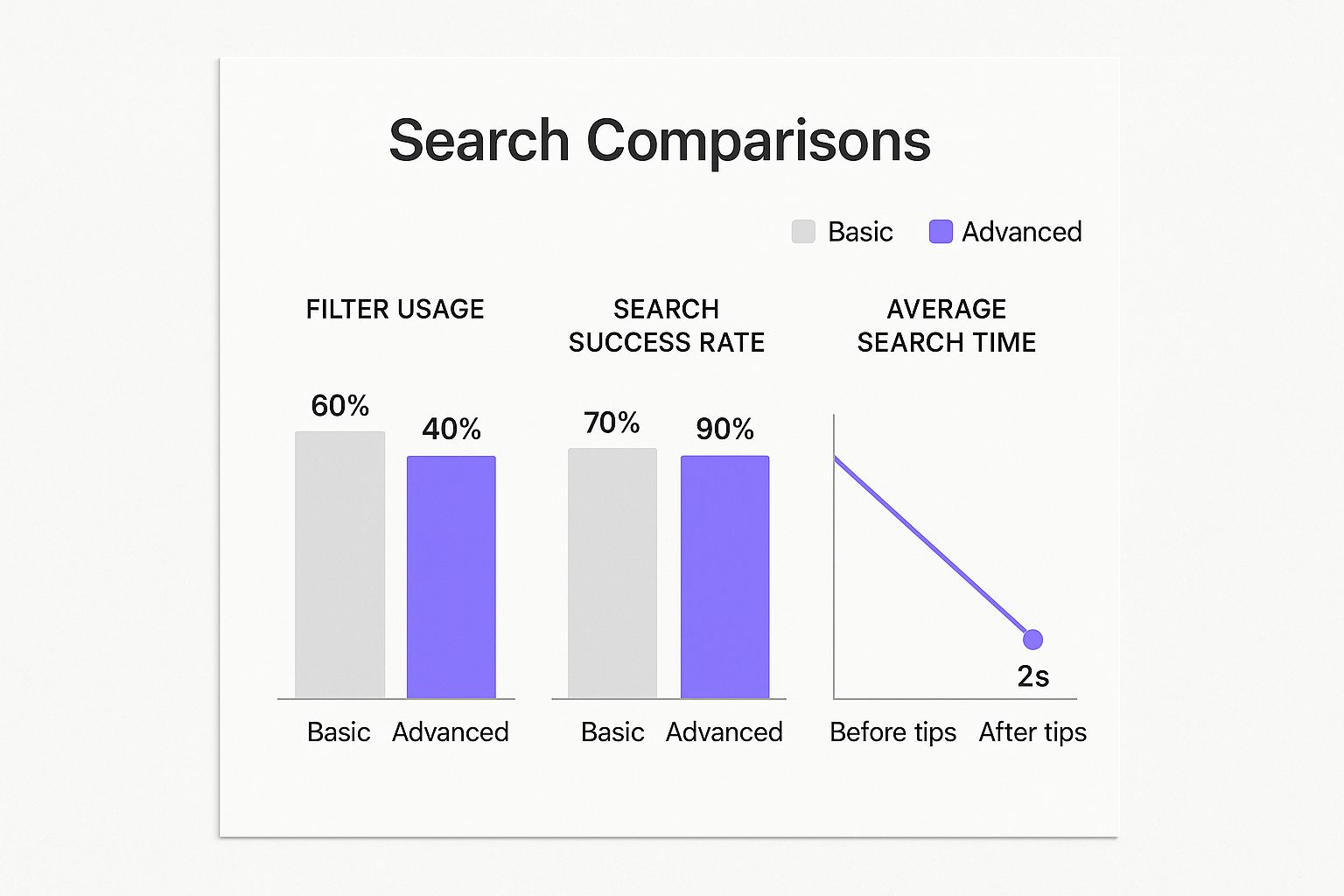
The data speaks for itself. Using these advanced methods can lead to a 20% higher success rate and cut your search time by more than half.
Key Insight: Google operators are all about filtering. By locking your search to the OnlyFans domain, you instantly eliminate millions of irrelevant results from blogs, news sites, and social media, boosting your odds of finding the exact profile you want.
Google Search Operators for OnlyFans
Here's a quick reference table to help you build your own advanced search queries. These are your go-to tools for pinpointing creators.
| Operator | Example Search String | What It Does |
|---|---|---|
site: |
site:onlyfans.com "john smith" |
Restricts the search to only the onlyfans.com website. |
inurl: |
inurl:johnsmithfitness |
Finds pages with "johnsmithfitness" anywhere in the URL. |
"" |
site:onlyfans.com "john smith" |
Searches for the exact phrase "john smith." Essential for names. |
- |
site:onlyfans.com "jane" -doe |
Excludes results that contain the word "doe." |
OR |
site:onlyfans.com "jane" OR "janie" |
Searches for profiles containing either "jane" or "janie." |
Combining these operators gives you a powerful toolkit for tracking down nearly any public-facing profile.
While these tricks are fantastic for finding someone specific, discovering new creators in your area is a different ballgame. For that, you’ll need a different set of tools. We cover that in our guide on the best tools to find OnlyFans by location.
Safely Using Third-Party Search Engines
Because the official OnlyFans search is so limited, a whole cottage industry of third-party search engines has popped up to fill the void. These external sites essentially act like directories, scraping publicly available information from creator profiles and their social media promotions to build a searchable database.
They can be a goldmine for finding creators you’d never stumble upon otherwise. But it's absolutely crucial to approach them with a bit of skepticism. Not all of these tools are built the same, and some can be more trouble than they're worth.
The big issues are usually data privacy and accuracy. Some of these sites have flimsy security, while others are full of outdated links pointing to inactive or completely wrong profiles. Before you start plugging in names, it pays to do a quick safety check.
How to Vet an External Search Tool
Before you commit to using any third-party search engine, run through this quick mental checklist. It’s a simple way to separate the helpful tools from the sketchy ones.
A trustworthy platform will almost always have these things:
- Good User Reviews: Check what people are saying on places like Reddit or Trustpilot. Is the site reliable? Is it safe? Real user feedback is invaluable.
- A Clear Privacy Policy: Any legitimate website will tell you what data they collect and how they handle it. If you can’t easily find their privacy policy, that's a huge red flag.
- A Secure, Modern Design: Does the site look professional? Does it use HTTPS? If a website looks like it was built a decade ago and isn't secure, you probably shouldn't be using it.
Key Takeaway: Think of third-party tools as a powerful backup, not your primary search method. They're great for when official channels and social media searches don't give you what you need.
The very existence of these tools is a direct result of the platform's staggering size. We're talking over 305 million fan accounts and more than 4.19 million active creators as of 2025. This massive ecosystem, which pulled in over $6.6 billion in revenue in 2023, created a discovery problem that these external search engines are trying to solve. You can dig into more of these stats over at OFStats.net.
And if you find that even these powerful tools are giving you trouble, you might want to check out our guide on fixing common OnlyFans search problems.
Common Questions About Finding People on OnlyFans
Even after trying all the tricks in the book, you might still have a few questions. That's perfectly normal—finding a specific creator on OnlyFans can feel like a bit of a scavenger hunt sometimes. Let's clear up some of the most common things people ask.
Can I Find Creators Near Me?
This is probably the number one question I hear. Can you just type in "New York City" and find creators there? The short answer is no. OnlyFans doesn't have any kind of built-in location search or filter, and that's intentional to protect creator privacy.
So, if the platform itself won't help, what do you do?
Key Insight: Finding local creators means you have to get creative and look off-platform. Your best bet is to check social media for location-specific hashtags or use third-party search tools that are specifically built to solve this problem.
Is My Search History Private?
Another big concern is privacy. People often wonder if creators can see who is searching for them. You can relax—your search history on OnlyFans is completely private.
Nobody can see the names or usernames you type into that search bar. Your activity stays with you.
What If I Still Can't Find Someone?
Okay, so you've scoured social media, tried every clever Google search operator, and even checked a few third-party sites, but you've come up empty. What now?
It's entirely possible the creator you're looking for keeps a very low profile. They might be using a completely different alias online or have an account that’s private and unlisted. At this point, your best move is to circle back to any of their other social profiles to see if they've dropped new hints or links you might have missed before.
For a deeper dive, our guide on the 7 ways to find local OnlyFans creators breaks down even more advanced strategies. Tackling a local search is often the toughest challenge, and having the right game plan is everything.
Ready to discover new creators without the hassle? Fanclan provides advanced filters and a powerful search engine to help you find exactly what you're looking for. Explore over 100,000 profiles with ease at https://fanclan.io.