Trying to find an OnlyFans by city can feel like you're searching for a needle in a haystack. The platform itself doesn't offer a location search, which is a deliberate choice but a frustrating one for users. This guide cuts through the noise and shows you how to use Fanclan to find local creators, solving a problem that stumps most people.
Why You Can’t Find Creators by City on OnlyFans
Ever tried to find a creator from your hometown on OnlyFans? If so, you know the search bar is a dead end. The platform is built to protect creator privacy and cater to a worldwide audience, so there's simply no feature to filter profiles by city, state, or country. This becomes a real roadblock if you want to support local talent or find content that feels closer to home.
That’s exactly why specialized discovery platforms exist. They popped up to fill this gap, giving fans a much better way to connect with creators based on where they are.
The Problem With Guesswork
Without the right tool, you're left with some pretty ineffective methods. You could waste hours trying to:
- Guess usernames that might include a city, like "NYC_Nikki" or "LA_Lover."
- Comb through endless social media profiles hoping for a location tag in a bio.
- Cross your fingers and hope the algorithm magically suggests someone nearby.
These are just shots in the dark and rarely work. If the native search on OnlyFans is giving you trouble in general, you might want to check out some potential fixes and alternative finder tools to get better results.
The bottom line is that OnlyFans just wasn't designed for local discovery. It's all about broad content categories, not geography. That makes it nearly impossible to find creators in your own community without some outside help.
Why Fans Want Local Content
The demand for finding creators by city is huge, and it makes perfect sense. A massive chunk of the platform's audience is clustered in big cities. The United States, for example, drives about 38.13% of all global traffic, with places like New York and Los Angeles acting as major hubs for creators and their fans. This data, highlighted on platforms like PleazeMe, shows a clear desire for local connections that OnlyFans isn't set up to provide.
This is where the Fanclan homepage comes in, immediately giving you the option to find creators "Near You."
The entire interface is built to solve the location problem right from the start, making it incredibly simple to kick off a city-based search.
Navigating Your First Search on Fanclan

Jumping into a new search tool can feel a bit clunky, but Fanclan cuts right to the chase. The entire platform was built to find an OnlyFans by city, so you won't get lost in confusing menus. It’s all front and center.
The moment you hit the homepage, you’ll see the search bar. This is where the magic happens. Unlike the native OnlyFans site, this one is actually built for location searches. Just pop in the city you’re interested in—say, "Los Angeles" or "Chicago"—and let it rip.
Understanding the Results Page
Once you search, Fanclan lays everything out in a clean, grid-style format of creator profiles. Each one gives you a quick snapshot with a profile pic, username, and usually a piece of their bio. It's the perfect bird's-eye view of who’s creating content in that area.
You’ll want to keep an eye on a few key things here:
- Profile Snippets: These little bio blurbs are gold. They often give you a hint about a creator's niche or content style right away.
- Subscription Price: Prices are listed clearly, so you can immediately spot free pages versus premium accounts without clicking through.
- Sorting Options: Look for the dropdown menus. You can usually sort the results by what’s popular, who’s new, and other helpful criteria.
Fanclan's real strength is its simplicity. It gets rid of all the guesswork by focusing on one thing: aggregating public location data. This gives you a direct line to discovering local creators without the usual headache.
Having instant access to location-based profiles is a total game-changer. If you want to get into the nitty-gritty of how it all works, you can learn more about finding local creators with Fanclan to see just how powerful this is.
From here, the next move is to start using filters to really zero in on what you're looking for.
How to Pinpoint Creators in Your Target City
Okay, you've got the basics down. Now, let's get serious about finding OnlyFans by city and zero in on the exact creators you're after. A simple city search is a good starting point, but the real magic happens when you start layering filters. This is how you turn a massive, overwhelming list into a highly curated selection that perfectly matches what you're looking for.
Think about it this way: a search for creators in Miami could return hundreds of profiles. Who has time for that? But what if you add a "Fitness" category filter and cap the subscription price at $10? All of a sudden, you have a manageable list of Miami-based fitness creators who won't break the bank. That’s the power of smart filtering.
Combining Filters for Precision
The secret is to think beyond just the location. What else are you interested in? A specific content style? A particular niche? Fanclan's filters are designed to let you stack these preferences on top of each other.
Here are a couple of real-world scenarios to show you what I mean:
Your Goal: Find a brand-new, cheap creator in New York City.
Your Filters: "New York" + Subscription Price under $5 + Sort by "Newest."
The Result: You instantly see a list of the latest creators to join from NYC, all offering super affordable subscriptions.
Your Goal: Discover the most popular tattoo models in Los Angeles.
Your Filters: "Los Angeles" + "Tattoo" tag + Sort by "Most Popular."
The Result: Your results are now tailored to show only the most-followed LA creators within that specific niche. It's that simple.
The image below gives you a peek into the strategic thinking creators use to target different cities, which is pretty similar to how you can refine your own search.
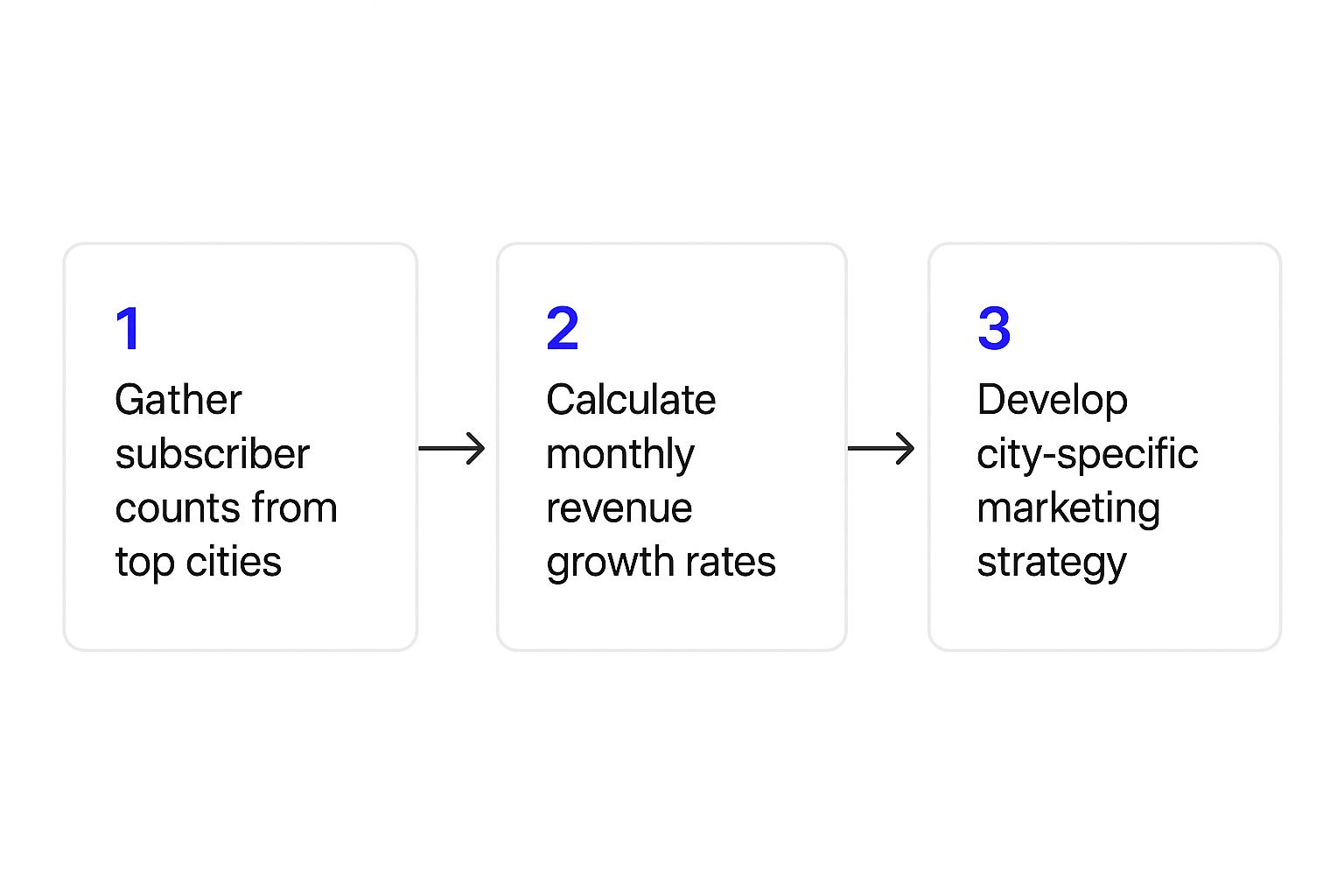
Just as creators use data to focus their efforts, you can use filters to focus your search on the cities and interests that matter to you.
This table shows a few more ways you can combine filters on Fanclan to get hyper-specific results when searching for creators in a particular city.
Example Filter Combinations for City-Based Searches
| Search Goal | City Filter | Additional Filter | Expected Outcome |
|---|---|---|---|
| Find popular cosplayers in Tokyo | Tokyo | "Cosplay" tag + Sort by "Most Popular" | A ranked list of the most followed cosplay creators based in Tokyo. |
| Discover budget-friendly creators in London | London | Subscription price under $8 | A feed of London-based models offering subscriptions for less than $8. |
| See the newest faces in Chicago | Chicago | Sort by "Newest" | A chronological list of the latest creators to join OnlyFans from Chicago. |
| Find top-rated fitness models in Miami | Miami | "Fitness" category + Sort by "Top Rated" | A curated list of Miami's best-reviewed fitness-focused creators. |
These are just starting points, of course. The more you experiment with different combinations, the more hidden gems you're likely to uncover.
Understand the Scene
It also helps to know a bit about the audience demographics in major hubs. As of February 2025, about 79% of monthly OnlyFans traffic worldwide came from male users, with female users making up the other 21%. This is especially true in big U.S. markets like New York and LA, which naturally shapes the kind of content that trends there. If you're curious about the numbers behind the platform, you can discover more insights about these OnlyFans statistics.
Don't be afraid to play around with different filter combos. Sometimes the most fascinating profiles pop up when you pair a city with a less common tag or a unique sorting option. The more specific you are, the better your results will be.
Once you master these filtering techniques, you’re no longer just browsing aimlessly. You're actively creating your own discovery experience. For an even deeper look into finding specific people, check out our guide on how to search for someone on OnlyFans.
Advanced Strategies for Location-Based Discovery

Alright, so you’ve got the hang of a basic OnlyFans by city search. Now it's time to level up. Just typing in a city name is a great start, but the real magic happens when you start thinking outside the box to find creators who aren't showing up in those simple searches.
Instead of just "Chicago," why not try a wider net like "Midwest"? Some creators tag themselves with broader regional terms like "Pacific Northwest" or "New England." It's a smart way for them to connect with a larger audience while still giving a nod to their general area. This is a killer tactic for finding talent just outside the major city limits.
You can also get hyper-specific. Think about searching for iconic districts or even landmarks. A creator based in New York City might not list "NYC" but could drop "Brooklyn" or "Manhattan" into their bio. Using those keywords can open up a whole new set of profiles you would have otherwise missed.
Reading Between the Lines on Profiles
Once a search gets you to a profile, it's time to put on your detective hat. A creator’s page is usually packed with subtle clues about their location, you just need to know where to look.
Scan their bio and recent posts for little hints like:
- Local sports teams: If she’s always cheering for the Lakers, there’s a solid chance she’s somewhere around Los Angeles.
- Weather talk: Constantly posting about snowstorms? You’re probably not looking at a profile from Southern California.
- Slang and dialect: Regional phrases are often a dead giveaway. You can tell a lot about where someone's from by the words they use.
The best results always come from mixing smart search terms with a little profile investigation. A creator's bio is their personal billboard—they often use it to drop hints about who they are and, more importantly, where they are.
By combining these clever search strategies with a bit of observation, you’ll start uncovering those hidden gems that don't show up for everyone else. And if you're looking to expand your toolkit, our breakdown of the 7 best OnlyFans finder tools for 2025 is a great place to see what other platforms can do for your search. Check it out here: https://fanclan.io/blog/7-best-onlyfans-finder-tools-for-2025
Common Search Mistakes and How to Avoid Them
Even with a tool like Fanclan, a few common slip-ups can derail your search for an OnlyFans by city. Let’s sidestep those rookie mistakes.
The single biggest mistake? Getting way too specific. Searching for "Westwood" when you should be searching for "Los Angeles" is a classic example. Think about it from the creator's perspective: they use the major city name to cast the widest net possible. You should, too.
Another thing to keep in mind is the metro area. A creator might technically live in a suburb but list the closest major city for privacy or just better reach. If your search for one city comes up short, don't be afraid to broaden your scope to include the entire surrounding region.
Respecting Creator Privacy and Safety
This is a big one. It's crucial to remember that any location data you see is based entirely on what creators choose to share publicly. For obvious reasons, many are intentionally vague about their exact whereabouts to maintain their safety.
Your search should be a tool for discovery, not surveillance. Trying to pinpoint a precise address crosses a serious boundary and is just plain disrespectful.
Always prioritize the creator's privacy and safety. This approach isn't just about showing basic human decency; it helps keep the whole community healthy and positive. For a deeper dive on staying safe, our guide on how to avoid online scams and protect your data has some great tips that apply here as well.
Remember: The goal is to connect with creators in a general area, not track them down. Shifting to this mindset will give you much better results and a far more positive experience.
By avoiding these pitfalls, you make your search smarter and more respectful. The key is to think like a creator, balancing broad appeal with personal privacy. Nail that balance, and you've mastered the art of local discovery.
Common Questions About Finding Creators By City
Even with a powerful search tool, you might have a few questions about looking for an Onlyfans by city. Let’s tackle some of the most common ones so you can find local creators like a pro.
Are Third-Party Search Tools Safe to Use?
Yes, but only if you stick with well-known, reputable platforms. A trusted search tool like Fanclan works by organizing publicly available information that creators have already shared on their profiles. It’s an aggregator, not a hacker—it never touches private account data or violates any terms of service. Just be sure to avoid sketchy websites and stick to trusted directories designed for safe discovery.
How Accurate is the Location Info?
The accuracy of the location data comes down to what the creators themselves decide to share publicly. These tools pull info from their bios and connected social media accounts, so think of the location as a strong clue, not a precise GPS pin. It’s the perfect starting point, but it's always smart to double-check a creator's profile for more context to confirm their general area.
The information is a reflection of a creator's public persona. If they list "Los Angeles" but live in a suburb, the search tool will show "Los Angeles." It's an effective way to discover talent without compromising anyone's exact location.
Why Can't I Find Anyone in My Small Town?
It's a simple numbers game: creator populations are much higher in major hubs. You'll naturally get more hits for a search in New York or Miami than you will for a small town. If your local search turns up empty, don't give up.
- Widen your search radius: Try looking for the nearest major city instead. Many creators tag a larger metro area to maintain their privacy while still connecting with a regional fanbase.
- Go bigger and search by state: If a specific city isn't working, broadening your search to the entire state can help you find profiles you might have missed that are still relatively close.
Ready to stop guessing and start finding? With Fanclan, you can instantly filter and discover creators in any city you want. Start your targeted search on Fanclan today.