Trying to find specific types of content on OnlyFans can be a real headache. The platform just wasn't built for discovery. If you already know a creator's username, the native search bar works great. But for finding anything else? You'll need a better strategy.
How to Find Content When the Search Bar Falls Short
Let's get one thing straight: the internal search function on OnlyFans is basic. It’s designed to do one job—find a specific creator when you know their exact username or display name. You can't search for content types, niches, or keywords. This is why any effective OnlyFans content search has to start outside the platform.
The truth is, creators do almost all their promotion on other social media sites. They build their audiences on platforms like Twitter, Reddit, and TikTok, sharing sneak peeks and funneling followers back to their OnlyFans pages. Once you understand this, finding content becomes a whole lot easier. The secret isn't to search for content on OnlyFans, but to find the creator you're looking for somewhere else first.
Your Roadmap to Finding the Best Creators
Not sure where to start? This decision tree maps out the smartest ways to find creators based on what you already know (or don't know).
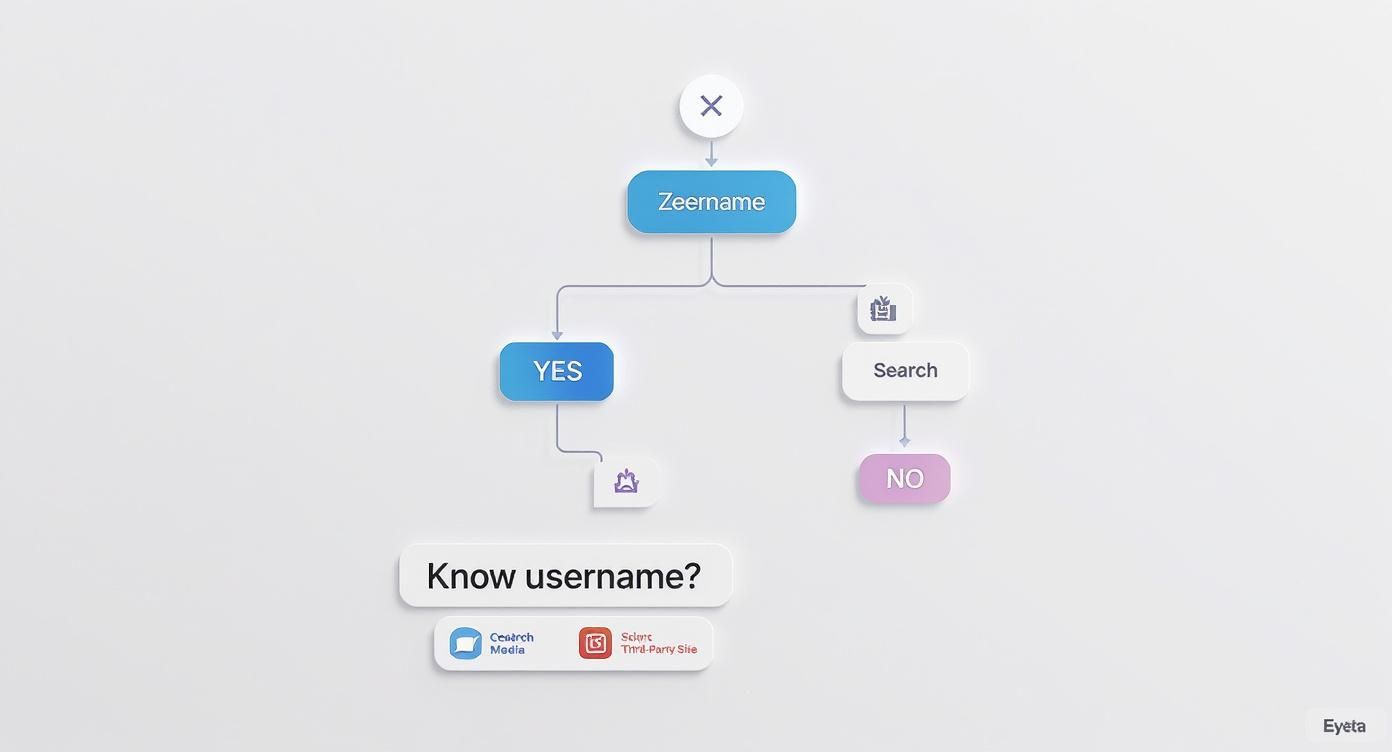
As you can see, if you don't have a username, your best bet is to immediately jump over to social media or use a specialized third-party directory. For a deeper dive into these powerful tools, check out our complete guide to using an OnlyFans model finder.
This need for off-platform discovery makes sense when you look at the numbers. From 2018 to 2023, search interest for OnlyFans in the U.S. shot up by an incredible 3700%. This explosion in demand shows just how many people are actively trying to connect with creators, and it highlights why knowing these outside search methods is so crucial.
Here's a quick breakdown of the main ways to search and when to use them.
OnlyFans Search Methods At a Glance
| Search Method | Best For | Key Limitation |
|---|---|---|
| OnlyFans Native Search | Finding a creator whose username you already know. | No keyword or category search. Useless for discovery. |
| Social Media (Twitter, Reddit) | Discovering new creators in specific niches via hashtags & subreddits. | Requires some manual digging and filtering. |
| Third-Party Directories | Searching with advanced filters like price, niche, and location. | May not list every single creator on the platform. |
| Google Search | Broad searches using keywords like "[niche] + OnlyFans." | Results can be overwhelming and not always up-to-date. |
Ultimately, combining these methods will give you the best results. Start broad on social media or a directory, then use the OnlyFans search bar to pinpoint the exact creator once you have their name.
Using OnlyFans' Built-In Discovery Tools

Let's be real—the main search bar on OnlyFans is pretty much only good for finding creators you already know by username. But don't give up just yet. There are a few subtle ways to improve your OnlyFans content search if you know where to look.
The platform's algorithm is always watching and learning from what you do. Every like, comment, and subscription is a vote telling it what you want more of. You can actually train it to serve you better content.
Train Your Suggestions Feed
Your home feed isn't just random; you can actively shape it into a personalized discovery engine. Don't just scroll passively—every action you take refines what OnlyFans shows you in the "Suggestions" section.
Here’s how to take control of your recommendations:
- Engage With What You Love: Smash that like button on posts from creators you genuinely enjoy. This is the strongest signal you can send.
- Stay Subscribed: Keeping your subscriptions active for your favorite models tells the algorithm these accounts are high-value to you.
- Follow the Connections: See a creator you like collaborating with someone else? Check them out. This is a goldmine for finding similar profiles.
If you've tried all this and your suggestions still feel off, there might be a bigger issue. Our guide can help you figure out what to do when your OnlyFans search is not working and discover other finder tools to find exactly what you're looking for.
Leverage Your Friends List for Discovery
Here's a feature most people sleep on: your Friends list. It’s more than just a list of contacts; it's a hidden discovery tool that shows you what creators are trending in your immediate circle.
Think of it as getting recommendations from people who might share your tastes. By seeing who your friends are following and interacting with, you can stumble upon popular creators you would've missed otherwise.
This flips the script from waiting on the algorithm to proactively finding new profiles. It’s a simple but effective way to see what's hot and get a fresh angle on your content discovery.
Finding Creators on Social Media Platforms
Honestly, some of the best creators I've found weren't on OnlyFans itself—they were on social media. This is where you'll get your best leads for a solid OnlyFans content search. Creators are all over Twitter, Reddit, and TikTok, promoting their work and giving you a taste of what to expect.
Forget mindless scrolling. The key is to search with a purpose and know where to look. With just a few smart moves, you can cut through all the noise and find exactly who you're looking for.
Social Media Search Tactics
Every platform is a different beast. On Twitter, for instance, just searching a generic term won't get you far. You need to combine a niche keyword with a hashtag. Think "fitness creator #OF" instead of just "model."
Reddit is all about communities. Subreddits like r/OnlyFansReviews or others dedicated to specific niches are goldmines. People there are already sharing and recommending their favorite creators, so you get a pre-vetted list to check out.
A quick pro-tip: always vet the profiles you find. Scammers are everywhere. Make sure the bio links go directly to their real OnlyFans page. Look for consistent usernames and branding across their social media to be sure you’ve found the genuine creator, not a fake.
TikTok has also exploded as a discovery tool. It’s not just for dances; research shows TikTok is a powerhouse for driving fans to creator pages and keeping them there. You can dig into the numbers by checking out these insights on OnlyFans statistics and analytics.
Each site has its own rhythm, and getting the hang of it is half the battle. We cover this in more detail in our guide on how to search for someone on OnlyFans.
Here are a few more strategies to sharpen your search:
- Get Specific with Keywords: Don't just search for "model." Try "alt model" or "cosplay artist." The more precise you are, the better your results will be.
- Follow Promo Accounts: Lots of accounts on Twitter and Reddit do nothing but promote creators. Following a few of these is an easy way to get a stream of new talent on your timeline.
- Lurk in the Comments: The comment sections on popular creator posts are often where you'll find hidden gems. See who other fans are hyping up—it’s a great way to discover new and rising stars.
How to Use Third-Party Search Engines

Alright, so you’ve tried the built-in search and hunted through social media, but you still haven’t found exactly what you're looking for. This is where specialized third-party directories come into play—they’re basically a superpower for discovery.
These external websites are built for one purpose: a granular OnlyFans content search. They offer all the filters the official platform is missing. Think drilling down by specific niches, locations, subscription prices, or even physical attributes. It puts you in the driver's seat.
Instead of just hoping the algorithm gets you, you can take total control. It's a proper search engine experience designed to deliver precision.
Navigating Third-Party Directories Safely
But let’s be real—not all these search engines are created equal. Some are just a minefield of pop-up ads, filled with outdated profiles, or worse, pose serious privacy risks. You’ve got to be smart about it to protect your info and avoid getting scammed.
Here are a few hard-and-fast rules I always follow:
- Never, Ever Log In: A legit directory won't ask for your OnlyFans credentials. If you see a login prompt, close the tab immediately. That's a huge red flag.
- Check for Freshness: Look for sites that show when profiles were last updated. There's nothing more frustrating than a stale directory pointing you to inactive accounts.
- Verify on the Official Site: Found a creator you like? Awesome. Now, click through to their actual OnlyFans page to subscribe. Never, ever complete a transaction on the third-party site itself.
For a solid list of trustworthy options, check out our deep dive into the 12 best OnlyFans search engine platforms for 2025. We've already done the legwork and broken down the pros and cons of each one.
The proof is in the numbers. Top-tier directories drive a massive 52.13% click-through rate to free creator pages, blowing other promotional methods out of the water.
When you're comparing your options, it helps to see how they stack up against each other for different needs.
Comparison of Content Discovery Approaches
| Discovery Method | Speed | Specificity | Safety Level |
|---|---|---|---|
| OnlyFans Native Search | Fast | Low | High |
| Social Media | Slow | Medium | Medium |
| Third-Party Tools | Fast | High | Varies |
Ultimately, third-party tools give you the most power, but that power comes with the responsibility of being cautious. By staying selective and using a bit of common sense, these directories can completely change how you find new content.
Staying Safe While You Search for Content
It's a blast finding new creators, but a smart Onlyfans content search always starts with safety. The internet can be a wild west of fake profiles and scams, and just a few extra seconds of caution before hitting 'subscribe' can save you a world of trouble.
One of the quickest ways to vet a creator is to check out their other social media. A real, professional creator will almost always have links to their Twitter, Instagram, or other platforms. Do a quick scan – does the username match? Is the branding consistent? This little bit of homework goes a long way.
Verifying Creator Authenticity
Before you pull the trigger on a subscription, look for signs of life. Are real people actually engaging with their posts? Genuine creators are building a community, so if their promo posts are a ghost town with no likes or comments, that's a major red flag.
Another pro tip is to check for community feedback outside of their own page. Reddit, for example, has entire subreddits dedicated to OnlyFans reviews. You can often find honest feedback from other users about whether a creator is legit and if their content is worth it.
Here's a golden rule to live by online: if an offer looks way too good to be true, it almost certainly is. Scammers love to bait people with unbelievable discounts or promises of free content that never materializes.
Beyond just dodging scams, you've got to protect your own information. Never share more than you have to, and always, always make sure you're subscribing on the official OnlyFans website—never through some sketchy third-party link. Getting savvy with a few extra tips on how to avoid online scams and protect your data can make all the difference. It’s a simple step to make sure your content hunt is both fun and secure.
Common Questions About OnlyFans Search
Even after learning the ropes, it's normal to have a few questions about how OnlyFans search really works. Nailing your OnlyFans content search is all about getting familiar with the platform's quirks.
Let's clear up some of the most common hangups people run into. One of the biggest is realizing just how basic the built-in search bar is. It trips up a lot of new users, but once you know its limitations, you can work around it and find what you're actually looking for.
Can I Search by Content Type on OnlyFans?
Honestly, no—and this is the single biggest misconception out there. The search bar on OnlyFans is only good for one thing: finding a creator when you already know their username or display name.
You can't just type in "fitness" or "cosplay" and expect to see a list of relevant profiles. It simply doesn't work that way. To actually discover new creators based on your interests, you have to look elsewhere.
This means getting comfortable with other methods, like:
- Searching hashtags on platforms like Twitter.
- Diving into specific subreddits on Reddit.
- Using third-party search tools that have the advanced filters OnlyFans lacks.
Think of the OnlyFans search bar like a phone book—it's great if you know exactly who you're calling, but useless if you're just browsing. Real discovery always starts off-platform.
This is exactly why learning to search on other sites is a non-negotiable skill for finding the creators you'll love.
Are Third-Party Search Websites Safe to Use?
This is a great question, and the answer is: it depends. The safety of these external sites can be all over the place, so you need to be smart about it. While many are totally legitimate and super helpful, others are sketchy, outdated, or loaded with ads.
To keep your account and information safe, just follow a few simple rules:
- Never, ever enter your OnlyFans login info on any website that isn't OnlyFans.com.
- Always complete your subscription directly on the official OnlyFans platform itself.
- If a site looks unprofessional or spams you with pop-ups, just leave.
Stick to these rules, and you can safely use the powerful search and filtering features these directories offer without putting your account at risk. Use them as a map to find creators, then head back to OnlyFans to subscribe.
Ready to stop searching and start discovering? Fanclan provides the most powerful and user-friendly search experience to find exactly what you're looking for. Explore over 100,000 profiles with advanced filters at https://fanclan.io.