
Let’s be real—trying to find a specific creator on OnlyFans can be a total headache. Their built-in search function is notoriously basic, making an OnlyFans lookup almost impossible unless you have the creator's exact username memorized. This is exactly why a dedicated discovery tool isn't just a nice-to-have; it's essential for finding the content and creators you're actually looking for.
Why a Better OnlyFans Lookup Is a Game Changer
If you've ever used OnlyFans' search bar, you know the frustration. You might have a creator's first name, a hint of their niche, or a general idea of what you want, but the platform gives you almost no tools to work with. It often feels like you're just endlessly scrolling, hoping to stumble upon the right profile by sheer luck.
This is where a specialized search platform like Fanclan completely changes the dynamic. It takes the guesswork out of the equation and puts powerful, targeted search tools at your fingertips. Instead of being stuck with just usernames, you can finally find creators using filters that actually matter.
The real issue isn't a lack of great creators on the platform; it's the challenge of connecting with them. Advanced lookup tools solve this problem by making the massive world of OnlyFans searchable and accessible.
Going Beyond Basic Search
The shortcomings of the native OnlyFans search become painfully obvious when you grasp the sheer scale of the platform. We're talking about over 4.19 million creators and more than 305 million fan accounts globally. Just trying to search by name is like looking for a needle in a haystack. With the United States making up nearly half of all visitors at 48.82%, the user base you're trying to navigate is massive.
The difference between the platform's basic search and a dedicated lookup tool is night and day. Here's a quick breakdown:
On-Platform Search vs Fanclan Lookup Capabilities
| Feature | OnlyFans Native Search | Fanclan Lookup Tool |
|---|---|---|
| Name Search | Requires exact username match | Flexible search by first name, last name, or partial name |
| Keyword/Niche Search | Not available | Search by hundreds of specific niches, tags, and keywords |
| Location Filtering | Not available | Filter creators by country, state, or even city |
| Social Media Links | Not searchable | Find creators by linking to their other social profiles |
| Profile Details | Limited to username and display name | Search by bio keywords, subscription price, and more |
As you can see, a dedicated tool offers a far more granular and effective way to discover creators.
This image really drives home just how many people are looking for better ways to find creators.
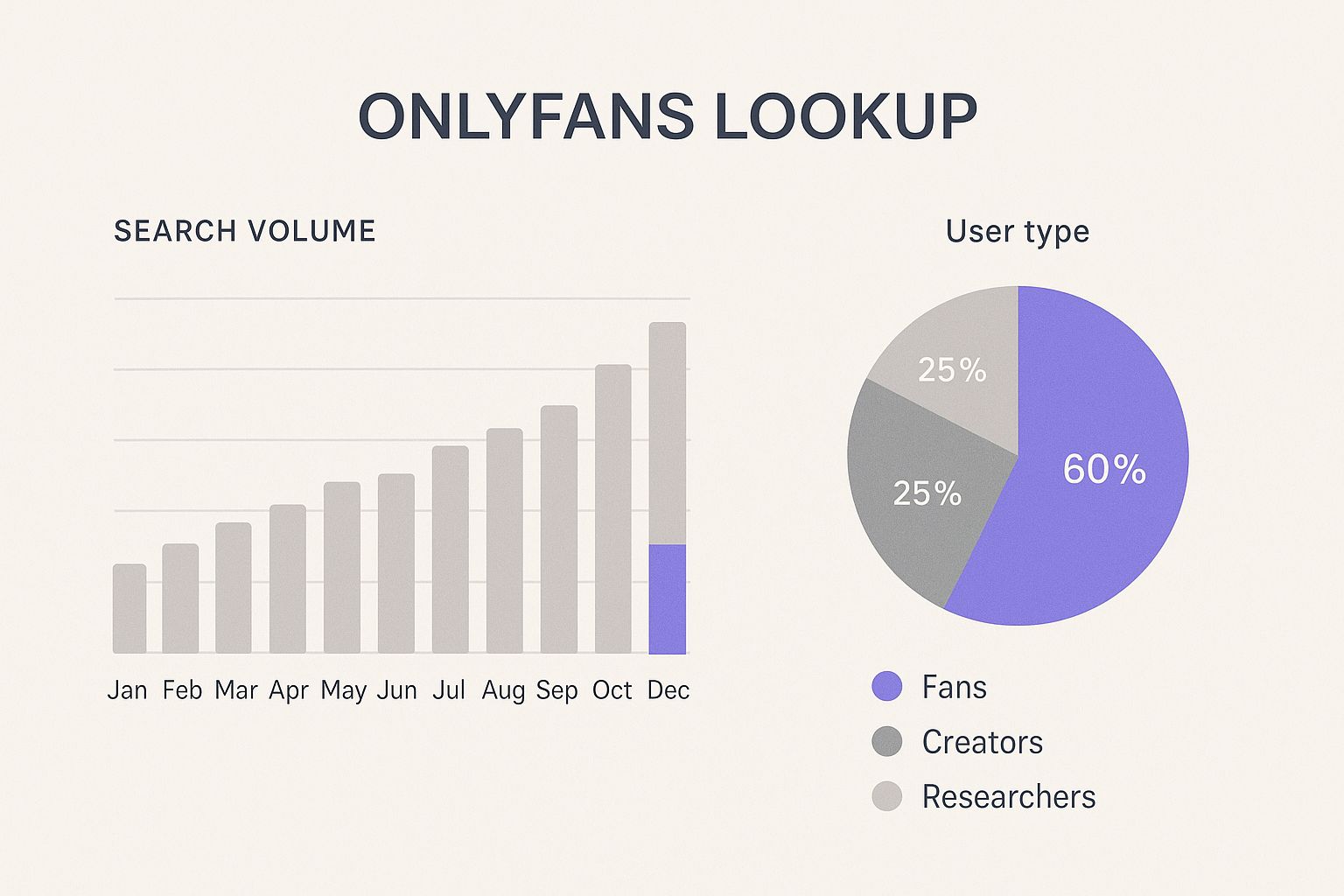
The data speaks for itself. There's a clear and growing demand from fans and creators alike for more robust discovery tools. An advanced search helps you slice through the noise, whether you're trying to track down one specific person or explore a new niche.
Ultimately, it’s about turning a frustrating search into a successful discovery. For a more detailed walkthrough, check out our guide to using an OnlyFans model finder and start finding exactly who you're looking for.
Finding Creators by Name or Username

Sometimes, you know exactly who you're looking for. You have their name, their Instagram handle, or at least something close. This is the most direct way to find someone, and it's where Fanclan's main search bar really shines. It's designed to make this kind of targeted OnlyFans lookup simple.
Just pop the name or username you have into the search field. This is the go-to method if you’ve seen a creator on another platform and want to find their OnlyFans without sifting through a dozen link-in-bio pages.
Of course, searches in the real world are rarely that perfect. What if you only have a partial name or a common nickname? That's where things can get a little more interesting.
Navigating Common Search Problems
So, you searched for "Jennifer" and got back hundreds of results. I've been there. This is a classic problem with popular names. The trick isn't to give up, but to get smarter with your search by adding other details you might know.
Fanclan lets you stack filters on top of your name search to whittle down the list. For instance, if you know this particular "Jennifer" is a fitness model, just add the "fitness" tag. If you remember her saying she's from Australia, you can apply that location filter, too. Each extra detail you add helps you home in on the right profile.
Pro Tip: A successful search is all about layering information. Don't get stuck on just the name. Combine it with their niche, location, or any other tidbit you can remember to zero in on the creator you're looking for.
Misspellings and different usernames across platforms are another common roadblock. Creators don't always use the same handle everywhere. If your first search comes up empty, try a few of these tricks:
- Think Nicknames: If you’re looking for "Katherine," try "Kate" or "Kat."
- Look for Variations: Creators often add numbers, underscores, or words like "official" to their usernames. For example, "jennifersmith" might be "jennifersmith_official" or "jennifersmith92."
- Check Their Socials: Go back to their other social media profiles. The exact username they use for OnlyFans is often hiding in plain sight in their bio or a pinned post.
By getting a little creative and using the filters at your disposal, you can turn a fuzzy memory into a direct hit. While Fanclan is built for this, it's always good to know what else is out there. For a great comparison, take a look at our roundup of the 7 best OnlyFans finder tools for 2025. It’ll give you a solid overview of the best search resources available.
How to Discover New Creators Using Niche and Tag Searches

Finding a creator you already know is one thing, but the real power of a good OnlyFans lookup tool is discovering new talent that perfectly matches your interests. This is where you move beyond searching for specific names and start exploring entire communities. Fanclan’s niche and tag system is built for just that.
Instead of just guessing at usernames, you can dive into categories built around hobbies and passions. Let’s say you’re looking for a home chef who specializes in Italian cooking or an indie musician who plays acoustic guitar. By using specific tags like "cosplay artists" or "home chefs," you'll instantly get a list of creators who are all about that specific craft.
This is more important than ever as the platform grows beyond its initial reputation. While a lot of the content is adult-oriented, niches like fitness, music, and fashion are booming. We're talking about a platform with over 4.5 million creators and 305 million users, so there's an incredible amount of diverse content out there. You can get a better sense of the platform's evolving landscape on Social-Rise.com.
Combine Tags to Get Super-Specific Results
The real magic happens when you start layering your searches. This is how you go from a broad search to finding exactly who you're looking for. Think of it like building a profile of your ideal creator.
For instance, a simple search for "fitness" will probably give you thousands upon thousands of results. It's too broad to be useful. But what if you’re after something more specific? By combining tags and filters, you can narrow that massive list down to a manageable few.
Here are a few real-world examples of how this works:
- UK-Based Fitness: Combine the "fitness" tag with the "United Kingdom" location filter. Now you're seeing trainers and athletes specifically in that region.
- Vegan Cooking Tutorials: Use the "cooking" tag and add the "vegan" tag. Suddenly, you have a curated list of creators focused on plant-based recipes.
- Beginner Yoga Guides: Mix the "yoga" tag with "beginner" to find instructors whose content is designed for people just starting out.
This approach turns a passive scroll into an active hunt. You're no longer just hoping to stumble upon someone interesting. Instead, you're setting the exact criteria to find them, which often uncovers amazing creators you never would have found otherwise.
Finding Creators by Location and Language

Sometimes you're not just looking for a specific niche; you're looking for a connection. That might mean supporting local creators from your hometown or finding someone who speaks your native language. This is where a good OnlyFans lookup tool moves beyond basic name searches, letting you filter by region and language to make a huge platform feel a little closer to home.
With Fanclan, you can pinpoint creators down to the country, state, and even city. This is fantastic if you want to discover talent in your own backyard or find creators who get your local references and culture. It's a completely different way to browse.
The language filter is just as powerful. Looking for content in Spanish, French, or Japanese? Just apply the filter. You’ll instantly see a list of creators who produce content specifically for that language group, which is a game-changer for non-English speakers or anyone wanting to enjoy content in their mother tongue.
How to Use the Regional Filters
Running a location-based search is incredibly easy. You just head to the location filters and start narrowing things down. I see this as more than just a search function; it's a way to actively support the creator economy in your specific part of the world.
Let's walk through a real-world example:
- You’re trying to find a fitness creator who lives in Texas. You’d set the country to the United States and then select Texas as the state.
- Maybe you want to get even more local. If you live in Austin, you can add "Austin" as a city filter.
- Just like that, you've gone from a sea of thousands of potential creators to a curated list of people right in your area.
This kind of detailed search just isn't possible on the OnlyFans platform itself. If you're really interested in getting good at this, we put together a guide on the 7 best tools to find OnlyFans by location in our 2025 guide that dives even deeper.
The real magic happens when you start layering these filters. For instance, searching for a "comedian" who is also "French-speaking" and "based in Quebec" is totally doable. It turns a vague idea into a direct hit, transforming a simple lookup into a powerful discovery tool.
Getting Granular with Advanced Filters
Sometimes, a basic name search just won't cut it. You need to get more specific. This is where you move beyond a general OnlyFans lookup and start using advanced filters to conduct a more surgical search. Fanclan’s detailed filtering options are your best friend for this.
Let's say you're on the hunt for a creator who's just starting to gain traction. You can easily set the subscription price filter to find free pages or accounts running a promotional trial. This is a fantastic way to discover fresh talent or snag a great deal without having to pay for a full subscription upfront.
Layering Filters for Pinpoint Accuracy
The real magic happens when you start combining these filters. You aren’t stuck using just one at a time—you can stack them to create a search so specific it feels like it was custom-built for you.
Here’s a practical example. Imagine you want to find an established, top-tier creator, but you’d also like to sample their content with a free trial before committing.
- First, you'd apply the account stats filter and select an option like "Top 1% of Creators."
- Then, you’d layer on the promotional offers filter, making sure to tick the "Free Trials" box.
Just like that, you’ve sifted through millions of profiles and found the handful that perfectly match your specific, demanding criteria. It's a method that helps you uncover hidden gems you’d almost certainly miss otherwise.
By combining filters for subscription price, promotional deals, and creator performance stats, you can run a laser-focused search that gives you exactly what you're after. This is, without a doubt, the most efficient way to find creators who fit your precise budget and interests.
The platform's economy is massive—fans spent an incredible $6.6 billion in 2023. But that income is concentrated at the top. In fact, about 12% of creators pull in 80% of the total revenue, leaving the average income much lower. You can find more interesting OnlyFans account statistics on Zipdo.co. These filters help you navigate that landscape, letting you find both the superstars and the up-and-comers offering great value.
Getting comfortable with these advanced search tactics is key to making your discovery process truly effective. For more foundational tips, be sure to check out our guide on how to use OnlyFans search to build on what you've learned here.
Your Top Questions About OnlyFans Lookup Tools Answered
Diving into a new search tool can bring up a few questions. That's perfectly normal. I've been working with these platforms for a while, so let me clear up some of the most common things people ask when using a tool like Fanclan for an OnlyFans lookup.
Are These Lookup Tools Safe to Use?
Absolutely, as long as you stick with a reputable platform. Think of a good lookup tool like Fanclan as a specialized search engine for OnlyFans—it just organizes publicly available information in a much smarter way.
A legitimate tool will never ask for your personal OnlyFans login details or any other sensitive data. Your account's security is never compromised because you're not actually connecting your account to the tool. The key is to use well-known, trusted sites.
Why Isn't a Specific Creator Showing Up in My Search?
This happens more often than you'd think, and it usually comes down to a few reasons. A creator might use a completely different handle on OnlyFans than they do on Instagram or TikTok, so a name search might not connect the dots.
They could also have their privacy settings cranked up, which makes them harder to find through general searches. And sometimes, their profile is just too new to have been picked up and indexed by the search tool yet.
If you're hitting a wall, don't give up. Try a few of these tricks:
- Search for different spellings or known nicknames.
- Plug in keywords related to the type of content you know they make.
- Go back to their other social media pages and look for the exact OnlyFans username in their bio links.
Can I Really Do an OnlyFans Lookup for Free?
You sure can. All the essential search features on a quality lookup tool are typically free to use. Searching by name or username and applying most of the core filters won't cost you a dime.
Sure, some platforms might reserve super-advanced analytics or data-heavy features for a paid tier, but the fundamental OnlyFans lookup you need to discover creators is almost always free.
A good lookup tool's main purpose is to make creator discovery easy for everyone. Finding free content and new creators should be a straightforward process, not hidden behind a paywall.
Speaking of free, there are plenty of ways to find creators who offer it. For a much deeper look at that, check out our guide on the 7 ways to find free OnlyFans content in 2025 for more expert strategies.
Ready to stop scrolling aimlessly and start finding exactly who you're looking for? Fanclan provides the powerful, precise search filters you need. Start your search on Fanclan today!