Ever tried to find a creator on OnlyFans and come up empty-handed? You’re not the only one. The platform's native OnlyFans profile search is notoriously basic, and that’s by design. To protect creator privacy, you usually need to know their exact username to find them, which makes discovering new talent a real headache.
Why You Can't Find Creators on OnlyFans

If you've ever typed a name into the OnlyFans search bar and gotten zero results, you've hit the platform's biggest discovery wall. This isn't a glitch—it's a deliberate feature. It gives creators total control over who finds them and shields them from unwanted attention.
Unlike other social media, OnlyFans doesn't give you search filters for things like location, specific niches, or content categories. This leaves a huge gap for fans who want to explore or find someone without knowing their exact handle.
The sheer size of the platform makes it even tougher. As of early 2025, OnlyFans is home to over 4.5 million creator accounts and a staggering 305 million users. You can dig into more of these stats over at Vocal.media. With numbers like that, finding anyone without the right strategy is like looking for a needle in a digital haystack.
The Need for Alternative Search Methods
Since the built-in search is so limited, fans have to get creative. This guide is all about cutting through that frustration. We'll focus on proven workarounds and powerful third-party tools that actually get the job done. Think of these alternative methods as your essential toolkit for navigating the platform like a pro.
The real problem isn't just finding a specific person; it's about discovery itself. OnlyFans prioritizes privacy over exploration, which is exactly why external search engines and social media sleuthing have become so important for fans.
This guide will lay out a clear roadmap for mastering your OnlyFans profile search, covering everything from specialized search directories to clever tricks on social media. And if you’re dealing with a search bar that’s completely broken, you might want to check out our guide on fixing OnlyFans search problems.
To see just how different the experiences are, here's a quick breakdown:
OnlyFans Native Search vs Third-Party Search Tools
| Feature | OnlyFans Native Search | Third-Party Search Tools |
|---|---|---|
| Username Search | Requires exact match | Flexible, often allows partial matches |
| Keyword Search | Not available | Available (searches bios, names, niches) |
| Category Filters | Not available | Available (e.g., fitness, cosplay, etc.) |
| Location Search | Not available | Often available (by city, state, or country) |
| Price Filters | Not available | Sometimes available (free vs. paid) |
| Social Media Linking | Not available | Often links to creator's other social media |
Ultimately, while OnlyFans keeps its search locked down, third-party tools are built specifically to open up discovery and connect you with the creators you're looking for.
Using Third-Party Search Engines to Find Anyone
Let's be honest, the native OnlyFans search function can be frustratingly limited. When you hit a wall there, it's time to turn to third-party search engines. These platforms are the secret weapon for discovery, acting like massive, specialized directories that pull in public info from creators all over the internet.
Think of it this way: instead of needing to know an exact username, you can search with keywords, categories, or even physical traits. Say you’re looking for a fitness creator who lives in California. A good third-party tool lets you filter for "fitness" and "California," instantly cutting through the noise to show you exactly who you’re looking for.
This is a game-changer for finding specific creators efficiently.
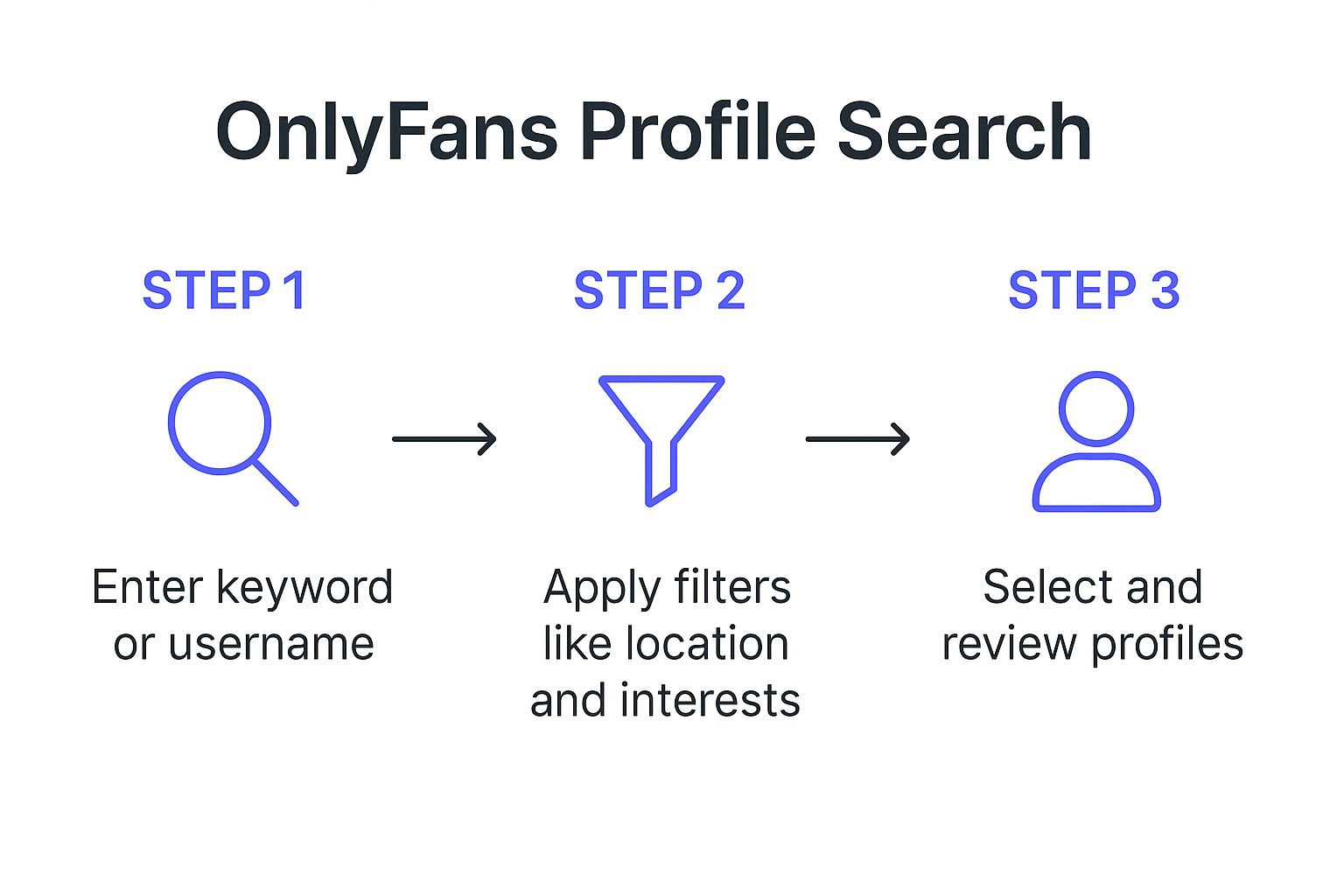
As you can see, the real power comes from layering filters. You can turn a vague idea into a handful of perfect matches in just a few clicks.
How These Search Tools Work
These platforms aren't hacking into private OnlyFans data. Not at all. They work by constantly scanning the public web—think social media bios, personal websites, and forums where creators promote themselves. They gather up all these mentions of OnlyFans profiles and organize them into a clean, searchable database.
Honestly, it’s the most straightforward and effective way to do any serious OnlyFans profile search. Tools like FanScout, OnlySearch, and others have popped up to master this process, using smart indexing to build comprehensive directories. They're built for one purpose: to help you find creators.
The key thing to remember is that these search engines operate on publicly available information. They are discovery tools, designed to connect you with creators who want to be found.
Choosing the Right Search Platform
With a few different options out there, how do you pick the right one? It really comes down to what you’re searching for. Some platforms are fantastic for location-based searches, while others have incredibly detailed filters for specific niches or looks. My advice? Try a couple of them out to see which one gives you the best results for your kind of search.
A good platform will feel intuitive, with a simple interface and logical filters that make sense. If you're ready to dive in, our complete guide to using an OnlyFans model finder is a great place to start, as it breaks down what the best platforms offer. Ultimately, these directories empower you to sidestep the platform's native limits and find exactly the content you're looking for.
Using Social Media to Find Profiles

Sure, third-party directories are great, but the real action happens where creators spend most of their time: social media. Platforms like Twitter, Instagram, and Reddit are the main promotional hubs for OnlyFans talent. If you know how to look, they're a goldmine for discovery.
Creators are constantly dropping hints, direct links, and promotions in their posts, stories, and bios. This method is less about broad, filtered searches and more about following digital breadcrumbs. It's the perfect way to find creators who are already part of the communities and niches you love.
Mastering Social Search Tactics
Every platform has its own quirks for running an OnlyFans profile search. Twitter (or X, as it's now called) is a hotspot for real-time promotion. Creators use hashtags to blast out news about fresh content or special deals, making those tags a direct line to their profiles. A quick search for a common tag can yield immediate results.
But why stop there? The real magic is in using advanced search operators to cut through the noise.
The most powerful social media searches go way beyond basic hashtags. When you combine smart keywords with platform-specific search commands, you can sift through millions of profiles to find exactly who you’re looking for—including creators who fly under the radar of the big directories.
On Twitter, for example, try a search like "onlyfans" AND "linktr.ee" in:bio. This simple string tells Twitter to only show you users who have both terms in their profile description, instantly filtering out tons of irrelevant chatter and zeroing in on active creators.
Platform-Specific Strategies
What works on Reddit will fall flat on Instagram. You have to tailor your approach to the platform you're on.
Here's a quick rundown of strategies that actually work:
- Reddit: Dive into subreddits built for creator promotion. Communities like r/OnlyFansPromotions are obvious starting points, but niche-specific subs (think cosplay, fitness, or gaming) are often filled with creators sharing their links directly with a super-engaged audience.
- Instagram: Get used to checking bios and Linktree pages. Instagram is famously strict about direct links, so creators get creative. Look for the classic "link in bio" phrase—it's your cue to check their landing page, which almost always features their OnlyFans URL.
- Twitter/X: This is where you can really flex your search muscles. Use the advanced search to filter by users, specific keywords in bios, or even phrases within tweets. The level of precision you can achieve is incredible.
Here’s a quick-glance table to summarize the best tactics for each platform.
Social Media Search Strategies for OnlyFans
This table breaks down the most effective tactics for finding OnlyFans creators on major social media platforms, complete with example search queries to get you started.
| Platform | Primary Tactic | Example Search Query/Hashtag |
|---|---|---|
| Twitter/X | Advanced Bio Search | "onlyfans" AND "cosplay" in:bio |
| Bio Link Scouring | Check profiles with phrases like "spicy link in bio" | |
| Subreddit Browsing | Join and search within r/OFsfind, r/OnlyFansPromotions |
By thinking a bit like a digital marketer, you can transform these social hubs from simple entertainment apps into powerful tools for your OnlyFans profile search.
Uncovering Profiles with Advanced Search Tactics
When the usual search methods just aren't cutting it, it's time to put on your digital detective hat. Google can be much more than a simple search bar; with a few tricks, it becomes a powerful tool for your OnlyFans profile search. We're talking about advanced search operators—simple commands that let you tell Google exactly what to look for and where.
For instance, you can zero in on a specific website. By using a command like site:, you cut through all the noise of the internet and focus your search on platforms where creators actually hang out and promote their work.
Pinpointing Creators with Search Operators
Let's say you're looking for a fitness coach who you know promotes their OnlyFans on Twitter. If you just Google "fitness coach OnlyFans," you’ll be buried under a mountain of random articles, directories, and profiles you don't care about.
Instead, get specific. Try a targeted query like this:
- Example Query:
site:twitter.com "onlyfans" "fitness coach"
This command instructs Google to search only within Twitter for posts or profiles that contain both the exact phrase "onlyfans" and "fitness coach." It's a simple move, but it can unearth profiles that other tools completely miss, giving you a direct link to the creators in your specific niche. We dive into more strategies like this in our guide on how to search for someone on OnlyFans.
Tapping into Community Knowledge
Don't just rely on search engines. Some of the best discoveries happen inside online communities. Forums and discussion boards, especially on places like Reddit, are absolute goldmines where fans share recommendations and vetted lists of their favorite creators. These threads often come with direct links and, even better, honest reviews from real subscribers.
Tapping into community forums gives you access to curated discoveries. Instead of searching cold, you're leveraging the collective experience of thousands of other fans who have already found high-quality creators worth following.
Searching within these communities can lead you straight to hidden gems. Keep an eye out for threads like "best new creators" or discussions focused on a particular niche you're into. This approach uses social proof to your advantage and can save you a ton of time.
Finally, a word of caution: always verify a profile's authenticity before you subscribe. Scammers are great at creating convincing fakes. Look for linked social media accounts with a real history, check for genuine engagement from other followers, and be suspicious of profiles with very little content or interaction. A quick check ensures your hard work leads you to real, awesome creators.
Staying Safe and Ethical During Your Search

As you get better at finding OnlyFans profiles, it's smart to keep things responsible. The reputable third-party tools we've talked about are completely ethical—they just organize the public information creators are already sharing to get noticed.
Think of them as discovery aids, not hacking tools. They don't expose private data.
This is a key point for your own safety, too. Be on the lookout for sketchy sites or links that promise free access to paid content or demand your personal details. These are almost always scams designed to steal your data. Stick to trusted platforms and secure browsing to keep yourself protected.
Remember, every profile belongs to a real person. Always respect their boundaries and privacy. The whole point is to find creators you want to genuinely support, not to pry into their personal lives. If you're looking for creators nearby, our guide on finding local OnlyFans creators has more tips on how to do it respectfully.
How OnlyFans Protects Its Community
OnlyFans itself does a lot to create a safer space, starting with a surprisingly strict creator vetting process. They don't just let anyone start posting content, which helps keep the quality and safety standards high for everyone involved.
This tough approval process is a core part of the platform's ecosystem. By being selective, OnlyFans makes sure that when you find and subscribe to someone, you're entering a more secure and professionally managed environment.
For example, in February 2025 alone, OnlyFans processed about 179,522 applications from aspiring creators. Only 36% of them were actually approved.
That number really shows how serious they are about their community guidelines. You can explore more creator account statistics to get a better sense of their scale. By mixing smart search habits with an understanding of these safety measures, you can browse with total confidence.
Still Coming Up Empty? Let's Troubleshoot
Even with the best strategies, you're bound to have some questions. Finding creators isn't always a straight line, so let's clear the air on a few things that trip people up.
First, let's talk about third-party search tools. Are they safe? The short answer is yes—if you stick to reputable ones. Legitimate directories simply organize public information that creators are already sharing to get noticed. They aren't hacking into anything or grabbing private data. Think of them as a phone book for OnlyFans.
But what happens when you've tried everything and still can't find the person you're looking for? It's frustrating, but there's usually a good reason.
Why Your OnlyFans Search Might Be Failing
If your OnlyFans profile search isn't giving you results, don't throw in the towel just yet. The most common culprit is the name. Many creators use a pseudonym or a completely different username to maintain their privacy. Searching their real name is often a dead end.
It's also possible they’ve locked down their profile. Creators can adjust their settings to prevent their account from showing up in searches, or they might just not be promoting it anywhere publicly. In that case, you have to respect their decision to stay under the radar.
The whole point of these search methods is to connect with creators who are actively trying to build an audience. If someone has gone out of their way to be private, no amount of searching will find them—and that’s by design.
Are Free OnlyFans Search Tools Actually Legit?
You'll see a ton of sites promising the world for free, but a little healthy skepticism goes a long way. While many great search directories have free options, you need to watch out for red flags. Any site asking for your credit card info or promising free access to paid content is almost certainly a scam.
Here’s a quick checklist for spotting a trustworthy tool:
- They're upfront about their methods. Reputable sites will tell you they index public data.
- No shady sign-ups. You shouldn't have to give up personal info for a simple search.
- They're a discovery tool, not a back door. Their mission is to help you find profiles, not to give you illegal access to content.
Ultimately, finding who you're looking for safely comes down to using smart tools and respecting boundaries. Keep these common issues in mind, and you can search with confidence.
Ready to stop searching and start discovering? Fanclan offers the most powerful and intuitive search filters to help you find exactly who you're looking for. Explore over 100,000 profiles at https://fanclan.io.