Looking for creators using an OnlyFans search by location isn't just a gimmick; it's one of the best ways to discover content that genuinely connects with you. Let's be honest, the built-in search on OnlyFans itself is pretty limited. This is where location-based tools come in, helping you find and support local talent who get your vibe because they share your city or culture.
Why Finding Local OnlyFans Creators Matters
It's not just about finding someone who lives down the street. It’s about relevance. When you can narrow your search to a specific city or region, the whole experience feels more personal. Suddenly, a massive global platform feels like your own local community, and you can directly support creators from your neck of the woods.
This isn't a niche interest, either. More and more, fans are looking for something beyond generic, one-size-fits-all content. They want creators who share their local slang, understand the regional inside jokes, or just have that specific flair you only find in certain places. A creator from Austin, Texas, is going to have a totally different energy than one from Miami, and a location search is the only real way to find that specific flavor you're after.
The data backs this up. Take a look.
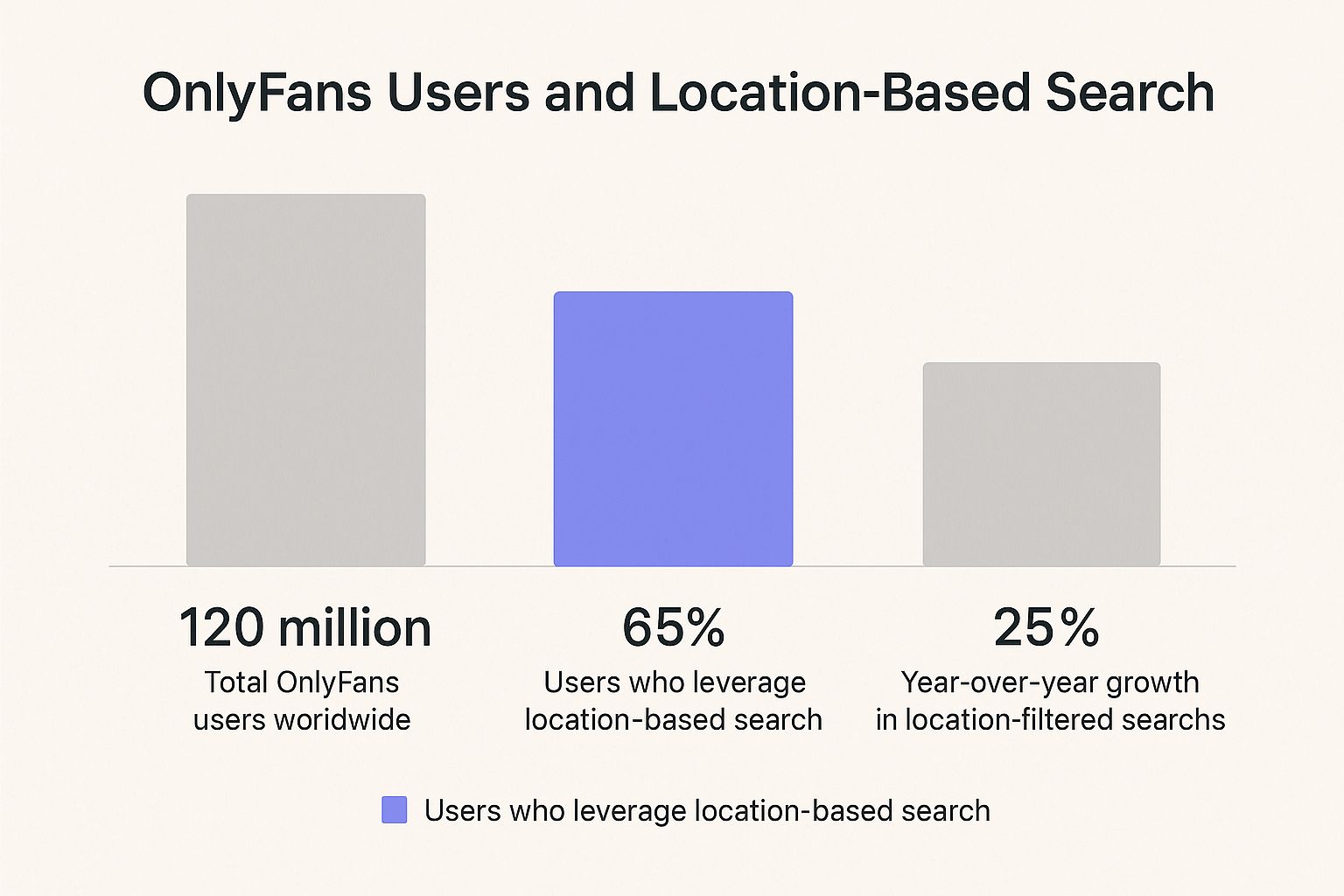
As you can see, a huge chunk of users—over 65%—are already using location filters when they have the chance. On top of that, these kinds of searches are growing by 25% every year. This isn't just a small trend; it's a major shift in how people are finding new creators to follow.
The Geographic Advantage
It's also worth noting where most of the platform's audience is concentrated. The numbers show that a handful of countries dominate the traffic, making location-based searches especially powerful in those high-density regions.
Here’s a quick breakdown of where the majority of OnlyFans traffic comes from, according to recent data from Semrush.
Top Countries For OnlyFans Traffic
The following table shows the distribution of OnlyFans traffic from the top 5 countries, illustrating why location-based searches are so popular in these regions.
| Country | Percentage of Global Traffic | Estimated Monthly Desktop Visits |
|---|---|---|
| United States | 39.11% | 162.2M |
| United Kingdom | 4.20% | 17.4M |
| Canada | 3.80% | 15.7M |
| Netherlands | 3.56% | 14.7M |
| Australia | 2.97% | 12.3M |
With the United States alone making up nearly 40% of the user base, it’s clear why finding creators in a specific American city or state is such a popular goal. The UK and Canada also have significant, concentrated audiences.
Key Takeaway: When you search for creators in a specific area, you're tapping into a localized ecosystem. This not only helps you find more relevant content but also supports the creators who are part of your community, fostering a stronger connection.
This geographic relevance is exactly why third-party search tools have become so popular. They fill a gap that the official platform leaves wide open. To see which ones we recommend, check out our guide on the 7 best tools to find OnlyFans by location for 2025. Understanding why location matters is the first step to using these tools to find exactly what you're looking for.
Diving Into Your First Location-Based Search
Alright, let's get down to business and find some creators in your area. You might think an OnlyFans search by location is a complicated affair, but with a platform like Fanclan, it’s surprisingly simple. The goal here is to get you meaningful results quickly, without needing to be a tech wizard.
The secret is to start broad. Find the location filter—it's usually the most obvious search bar on the page—and pop in a city, state, or even a country. The tool takes care of the rest, scouring public profiles for any mention of that location.
Plugging in Your Location
What I love about these tools is how forgiving they are. You don't need a specific zip code or a full address. Just feed it a general geographic term, and it will pull up a list of creators who have publicly linked themselves to that spot.
Let’s say you're looking for someone in your state. You could try a few different approaches:
- Typing "California" will give you a wide-ranging, statewide list.
- Getting more specific with "Los Angeles" narrows it down to the city.
- Using a regional term like "SoCal" can even help you find creators in the broader Southern California area.
This first step is all about getting a feel for the landscape. You'll immediately get a sense of how many creators are in your target area, giving you a solid base to work from before you start digging deeper. For more general search strategies, you can check out our easy tips and methods for searching.
Your first search is just about getting a baseline. Don't overthink it. Just enter a location and see what comes back. This is the first real step to discovering local creators.
Making Sense of the Results
After you hit search, Fanclan will lay out the profiles in a clean grid or list. Every result you see is a creator who's mentioned your chosen location somewhere public, like in their bio or tags. Think of this as your initial pool of local talent.
From here, the real fun begins as you start clicking into individual profiles. This initial search gives you the raw data; in the next sections, we’ll talk about how to apply more filters to zero in on exactly the kind of creator you're hoping to find.
How To Refine Your Local Creator Search

Alright, so you’ve tried a basic city search. That’s a good start, but to really zero in on local creators, you need to get a little more creative. A truly effective OnlyFans search by location means thinking like a creator. How would they describe where they live?
Just typing "Miami" into the search bar gives you one set of results. But what if a creator listed their location as "South Florida" to cast a wider net or protect their privacy? You'd miss them completely. The trick is to experiment.
Here’s how you can broaden your search to uncover those hidden gems:
- Try the full formal location, like "Miami, Florida", to add that extra layer of specificity.
- Go wider with a regional term like "South Florida" to find creators in surrounding towns.
- Think like a local and use popular nicknames or abbreviations, such as "SoFlo".
This isn't about just throwing terms at the wall; it's about anticipating the language creators use themselves. A simple change in your search query can open up a whole new list of profiles.
How Does The Search Actually Work?
You might be wondering how tools like Fanclan find this information without accessing private data. It's actually quite clever. They act like a sophisticated search engine, systematically scanning and indexing the public-facing information creators have willingly shared.
This data comes from a few key places: their profile bios, any location tags they've added, and even linked social media accounts where they might mention their city or state. It’s all out there; these tools just put it all in one searchable place. Modern discovery tools have gotten incredibly good at this, using multi-filter systems to sort through mountains of public data for better accuracy.
Pro Tip: If you're looking for someone in a major metro area, don't forget the suburbs. A creator living just outside a big city will often list their specific smaller town rather than the huge urban center everyone else is tagging.
A Quick Real-World Example
Let's say you're looking for creators in New York City. A simple "NYC" search will probably overwhelm you with thousands of results, including many from people who just visited once and tagged the city in a post.
Here’s a smarter, layered approach:
- Get Hyper-Local First: Instead of "NYC," try searching for specific boroughs like "Brooklyn" or "Queens."
- Then, Widen the Net: If that’s too narrow, use a broader term like "Five Boroughs."
- Combine and Filter: Search "NYC" but add a niche filter, like "artist," to narrow the results to your specific interest.
This strategic approach helps you slice through the noise and find the local talent you actually want to connect with. For even more powerful ways to find creators, check out our guide on the 7 best OnlyFans accounts discovery tools in 2025.
Taking Your Location Search to the Next Level
Alright, so you've mastered the basics of searching by location. Now, let's get into the advanced stuff—this is where you really start to uncover the creators you're looking for. The trick isn't just searching for a city; it's about layering your filters to get incredibly specific.
Think of it this way: a simple search for "Los Angeles" will give you thousands of creators. But what if you're looking for a fitness model? By adding the keyword 'fitness' to your "Los Angeles" search, you instantly cut through the noise. You’re telling the system to only show you people who meet both conditions, which is how you find exactly what you want.
How to Combine Filters Like a Pro
This strategy works for pretty much any niche or interest you can think of. Once you start stacking filters, you’ll wonder how you ever managed without it.
Here are a few real-world examples to get you started:
- Looking for a 'cosplay' artist based anywhere in the 'UK'? Combine those two, and you’ll get a curated list of British cosplayers.
- Hoping to find a 'musician' in 'Nashville'? That search will tap directly into the city's famous music scene.
- On a budget? Filter for 'free accounts' located in 'Australia' to discover up-and-coming creators you can follow without paying upfront.
This is about being intentional. Instead of mindlessly scrolling, you’re actively guiding the search to bring the perfect profiles straight to you. It's the smartest way to navigate a platform with millions of creators.
The most powerful searches combine what you want with where you want it. Layering a keyword like ‘tattoo’ or a category like ‘gamer’ on top of a location filter delivers incredibly relevant results that a simple geographic search would miss.
Making Sense of Your Search Results
You might notice that some creators pop up in searches for different locations. This is pretty common. Often, it’s because they use a broad regional term like "East Coast" in their profile, or maybe they travel a lot and tag different cities they visit. Don't write them off immediately; they could still be exactly what you're looking for.
Once you have your refined list, make sure to use the sorting options. Sorting by 'most popular' or 'newest' is a fantastic way to surface the best or freshest local talent.
As OnlyFans continues to grow worldwide, this kind of location-specific data becomes even more valuable for both fans and creators. It helps you find culturally relevant content that might otherwise get lost in the crowd. If you're interested in the data behind this, check out this deep dive into OnlyFans statistics to see how analytics influence discovery. Ultimately, using these strategies helps you pinpoint the exact profiles you want to see.
Common Search Problems And How To Fix Them
Even with a great tool, your OnlyFans search by location can sometimes hit a wall. It’s incredibly frustrating to type in your city only to get zero results. But don't throw in the towel just yet. This usually doesn't mean there are no creators nearby; it just means you need to tweak your search strategy.
The most common mistake I see is getting too specific right off the bat. If you search for a small town like "Ojai, California" and come up empty, the fix is to think bigger. Broaden your scope to the entire county—in this case, "Ventura County"—or even the general region like "SoCal." This simple adjustment helps you catch creators who tag themselves with more general location info.
Why Some Creators Are Invisible
Ever tried finding a creator you know is in a specific city, but they just don't show up? This almost always comes down to their personal profile settings. For very valid privacy and safety reasons, many creators simply don't list their exact city. They might use a vague regional description or leave the location field blank entirely.
Keep this in mind: A location search tool can only work with the information creators make public. If they’ve opted for privacy, no search engine can magically find them by location.
Another classic snag is ambiguous city names. A search for "Portland" could easily pull results from both Oregon and Maine, which isn't very helpful. Always try to include a state or even a country to narrow things down, like "Portland, OR", to get the results you actually want.
Understanding these common pitfalls is half the battle. If you're consistently hitting dead ends, our guide on fixing a non-working OnlyFans search has even more advanced tips and tool recommendations.
When you learn to anticipate these issues, you can quickly turn a failed search into a successful discovery and make your hunt for local talent much more effective.
Got Questions About Finding Creators by Location? We've Got Answers
When you start using a third-party tool for an OnlyFans search by location, a few questions almost always pop up. Let's tackle some of the most common ones I hear, so you can feel confident in your search.
Are Third-Party OnlyFans Search Tools Actually Safe?
I get this one a lot. The short answer is yes, as long as you stick with reputable platforms. A good tool like Fanclan isn't hacking anything; it’s simply organizing publicly available information that creators have already shared on their profiles or connected social media.
These platforms won't ask for your OnlyFans login details or access any private data. Think of them as a specialized search engine for OnlyFans, not a back-door pass.
A word of caution: if any site ever asks for your OnlyFans username and password, run. That's a massive red flag. Legitimate search directories have zero need for that information.
Why Can't I Find a Specific Creator in My City?
This is a common frustration, and there are a few likely reasons. First, the creator might not have their location listed publicly at all. Many creators prioritize their privacy and safety by keeping that information under wraps.
Others might use a broad term like "PNW" or "Southern Girl" instead of a specific city. A search tool can only work with the data that's out there. If a creator hasn't shared their location, they won't show up in a location-based search.
Can I Look for Creators in a Different Country?
Of course! That's one of the best parts. You aren't tied to your own physical location. You can manually pop any city, state, or country into the search filter to explore creators from literally anywhere on the globe.
This is a great feature if you're curious about international creators or want to find someone in a city you're planning to visit. Just type the location you're interested in into the search bar and see who's there. For a deeper dive on this, take a look at our complete guide to using an OnlyFans model finder.
Do These Tools Find Free OnlyFans Accounts Too?
Yep. Most location search tools are built to find both free and paid accounts without distinction. The search itself is based on public profile info, not the subscription price.
In fact, many platforms take it a step further and offer filters so you can narrow your results. You can often specifically look for:
- Free accounts
- Paid accounts
- Accounts offering free trials
This gives you much more control to find exactly the kind of creator experience you're after.
Ready to give it a try? With Fanclan, you can sift through over 100,000 profiles using filters for location, niche, and more to find your perfect match. Discover top creators near you or around the world today at https://fanclan.io.