Let’s be honest, trying an OnlyFans search by name can feel like you're hitting a brick wall. The platform’s own search function is notoriously bad, and that’s not an accident—it’s intentionally limited to protect creators.
So, how do you actually find someone? You need a specialized tool built for the job.
Why You Can't Just Search on OnlyFans

If you’ve ever typed a name into the OnlyFans search bar and gotten zero results, you’re not alone. It's not a bug. It's a core part of how the platform was designed. OnlyFans operates as a closed ecosystem, built to foster direct connections between creators and the fans they bring with them, not for public discovery.
This privacy-first approach means you typically need to know a creator's exact username or have a direct link to their page. While this is great for protecting creators from unwanted attention and giving them control, it leaves fans in a tough spot when they're trying to find a specific person.
The Rise of Third-Party Search Tools
This is exactly why third-party search engines like Fanclan were created. We bridge the gap by indexing the public information that creators share across their social media and other online profiles. Think of it as creating the powerful, user-friendly search database that OnlyFans itself is missing.
This kind of tool isn't just a convenience; it's a necessity. The number of creators is exploding, projected to hit 4.18 million by 2025—a massive jump from just 348,000 back in 2019. Trying to find one person among millions without a real search engine is practically impossible. If you want to dive deeper into the different ways to search, check out our guide on how to search in OnlyFans with easy tips and methods.
Key Takeaway: The issue isn't that creators are hiding. It's that OnlyFans deliberately doesn't give you the tools to find them. Once you understand that, you can shift your strategy and start using the right resources to get results.
Comparing OnlyFans Search Methods
To put it all in perspective, here's a quick breakdown of the common ways people try to find creators and why some methods work better than others.
| Search Method | Effectiveness | Key Limitation |
|---|---|---|
| OnlyFans Native Search | Very Low | Only works for exact username matches. |
| Google/Social Media | Moderate | Hit-or-miss; relies on creators linking their profiles. |
| Third-Party Search Tool | High | Specifically designed for discovery using names, keywords, etc. |
As you can see, relying on the platform itself or general web searches can be a frustrating gamble. A dedicated search tool is built to solve this exact problem, making your search quick and effective.
Using Third-Party Search Engines Effectively
Let's be real—OnlyFans' built-in search function is basically nonexistent for finding new creators. That's where third-party search engines come in. These tools are specifically designed to index all the publicly available data from creator profiles, giving you the powerful search experience that the official site is missing. Think of them as a specialized Google, just for OnlyFans.
Trying to find a specific person named "Jessica" among the 4.6 million creators on the platform is a lost cause without the right tool. But a good search engine helps you cut through the static, especially if you have a few extra details to go on. If you want to see what's out there, check out our roundup of the 7 best OnlyFans finder tools for 2025.
The platform's growth has been insane. By late 2024, OnlyFans had ballooned to 377.5 million users, a 24% jump from the year before, with a staggering $7.2 billion in payments processed. This explosion of creators makes dedicated search tools an absolute necessity, not just a convenience.
Starting Your Search
It all starts with a name. Just pop what you know into the search bar—even a partial name or a username from another social media site can get you surprisingly close.
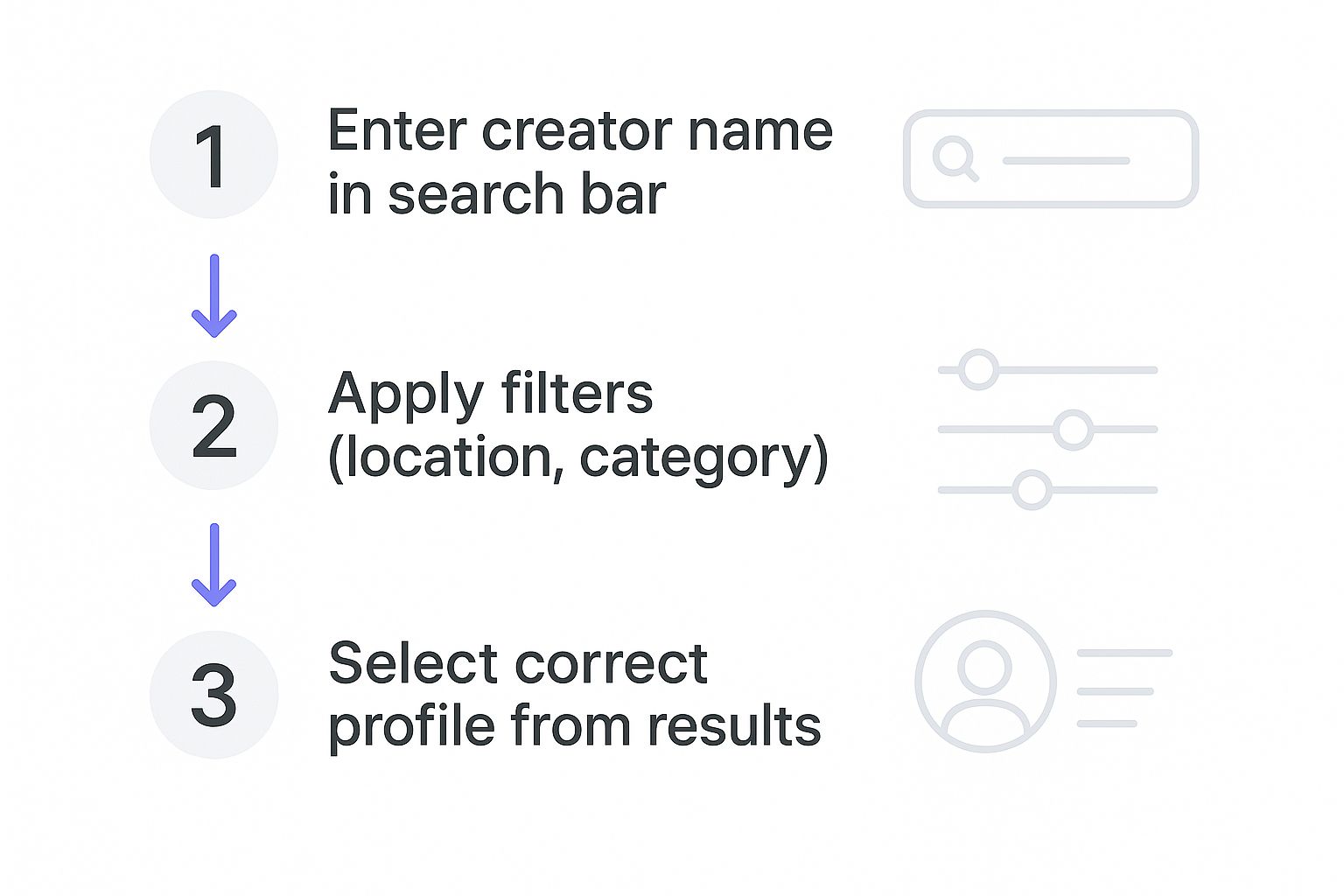
But here's the key: a name is just your starting point. The real magic happens when you use filters to narrow things down and get the accurate results you're looking for.
The best third-party search engines don’t just find names; they help you find the right person by allowing you to layer in extra information like location or content niche. This turns a frustrating search into a simple, targeted process.
Interpreting Your Results
Once the search engine spits back a list of potential matches, don't just stop at the profile picture. You need to play detective for a second to confirm you've got the right person.
Look for these clues in the search results:
- Username: Does it match a handle they use on Instagram, X, or TikTok?
- Bio Snippet: Does the description line up with what you know about their content or niche?
- Location Data: If the tool provides it, does the location make sense?
By cross-referencing these little details, you can confidently pinpoint the right profile, even if the creator has a common name or uses different aliases. It’s this methodical approach that separates a successful search from a dead end.
How to Refine Your Search with Filters

Let's be real—typing a common name like "Jen" into a search bar is a surefire way to get lost in a sea of profiles. You'll likely end up with hundreds, if not thousands, of results that are completely irrelevant. This is exactly why filters are your secret weapon. They let you turn a wild guess into a precision strike.
Think about it this way: you’re trying to track down a fitness creator named Jen who you remember is from Texas. A simple OnlyFans search by name will get you nowhere fast. But, by adding just two filters—"Fitness" as the category and "Texas" as the location—you instantly slash the number of profiles you have to sift through. Your search goes from a frustrating waste of time to a smart, targeted process.
Combining Filters for Maximum Accuracy
The real magic happens when you start stacking multiple filters. Every piece of information you add dramatically shrinks the pool of potential matches, making it much easier to zero in on the right person. For a deeper dive into this, our guide on how to use OnlyFans search to find creators is a fantastic place to start.
Here’s how you can layer filters to nail your search every time:
- Location: If you have any idea of their city or state, this is one of the most powerful filters you can use. It cuts down the noise immediately.
- Content Category: Choosing a specific niche like "Fitness," "Cosplay," or "Artist" is a game-changer. It gets rid of anyone who doesn't fit the bill.
- Subscription Price: Do you recall if their page was free, or maybe had a $9.99 price tag? Filtering by price range can be a surprisingly quick way to find them.
- Keywords: Don't forget to use keywords alongside your filters. Searching for "Jen Texas" while also applying the "Fitness" category filter is a pro-level move.
The whole point isn’t just to find a creator with the right name; it's to find the creator you're actually looking for. Filters add crucial context, making sure the results match the person you have in mind.
It’s like building a puzzle. The name is just one piece. Add a location, and you’ve got two. Add their niche, and the picture starts becoming crystal clear. This method gives you the power to find creators even when you’re working with just a few scattered details.
Creative Strategies When a Name Search Fails
So, you tried searching for a creator by name and came up empty. Don't sweat it—this is actually pretty common. A lot of creators use a totally different handle on OnlyFans than they do on their other social profiles. It's time to put on your detective hat and think beyond just their name.
A great first move is to check their other social media accounts. Creators often keep their usernames consistent across platforms like Instagram, X (formerly Twitter), or TikTok. If you know their handle on one of those, you've got a solid lead. Pro tip: always check the link in their bio. It's the #1 spot they use to promote their OnlyFans page.
Think Beyond the Name
If the username trail goes cold, it's time to switch gears and focus on keywords. Think about what makes their content unique. Instead of just searching for "Sarah," try something more specific like "Sarah yoga" or "Sarah cosplay." Adding a niche or interest dramatically cuts down the noise and helps you zero in on the right profile, even if the name isn't a perfect match.
Another solid strategy is to scout out the online communities where they hang out. Dive into forums, subreddits, or Discord servers dedicated to their specific content style. Creators are always promoting their pages in these spaces to find new fans, which can give you a direct link right to their account.
Remember, a failed name search isn’t a dead end. It’s just a signal to get a little more creative with the other info you have, whether that's a social media handle or their content niche.
This hustle makes sense when you look at the platform's economics. There's a massive earnings gap—while a celebrity like Blac Chyna might pull in a reported $20 million per month, the average creator is making closer to $150-$180. That difference is a huge motivator for creators to market themselves hard across every channel possible. You can learn more about this by checking out the top OnlyFans earners.
Common Search Mistakes to Avoid

Even with the best tools, it's easy to get derailed when you’re doing an OnlyFans search by name. We see it all the time. The biggest culprit is usually something super simple: a typo. Just double-checking the spelling of a username can save you a ton of frustration.
Another classic mistake? Giving up after trying just one name. Creators often use different handles across their social media. The name you know them by on TikTok might not be their exact OnlyFans username, so it’s always a good idea to try a few variations if your first search comes up empty.
Don't Get Tripped Up by Old Info
Things move fast online. Relying on outdated information is a guaranteed way to hit a dead end. A creator could have changed their username last week, deleted their account, or jumped to a completely different platform.
When you find a profile that looks promising, do a quick cross-reference. Check for recent posts or look at their linked social media to make sure the account is still active. If you keep hitting roadblocks, you might want to check out our guide on what to do when your OnlyFans search is not working and potential fixes.
A Note on Privacy: These search tools are powerful, but they need to be used responsibly. Always respect a creator's privacy. Ethical searching is about finding the public content they've chosen to share, not digging into their personal life.
Keep these common slip-ups in mind to sharpen your search skills:
- Sticking to one name: Don't be afraid to test different known usernames and aliases.
- Ignoring the details: That one underscore or number you missed could be the key.
- Forgetting to verify: Always cross-check with other social accounts to confirm you've found the right person and that they're still active.
By sidestepping these common pitfalls, you’ll find what you’re looking for much faster and keep your search both effective and respectful.
Burning Questions About Finding Creators
Even with the best search tools, a few questions always pop up when you're trying to track down a specific creator. Let's tackle some of the most common ones so you can get back to finding the content you're looking for.
Are Third-Party OnlyFans Search Tools Actually Safe?
Totally understandable question. The good news is that reputable search platforms are safe because they only gather public information that creators have already put out there themselves.
Think of it this way: a good tool isn't hacking anything. It’s just organizing publicly available data. That said, always stick to well-known sites. A huge red flag is any site that asks for your personal login details or demands payment just for a basic name search.
Can I Find a Private OnlyFans Account?
That’s a hard no. If a creator's profile is set to private and they haven't linked it anywhere online, it’s basically invisible to the outside world.
Search engines are powerful, but they can't magically bypass OnlyFans' own privacy settings. All the strategies in this guide are for finding accounts that are meant to be found—the ones creators are actively promoting on social media or other platforms.
Why Can't I Find a Creator Even with Their Exact Name?
This is probably the most frustrating part of the search, and it happens all the time. There are a few likely culprits:
- They use a pseudonym. Many creators use a completely different name on OnlyFans than their real name or other social media handles.
- Their name is too common. If you're searching for "Jessica," you're going to get lost in a sea of thousands of results.
- The account is gone. It's also possible they've recently deleted or deactivated their profile, so there's nothing left to find.
Remember, creators often use slight variations of their username across different platforms. A simple underscore, a number, or a small spelling change could be the key to unlocking the profile you're looking for.
If a name search hits a dead end, don't give up. Try searching by location. Sometimes knowing their general area can narrow things down dramatically. We've got a whole guide on this, packed with the most effective tools for 2025—check out how to find OnlyFans creators by location.
Ready to stop searching and start finding? Fanclan gives you the most powerful search and filtering tools available to connect with your favorite creators in seconds. Give it a try now at https://fanclan.io.