
If you’ve ever typed a name into the OnlyFans search bar and come up empty, you’re definitely not alone. It’s a common point of frustration, but the issue isn't a bug or a glitch. The platform's search function is intentionally limited to protect creator privacy, which makes finding anyone a real challenge unless you know their exact username.
Why Your OnlyFans Search Isn't Working

Seeing "No results found" is confusing, but it’s a direct result of how OnlyFans was built. From day one, the platform has prioritized creator privacy and control over public discoverability. This means their search tool is deliberately basic. Think of it less like a search engine and more like a simple directory.
This design creates a closed ecosystem, making it nearly impossible to stumble upon new creators without their specific details.
Understanding the Built-In Roadblocks
Once you know what you’re up against, the limitations become pretty clear. You’ve probably already hit these walls:
- You need the exact username. The search bar is designed to work with a creator's precise @username. A single typo, a slight variation, or trying to search by their display name will almost always get you nowhere.
- There are no discovery filters. Unlike Instagram or Twitter, you can't filter by location, niche, or any other keyword. A search like "fitness models in Miami" just won't work.
- You must be logged in. OnlyFans requires an active account to use the search function at all. This keeps profiles from being scraped by public search engines and prevents casual, unauthenticated browsing.
It’s a double-edged sword. This setup gives creators a valuable layer of protection from unwanted attention, but it's also the very reason for the search headaches you're facing.
The Bottom Line: When your OnlyFans search doesn't work, it's not a technical problem you can fix. It’s a core feature of the platform. You have to work around it, not through it.
To help you stop guessing, here’s a quick-reference table that connects what you're seeing with the real reason behind it.
Common OnlyFans Search Issues and Why They Happen
| Your Search Outcome | The Real Reason It Failed |
|---|---|
| "No results found" for a creator you know exists | You likely have a typo or are using their display name instead of their @username. |
| Searching by a keyword or niche shows nothing | The platform has no filters for categories, interests, or locations. It's username-only. |
| You can't find the search bar at all | You need to be logged into an active account to access the search feature. |
| The search results are completely irrelevant | The system might be pulling up profiles with similar character strings in their username. |
Understanding these intentional design choices is the first step. It clarifies that you're not doing anything wrong; you just need a different approach.
This has been a consistent challenge for users, even as the platform has exploded in popularity. Despite creators earning over $4 billion in payouts in 2022, OnlyFans has kept its internal search locked down. This steadfast commitment to privacy is exactly why you need to look beyond the on-site search bar to find new profiles. You can dive deeper into this topic by exploring these insights on OnlyFans discovery tools.
Getting the Most Out of On-Platform Search

Before you write off the OnlyFans search function completely, let's try a few insider tricks. When the main problem is that the onlyfans search not working as you'd expect, a bit of finesse can go a long way. The best place to start? An exact username.
If you know a creator's handle from another social media site like Twitter or Instagram, that’s your best bet. But don't just copy and paste it blindly. Creators often have to get creative. Someone known as ‘JaneFit’ on Instagram might be ‘JaneFitOfficial’ or ‘JaneFitOF’ on OnlyFans just to keep their accounts separate or because the original was already taken.
Mastering Search Variations
You have to think like a creator trying to build a brand. When their ideal username is unavailable, they often tack on common words to make it unique. It's a simple but effective tactic.
Try searching for their base username with these common additions:
officialrealthexooforonly
So, if you’re looking for "ModelMaria," you should also try searching for "TheModelMaria," "ModelMariaxo," and "RealModelMaria." This kind of simple trial-and-error approach can often get you past the platform's frustrating search limitations.
Pro Tip: Here’s a less common trick I’ve seen work. Try searching for a unique keyword you know the creator uses in their public posts or bio. If they have a catchphrase or mention a specific hobby frequently, that keyword might just pull up their profile if it’s part of an indexed public post.
This approach definitely requires some patience, but it’s worth trying before giving up on the native search entirely. For a deeper dive, check out our complete guide on how to search in OnlyFans. Sometimes these small tweaks are all you need to beat a system that’s designed to be restrictive.
What to Do When OnlyFans Search Fails: Using Third-Party Tools
So you've tried everything, and the official onlyfans search is not working or just isn't giving you the results you want. When you hit that wall, it’s time to look beyond the platform itself. A whole ecosystem of third-party search engines has popped up specifically to address the shortcomings of OnlyFans' built-in search.
These external tools work by a completely different method. They essentially crawl the web, pulling publicly available data from creators' social media profiles and other online footprints to create their own, far more powerful, searchable databases. This means you aren't stuck just searching for an exact username. You can often look for creators based on keywords, specific niches, or even their location, which opens up a world of discovery that OnlyFans itself just doesn't offer.
Of course, this approach isn't foolproof. The biggest catch is that the information can sometimes be stale, pointing you to a username that a creator has since changed or a profile that's been deleted entirely.
How to Use External Search Tools Safely
Think of these third-party finders as a starting point, not the final word. A site might give you a promising lead on a creator's profile, but your work isn't done yet. Verification is the most crucial next step.
Before you even think about subscribing, take the username you found and cross-reference it with the creator’s official Twitter, Instagram, or other public social media accounts. This simple check is your best defense against fake profiles and scam accounts designed to fool fans.
Here's the hard truth about these external tools: their accuracy can be a real coin toss. Creators change their usernames and update profiles all the time. As a result, we estimate that only about 50-60% of searches on these third-party sites will give you a currently accurate result.
This flowchart illustrates the basic troubleshooting you should do before even turning to an external tool. It helps confirm the issue isn't something simple on your end.
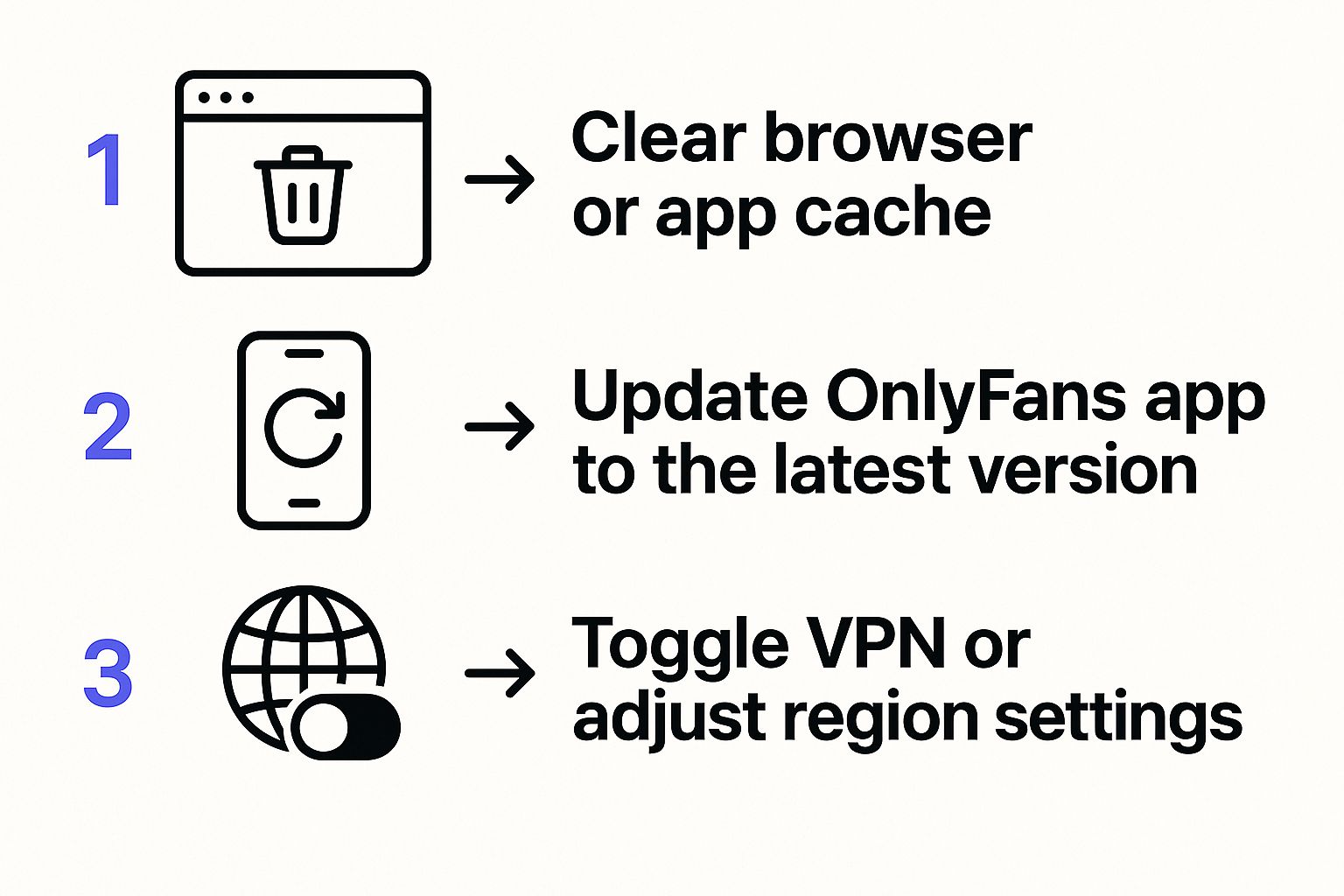
Running through these quick checks ensures you aren't chasing a technical glitch before you explore more advanced, off-platform solutions.
Choosing the Right Finder Tool
Not all finder tools are created equal. With several options out there, it really pays to pick a reliable one. Some are updated far more frequently than others, and the best ones offer better filtering and a much cleaner user experience. A little homework goes a long way.
To help you sift through the noise, we've put together a detailed breakdown of the 7 best OnlyFans finder tools for 2025. This guide will point you toward a trustworthy and effective directory, like Fanclan, to make your search a whole lot easier and safer.
The Hidden Dangers of Third-Party Search Tools
Let's be real—when the OnlyFans search not working hits you, turning to a third-party tool feels like the only option. But before you jump onto the first Google result, you need to understand the risks you're taking on. Many of these external finders operate in a shady, gray area of the internet. They often scrape data and can become hotbeds for scams, fake profiles, and links pushing stolen content.
If you take only one piece of advice from this, let it be this: never, ever enter your OnlyFans login details on any site other than OnlyFans.com itself. It’s a classic phishing tactic. Scammers are experts at creating convincing look-alikes to snatch your account info and credit card details. Staying sharp is your best line of defense.
How These Tools Can Hurt Creators
From a creator’s perspective, these external search sites are more than just an annoyance—they can be a direct threat. While some are legitimate directories, many unintentionally make it easier for bad actors to find and share leaked content. It's a huge problem for creators whose entire business model depends on the platform's paywall to protect their work and income.
Privacy and content protection are the very reasons OnlyFans keeps its own search so locked down. Despite these controls, leaked content is a persistent nightmare. Community reports from 2022-2023 suggest that an estimated 10-15% of creators have been affected by unauthorized sharing. This issue ironically drives more people to external tools, which can then help spread the very content that was stolen. You can read more about the ongoing struggles with content protection on OnlyFans.
Key Takeaway: Using an external finder is a trade-off. You get the discovery features OnlyFans doesn't offer, but you also step into an ecosystem that can be risky for you and harmful to the creators you’re trying to find.
The key is to use these finders responsibly. Treat them as a starting point for discovery, not the final word. Our guide on how to use an OnlyFans model finder dives deeper into strategies for finding creators safely.
A great rule of thumb? Always double-check any profile you find on a third-party site by looking for the creator's official, verified social media accounts before you even think about subscribing.
Creative Ways to Discover New Creators
When the OnlyFans search not working hits a dead end, it’s time to stop fighting the platform and start thinking like a promoter. The smartest move is to look where creators are already trying to get your attention: their other social media channels.
This isn't just a workaround; it's a more organic and reliable way to find people. You're tapping directly into the communities and promotional hubs that creators themselves trust to build their audience.
Use Social Media and Online Communities to Your Advantage
Your best bet for finding anyone is almost always going to be platforms like Twitter and Reddit. Creators live on these sites, sharing links, engaging with fans, and promoting their pages. It’s a direct line to the source, completely sidestepping OnlyFans' search limitations.
Here are a couple of practical ways to do this:
- Master the Social Search: Head over to Twitter and try a simple search like
[Creator's Name] + OnlyFans. This little trick almost always brings up their promotional account or posts from fans sharing the official link. - Dive into Subreddits: Reddit is an absolute goldmine. Communities like
r/OnlyFansReviewsor other niche-specific subreddits are filled with real people sharing recommendations and direct links.
Shifting your strategy this way turns a frustrating hunt into a much more successful discovery mission. You get real opinions and verified links instead of just guessing at usernames.
Expert Tip: Finding a creator isn't just about locating a profile; it's about finding the right one. A great tactic is to follow aggregator accounts that ethically review and share creators. They do the vetting for you and can introduce you to high-quality, verified accounts you'd otherwise miss.
If you're looking to sample different styles, creators often use free previews on their socials as a promotional tool. Our guide on 7 ways to find free OnlyFans content dives deeper into this, which can also be a fantastic route for discovering new talent.
Answering Your OnlyFans Search Questions
Even with the right techniques, finding creators can sometimes feel like a puzzle. When your onlyfans search not working is a recurring headache, you probably have a few specific questions. Let's tackle the most common ones I hear.
Can I Find OnlyFans Creators by Location?
The short answer is no, not on the OnlyFans platform itself. OnlyFans intentionally leaves out any kind of location filter to protect its creators' privacy and security. Think of it as a feature, not a bug.
You might stumble across third-party search tools that claim to offer location-based searches. They usually scrape this info from creators' public social media profiles. The problem? That data is often unreliable or completely out of date. If you decide to go this route, take the results with a grain of salt and always look for other ways to verify a creator's location if it's important to you.
Why Can't I Find a Creator with Their Exact Username?
This is one of the most frustrating search problems, and it usually boils down to a few key things. The first, and most common, is a simple typo. It happens to everyone, so double-check the spelling, hyphens, or underscores.
If you're certain the username is correct, there are other reasons it won't show up:
- The creator might have changed their username recently.
- Their profile could have been suspended by the platform or deleted entirely.
- It's also possible that you've been blocked by that creator.
Key Insight: When a username you know is correct isn't working, it almost always points to an issue with the account's status (like it's been changed, deleted, or you're blocked), not a technical glitch with your search.
Are Third-Party OnlyFans Search Engines Safe?
It’s a mixed bag. Their safety and reliability are all over the place. Some external search tools can be great for discovering new people, but remember, they are completely separate from OnlyFans. This means they can have outdated links, point to fake or scam profiles, or even have their own security issues.
Here's the most important rule: Never, ever enter your OnlyFans login details on any site other than the official one. Use these tools for discovery, but always cross-reference a creator on their verified social media accounts before you even think about subscribing.
For more on this, check out our guide on how to find creators on OnlyFans by category.
Tired of hitting dead ends? Fanclan gives you a powerful, easy-to-use search with the advanced filters OnlyFans is missing—including location, niche, and more. You can explore over 100,000 creator profiles and find exactly who you're looking for. Give it a try at https://fanclan.io.