
A reverse image search for OnlyFans is simply using a picture to find a creator's profile. Instead of typing a name, you upload an image to a search engine. The engine then scours the web for identical or similar photos, hoping to trace them back to an OnlyFans account.
Why People Use Reverse Image Search for OnlyFans
Let's be honest, curiosity is a huge motivator. You might see a creator on another social platform and want to find their OnlyFans, or maybe you're just trying to verify if someone you know has an account. The reasons are all over the map, but the method has exploded in popularity as the tech has gotten smarter.
It’s a pretty clever process. You’re essentially turning a photo into a search query. Instead of using words, you're using the pixels themselves to ask the internet, "Hey, where else can I find this image?"
The Technology Behind the Search
Modern search engines are way past just finding exact copies of a photo. They break down images by analyzing patterns, colors, shapes, and—most importantly—facial features. This is where facial recognition comes in, and it's a game-changer.
The technology has advanced so much that specialized platforms now exist just for this. By 2025, some of these databases had indexed over 1.2 million OnlyFans profiles. When you use a high-quality picture, these tools can achieve match success rates of 95-98%. That’s incredibly accurate.
You don't have to take our word for it; the online search trends speak for themselves.
This chart from Google Trends shows just how many people are looking for "reverse image search onlyfans." It's a consistent and popular way people try to find creators.
While reverse image search is one tool in the toolbox, it's not the only one. Our guide on how to search for someone on OnlyFans covers other strategies that don't rely on having a picture.
Ultimately, knowing how this works gives you a better handle on the tools out there. It’s all about using technology to navigate the massive world of online content creation, both effectively and ethically.
Choosing the Right Reverse Image Search Engine
With so many reverse image search tools out there, picking the right one can feel like a shot in the dark. But here’s the thing: not all search engines are created equal. The tool you choose will make or break your search, especially when you're trying to find a specific creator profile.
The trick is to match the engine to your goal. A general search might cast a wide net, but finding a particular person often requires a more specialized tool. Knowing the strengths and weaknesses of each platform is key to getting fast, accurate results.
It all starts with a single image. This is your key to unlocking the entire process.
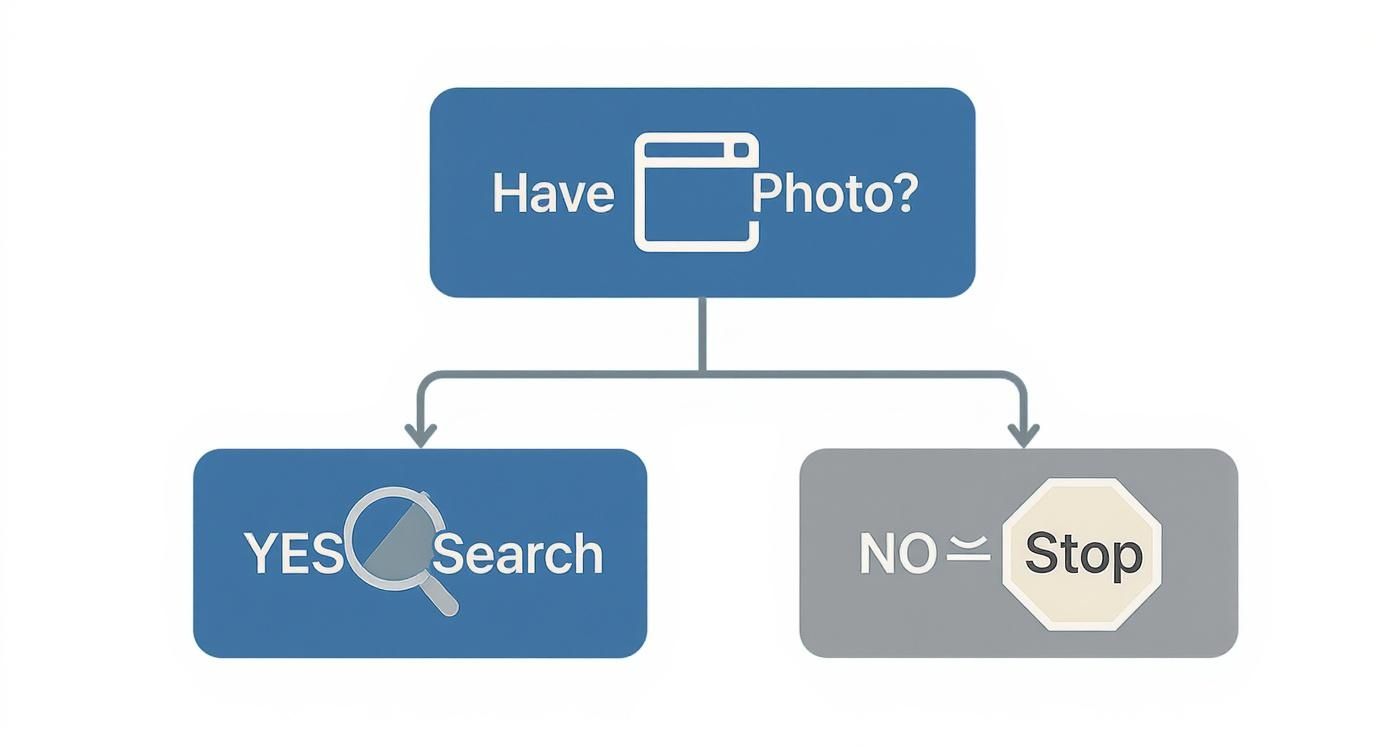
As you can see, having a photo is the non-negotiable first step. Without it, you'll have to pivot to other search methods entirely.
Google Lens for Broad Discovery
Google Lens is usually the first stop for most people, and for good reason. It’s a powerhouse for identifying just about anything in a picture—objects, text, and, of course, faces. Its biggest advantage is tapping into Google's absolutely massive index of the web.
The simple drag-and-drop interface makes it incredibly easy to use. Just upload your image, and Google gets to work.
But that enormous database can also be its downfall. Google often serves up visually similar images instead of exact matches, which can quickly lead you down a rabbit hole of irrelevant content. It’s fantastic for general discovery but often lacks the precision needed to nail down a specific creator profile.
TinEye for Tracking Exact Copies
If your main goal is to find out where an exact image has been used online, TinEye is your best bet. Unlike Google, TinEye doesn't care about "similar" photos. It's built to find identical copies, even if they've been resized, cropped, or slightly altered.
This makes it the perfect tool for tracking down reposts across different social media sites and forums.
Think of TinEye as a digital detective. If you have a promo picture from an OnlyFans creator and want to see if it’s been shared on Reddit, Twitter, or anywhere else, TinEye will sniff out every single instance.
The trade-off? TinEye's database is much smaller than Google's. If its crawlers haven't indexed the image, you'll come up empty. It’s a scalpel, not a sledgehammer.
Yandex for Superior Facial Recognition
Often flying under the radar, Yandex—a search engine popular in Eastern Europe—has developed a reputation for its incredibly accurate image recognition, especially with faces. Time and again, users report that Yandex finds matches that Google completely misses.
Its algorithm is impressively good at identifying people from different angles, in varying lighting, or even in lower-quality images.
Comparison of Reverse Image Search Tools
Choosing the right tool depends entirely on what you're trying to accomplish. A general search has different needs than a highly specific one. This table breaks down the core strengths and weaknesses of each platform to help you decide.
| Search Engine | Primary Use Case | Accuracy for Faces | Privacy Considerations |
|---|---|---|---|
| Google Lens | Broad discovery & finding visually similar content. | Moderate | Search history is tied to your Google account. |
| TinEye | Tracing exact copies of an image across the web. | Low (Not its focus) | Does not save your search images. |
| Yandex | Finding social profiles via strong facial recognition. | High | Less transparent privacy policy for non-EU users. |
As you can see, each tool is designed for a specific job. While they can sometimes overlap, you'll get the best results by using the right one for your particular search.
For those looking beyond these three tools, our guide to the 12 best OnlyFans search engine platforms for 2025 dives into more specialized discovery platforms.
Ultimately, the smartest approach is often a combined one. Start with a broad sweep on Google, switch to Yandex if a face is prominent, and then use TinEye to track the image's origins. Using multiple tools gives you the best possible chance of finding exactly what you’re looking for.
Advanced Techniques for Better Search Results
Hitting a dead end with a standard reverse image search is frustrating. We've all been there. But a failed search isn't usually the final answer—it's just a signal to switch up your tactics. With a few smart tweaks, you can seriously boost your chances of getting a match, especially when you’re trying to run a reverse image search for an OnlyFans profile where the little details make all the difference.

More often than not, the problem isn't the search engine; it's the image you're feeding it. By cleaning up the photo, you give the search algorithms a much clearer signal to work with. Think of it as removing digital "noise" so the most important features can shine through.
Isolate the Most Important Details
Search algorithms get easily confused by cluttered backgrounds or photos with multiple people. If you’re trying to identify one specific person, your best first move is to crop the image to focus only on their face. This gets rid of all the distracting junk and tells the AI what to look for.
Let's say you have a screenshot from a video. It probably has UI elements, text, and maybe other people in the shot. Cropping out everything but the person's face creates a clean, targeted image that engines like Yandex or Google Lens can analyze way more accurately. A tight crop on the face almost always beats a wide, messy shot.
But sometimes, the issue isn't what's in the picture—it's the picture itself.
Enhance Image Quality for Better Recognition
Low-res, blurry, or dark images are the number one cause of search failures. Today's AI is powerful, but it can't work miracles with a grainy photo that gives it almost no data to analyze. The result? Weak matches or nothing at all.
Luckily, you don't need to be a Photoshop wizard to fix this. There are plenty of free online tools that can give your image a quick glow-up:
- Upscaling Tools: AI upscalers can pump up the resolution of a pixelated image, making facial features much sharper and more distinct.
- Sharpening Filters: Even a basic sharpening filter can make a slightly out-of-focus photo "pop," highlighting details the algorithm needs.
- Brightness and Contrast Adjustments: If a photo is too dark or looks washed out, a simple tweak to the brightness and contrast can reveal hidden features.
Spending just a minute or two enhancing an image can be the difference between a dead end and finding exactly what you're looking for. A clearer photo gives facial recognition tech a much stronger signal to lock onto.
Look for Hidden Clues in Metadata
Every digital photo has hidden data baked into the file called EXIF data, or metadata. While most social media platforms scrub this information to protect privacy, it doesn't always get removed. And sometimes, it can contain some surprisingly useful clues.
Using a free online EXIF viewer, you can check an image for juicy details like:
- The exact date and time the picture was taken.
- The model of camera or smartphone used.
- In some cases, the actual GPS coordinates of where the photo was taken.
This info won't hand you a direct link to a profile, but it can give you crucial context to narrow your search. If you're still running into walls, our guide on fixing OnlyFans search problems and finding alternative tools has even more troubleshooting tips. Combining these advanced tricks with the right search engine is how you turn a frustrating hunt into a successful find.
The Rise of Specialized Creator Discovery Tools
The creator economy isn't just growing; it's exploding. This boom has sparked a whole new demand: finding specific creators online. It’s not about idle curiosity—it's a huge market fueled by fans eager to connect with the personalities they follow.
As a result, a new wave of specialized discovery tools has emerged, offering way more than a standard search engine ever could. These platforms are purpose-built to do one thing exceptionally well: find creator profiles.
This shift opened up a valuable niche. While Google is your go-to for general searches, it often falls short when you’re looking for someone on a specific creator platform. That's where specialized finders come in. They build focused databases and use sharp algorithms tuned for things like facial recognition and profile matching, making something like a reverse image search for OnlyFans actually work.
Who Is Driving This Market?
The main users of these tools are tech-savvy people who live on social media. The data shows a pretty clear trend: about 62% of users are between 18 and 34 years old. This is the exact same demographic that makes up the core audience for platforms like OnlyFans, showing that the people who consume the content are also the ones actively looking for better ways to find it.
This isn't just a local trend, either. The market for these discovery tools has gone global, with platforms now serving users in at least 50 countries. By 2025, it's estimated that 847 million social media users worldwide might use reverse image search features. It's a massive shift in how people find what they're looking for online.
The Scale of the Discovery Industry
The numbers behind this niche are staggering. We're not talking about some small, underground operation. These platforms are processing millions of searches every single month. The demand is so intense that a competitive subscription market has popped up, offering premium features for better, faster results.
Collectively, premium subscription access to the most advanced OnlyFans discovery tools generates an estimated $40-60 million annually.
This kind of revenue is what keeps these tools on the cutting edge. It fuels constant innovation, leading to more accurate searches and a smoother experience for users. As more people search for creators, the platforms reinvest in their tech, creating a cycle of improvement. It’s proof that simple reverse image searches are evolving into a sophisticated discovery ecosystem.
If you want to dig deeper into the best tools out there, check out our detailed guide on the 7 best OnlyFans accounts discovery tools in 2025.
Navigating Privacy and Ethical Search Practices

Being able to perform a reverse image search for OnlyFans profiles is an incredibly powerful tool, but it doesn't exist in a bubble. With every search, we have a responsibility to think about the privacy of the person on the other side of that image.
The bottom line for ethical searching is simple: consent is non-negotiable.
Creators on platforms like OnlyFans make conscious choices about what to share publicly versus what to keep behind a paywall. Using search tools to dig up non-consensual images or harass someone isn't just poor form—it crosses a major ethical boundary. The real goal should be finding public profiles, not invading personal space.
Understanding the Legal Framework
Let’s be clear: the law is catching up to technology. Regulations like GDPR in Europe are specifically designed to give people control over their personal data, and that absolutely includes their images. Misusing someone’s photo can land you in real legal trouble, especially if it leads to harassment, defamation, or copyright infringement.
This new legal reality is forcing platforms to get serious about transparency. With 84% of users worried about how their data is used, privacy is no longer an afterthought. It's now a core compliance issue, driven by regulations like the EU's Digital Services Act.
Even so, advocacy groups remain wary. About 42% of internet safety experts have major reservations about facial recognition's potential for misuse. You can get a deeper look into these issues at Face-Spy.com, which details OnlyFans face search ethics.
Best Practices for Respectful Searching
Staying on the right side of the ethical line is pretty straightforward if you just approach your search with respect.
Here’s how to make sure you're being responsible:
- Stick to Public Info: Your search should only ever be for profiles that are meant to be found. Never, ever try to access private or leaked content.
- Respect Boundaries: If a creator has blocked you or made their profile private, that's a clear signal. Respect their decision and don't use search tools to get around it.
- Check Your Intent: Before you hit search, ask yourself why you're doing it. If the reason is anything other than simple, respectful discovery, it’s time to rethink it.
The most important thing to remember is that behind every image is a real person. Technology should be a tool for connection, not a weapon for intrusion. Mindful searching protects everyone involved.
Building a better online community starts with our own actions. If you want to learn more about protecting your own digital life, check out our guide with essential tips on how to protect privacy online.
Still Have Questions? We've Got Answers
Diving into reverse image searches can feel a bit tricky, especially when you’re trying to find a specific creator. We get it. Here are some quick, no-nonsense answers to the questions we hear most often.
Is It Legal to Use Reverse Image Search to Find an OnlyFans Profile?
Here’s the deal: using a public search engine to find something that's already public is generally fine. The law cares about your intent and what you do with what you find.
Looking up a public profile just to follow a creator you admire? That’s perfectly okay. But if you use that information to harass, stalk, or share private content without their permission, you're crossing a serious line. That's illegal. Always play by the rules—respect platform policies and creator boundaries.
Why Isn't My Reverse Image Search Working?
Hitting a dead end with your search is frustrating, but it's usually fixable. It's rarely one single problem, but a mix of a few common culprits.
- Bad Photo Quality: A blurry, dark, or pixelated image is like giving the search engine a blindfold. It needs clear data to find a match.
- No Public Connection: The creator might not link that specific photo to any of their public profiles. A lot of creators use different photos on different platforms to keep things separate.
- The Content Isn't Indexed: The search engine simply might not have found (or "crawled") the website where the image lives yet.
The fix? Start by using a higher-quality version of the image. Try cropping it to focus just on the face, and don't give up if one engine fails—run the search on Google Lens, Yandex, and even specialized creator finders.
Are OnlyFans Finder Tools Safe?
This is a big one, and the answer is: it really depends. The safety of these tools is all over the map. Reputable platforms put your privacy first and will have clear policies saying they don’t store your uploaded images. Look for sites that use secure connections to keep your data safe.
Be smart about where you search. Sketchy, unknown websites are a major red flag. Many of these "free" tools might be logging your search history or even the photos you upload. Always check for a privacy policy before you upload anything and stick to trusted, well-reviewed platforms.
Ultimately, a reverse image search for OnlyFans can be an effective way to find someone, but it all comes down to using the right tools safely and ethically.
Ready to find your next favorite creator without all the searching? Fanclan gives you a better way to explore over 104,000 profiles with powerful filters. Find exactly who you’re looking for at https://fanclan.io.