Getting Started
Finding truly safe cam sites can feel overwhelming, especially with countless platforms vying for your attention. This guide cuts through the noise to provide a clear, direct comparison of the top options available today. We focus on what matters most to users: security, privacy, user experience, and the variety of content offered. Whether you're a newcomer trying to understand the basics or an experienced user looking for a better platform, this listicle is designed to give you actionable insights.
Our goal is to help you make an informed decision without wading through generic advice. We will evaluate each platform based on concrete criteria, including their specific safety protocols, encryption standards, and privacy policies. You'll learn how each site protects your personal data and financial information, ensuring a secure and enjoyable experience.
This comprehensive roundup examines the pros and cons of each service, highlighting key features that cater to different preferences. From platforms offering extensive free content to those specializing in niche fetishes, we provide the details you need to choose the best site for your needs. We'll explore the specific tools and settings that empower you to control your privacy and customize your interactions, making your search for safe cam sites simple and effective. Let's dive into the platforms that prioritize your security.
1. Zoom
While not traditionally categorized alongside adult entertainment platforms, Zoom has carved out a unique and vital niche as one of the most secure and private safe cam sites for creators offering premium, one-on-one, or small group sessions. Its enterprise-grade security architecture provides a controlled environment that empowers performers to connect with their audience on a more personal and exclusive level, completely separate from public-facing camming sites. This makes it an ideal choice for performers who prioritize discretion and control over their content and interactions.
The platform's strength lies in its robust security features, which are designed for corporate and governmental use but are perfectly suited for private, paid encounters. Performers can manage every aspect of the interaction, from who enters the virtual room to what they can do once inside. This level of control is unparalleled, offering peace of mind that is often hard to find on larger, more open platforms.
Why Zoom is a Top Choice for Private Sessions
Zoom excels by giving creators the tools to build a secure, premium business. For instance, a performer can schedule a private session with a client, send them a unique, password-protected meeting link, and use the Waiting Room feature to verify their identity before granting access. This process eliminates the risk of unauthorized viewers and ensures the session remains completely confidential. It's this focus on security and privacy that makes it a trusted solution for intimate virtual experiences.
This infographic highlights the key features that make Zoom a secure and scalable option for private cam sessions.
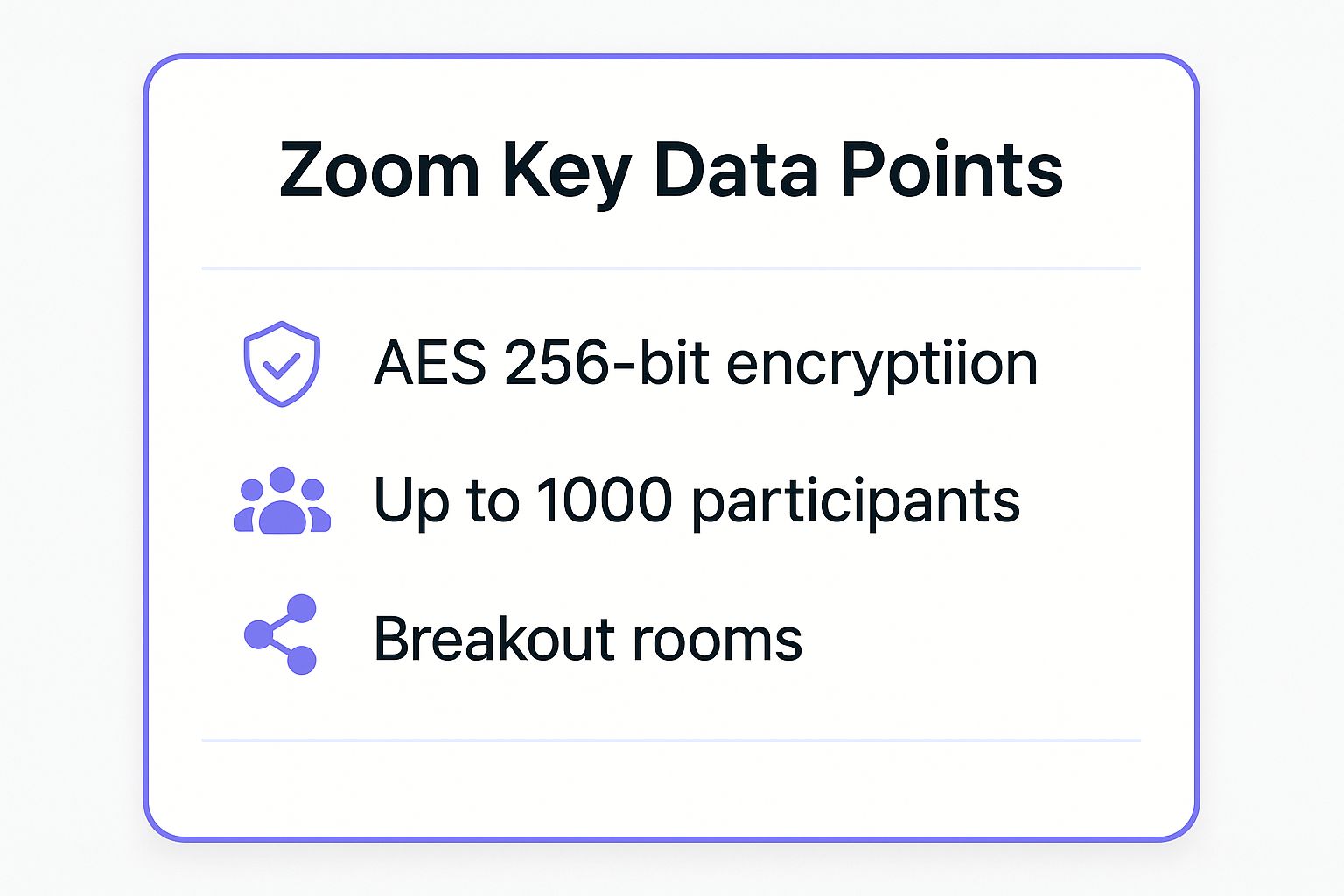
As the data shows, the combination of strong encryption, high participant capacity, and session management tools like Breakout Rooms provides a versatile and safe foundation for any private broadcast.
Actionable Tips for Using Zoom Securely
To maximize safety and provide a seamless experience, always follow best practices:
- Always Use Passwords and Waiting Rooms: Never host a meeting without a password. The Waiting Room is your first line of defense, allowing you to screen participants before they join.
- Keep Your Software Updated: Zoom frequently releases security patches. Regularly updating your client ensures you are protected against the latest vulnerabilities.
- Disable Guest Screen Sharing: In your meeting settings, restrict screen sharing to "Host Only" to prevent participants from broadcasting unwanted content.
- Lock the Meeting: Once all your expected participants have joined, use the "Lock Meeting" feature in the security panel to prevent anyone else from entering.
For a deeper dive into managing meeting settings for maximum security, this official tutorial provides a helpful overview.
2. Microsoft Teams
Similar to Zoom, Microsoft Teams stands out as a highly secure platform for private, one-on-one sessions, leveraging its position within the Microsoft 365 ecosystem. While designed for corporate collaboration, its robust security infrastructure and advanced compliance features make it one of the most dependable safe cam sites for creators who manage their own premium content. Its integration with other Microsoft services allows for a seamless workflow, from scheduling to the private broadcast itself. This makes it an excellent option for performers who already use or are familiar with the Office 365 environment and want to keep their premium offerings separate from public platforms.
The platform's core advantage is its enterprise-grade security, built to handle sensitive data for global corporations, government agencies, and educational institutions. This framework provides performers with exceptional control over their virtual environment. You can manage access, enforce policies, and ensure every interaction is confidential and secure, giving both the creator and client a sense of safety that is difficult to replicate on mainstream camming websites.
Why Teams is a Top Choice for Private Sessions
Microsoft Teams excels by offering a powerful, integrated suite of tools that go beyond simple video calls. For example, a performer can use their existing Office 365 account to schedule a private session in Outlook, which automatically generates a unique Teams meeting link. Before the session, they can use the guest access policies to control what the client can do, and once the meeting starts, they can admit them from a lobby. This structured process ensures only the intended client joins and that the session remains private from start to finish.
The ability to use sensitivity labels to classify content and leverage Microsoft's built-in compliance features adds another layer of security. This is particularly useful for creators who want to maintain strict control over their intellectual property and ensure their recordings or shared files are protected.
Actionable Tips for Using Teams Securely
To ensure maximum privacy and a professional experience, follow these security best practices:
- Utilize the Meeting Lobby: Always enable the lobby feature in your meeting options. This forces all attendees, including guests, to wait until you manually admit them, preventing unauthorized access.
- Manage Guest Access Policies: Before inviting clients, configure your guest access settings. You can restrict guests from sharing their screen, using the chat, or accessing shared files, giving you complete control over the interaction.
- Keep Your Software Updated: Microsoft regularly updates Teams with new features and security enhancements. Ensure your app is always up to date to protect against potential vulnerabilities.
- End the Meeting for All: When the session is over, don't just leave the meeting. Use the "End meeting" option to ensure the session is terminated for all participants, preventing anyone from staying in the virtual room after you've left.
3. Google Meet
While primarily known as a professional video conferencing tool, Google Meet has emerged as a surprisingly effective and secure platform for independent creators looking for safe cam sites to host private, paid sessions. Leveraging Google's world-class security infrastructure, Meet provides a stable and confidential environment. This makes it a strong contender for performers who manage their own client base and prioritize discretion and a seamless user experience away from the traditional adult entertainment ecosystem.
The platform's core advantage is its integration with the Google Workspace suite and its focus on simplicity and reliability. For creators who already use Gmail and Google Calendar, it offers a streamlined workflow for scheduling and managing one-on-one or small group encounters. This built-in ecosystem provides a professional framework for interactions, ensuring that both the performer and the client have a secure and controlled virtual space.
Why Google Meet is a Top Choice for Private Sessions
Google Meet excels by offering enterprise-level security in a user-friendly package. A performer can use Google Calendar to schedule a private session, which automatically generates a unique Meet link that is only sent to the invited client. This closed-loop system prevents unauthorized access and ensures the meeting remains completely private. Features like host controls, which allow the creator to mute or remove participants, add an essential layer of safety and command over the session.
For creators, this means you can build a premium, appointment-based business with tools you likely already use. The simplicity of joining a meeting with just a click, without requiring clients to create a new account on an unfamiliar platform, reduces friction and enhances the professional feel of the service. It’s this combination of robust security, ease of use, and professional integration that makes it a trusted choice for confidential virtual performances.
Actionable Tips for Using Google Meet Securely
To ensure maximum safety and a professional experience, follow these best practices when using Google Meet for private sessions:
- Use Google Calendar for Scheduling: Always create events in Google Calendar to generate unique, single-use meeting links. This prevents link reuse and unauthorized entry into future sessions.
- Leverage Host Controls: Familiarize yourself with the host controls before the session starts. You have the power to mute participants, turn off their video, or remove them from the meeting entirely if needed.
- Manage Guest Access: In your Google Calendar event settings, you can control who can join. By unchecking "Guests can invite others," you ensure only your verified client has access to the link.
- Record Sessions to Google Drive: For record-keeping or content creation, you can record the meeting. The video is automatically saved to a private folder in your Google Drive, giving you full control over the file.
4. Cisco Webex
Similar to Zoom, Cisco Webex is a corporate-grade video conferencing tool that has become a powerful, secure alternative for performers seeking the highest level of privacy. While not a traditional camming platform, its deep-rooted history in enterprise security makes it one of the most reliable safe cam sites for private, one-on-one sessions. Webex is engineered for sensitive communications in sectors like government and finance, offering a fortress-like environment that performers can leverage for exclusive, high-value interactions. This makes it a go-to for creators who cater to a clientele demanding absolute discretion and confidentiality.
The platform's core advantage is its commitment to end-to-end security and compliance. Performers retain complete authority over their virtual space, dictating who can enter, what they can see, and how they can interact. This granular control is essential for creating a professional and secure atmosphere, free from the unpredictability of public camming websites.
Why Webex is a Top Choice for Private Sessions
Webex stands out by providing an enterprise-level security framework that translates perfectly to private, paid performances. For instance, a creator can schedule a session and send a client a unique link to their password-protected Personal Meeting Room. Before the session begins, the performer can hold the client in a virtual lobby, verifying their identity and payment before granting them access. This multi-layered approach effectively prevents unauthorized entry and ensures that the encounter remains entirely private. It's this focus on controlled access and robust encryption that solidifies its status as a trusted solution for confidential virtual meetings.
The platform's stability and feature set, designed for high-stakes business meetings, provide a professional and reliable experience for both the performer and the client.
Actionable Tips for Using Webex Securely
To ensure maximum safety and a premium client experience, follow these security protocols:
- Lock Your Personal Room: Once your client has joined the session, use the "Lock Meeting" option to prevent anyone else from entering, even if they have the link and password.
- Always Require a Password: Configure your meeting settings to always require a complex password for entry. Avoid using simple or easily guessable passwords.
- Control Attendee Privileges: In the participant panel, you can mute attendees, turn off their video, and restrict their ability to chat or share content, giving you full command of the interaction.
- Use End-to-End Encryption: For maximum security, enable end-to-end encryption in your meeting settings. This ensures that only you and your participant can access the content of the meeting.
For an in-depth guide on securing your Webex meetings, Cisco's official documentation offers valuable insights.
5. Signal
Signal stands as the gold standard for encrypted communication, making it one of the most secure and private safe cam sites for performers focused on ultimate confidentiality in one-on-one video calls. Developed by the non-profit Signal Foundation and endorsed by leading privacy advocates like Edward Snowden, its core mission is user privacy, not profit. This distinction means there is no data mining, no advertising, and no tracking, providing an unparalleled sanctuary for private interactions. For performers who prioritize absolute discretion and data protection above all else, Signal offers a fortress-like environment.
The platform's power comes from its open-source, state-of-the-art Signal Protocol, which provides end-to-end encryption for every video call, voice call, and message by default. This means only the performer and their client can see or hear the content of their interaction; not even Signal can access it. This level of uncompromising security makes it an exceptional choice for creators building a business based on trust and exclusivity, far removed from the public architecture of mainstream cam platforms.
Why Signal is a Top Choice for Private Sessions
Signal excels by offering a completely private channel for direct communication and video sessions. A performer can establish a secure connection with a client simply by sharing their phone number or a private link. Once connected, they can initiate an encrypted video call that is protected from any form of external surveillance or data collection. This method is ideal for building long-term, trust-based relationships with high-value clients who demand the utmost privacy.
For instance, a creator can use an anonymous, dedicated phone number for their Signal account to keep their personal and professional lives separate. They can then use this account to conduct highly secure, paid video sessions. The platform's simplicity and singular focus on privacy ensure that the technology never gets in the way of the personal connection, making it a reliable tool for intimate and confidential performances.
Actionable Tips for Using Signal Securely
To guarantee maximum privacy and a professional experience, adhere to these security best practices:
- Verify Safety Numbers: For trusted, recurring clients, manually verify the safety number. This ensures you are connected to the correct person and that your communication channel has not been compromised.
- Use Disappearing Messages: Set messages and media to disappear after a set time. This prevents chat histories from being stored on either device, adding another layer of security for sensitive arrangements.
- Enable Screen Lock: Use your phone’s biometric or PIN lock to secure the Signal app. This prevents unauthorized access to your account if someone gains physical access to your device.
- Keep Your App Updated: Signal’s team continuously works to strengthen its security. Always install the latest updates to benefit from the most current protections against emerging threats.
6. Jitsi Meet
For creators and users who prioritize ultimate privacy and decentralization, Jitsi Meet emerges as a powerful open-source solution. While not a conventional cam platform, it functions as one of the most anonymous and safe cam sites for conducting private video calls. Its core advantage is that it requires no accounts, no software installation, and can even be self-hosted, giving performers absolute authority over their data and interactions. This makes it an exceptional choice for those who are highly tech-savvy or wish to operate completely off the grid of mainstream platforms.
The platform's open-source nature means its security protocols are transparent and constantly scrutinized by a global community of developers. This commitment to privacy is its defining feature, allowing for end-to-end encrypted conversations in a peer-to-peer setting. For performers, this translates to a secure environment where they can connect with clients without leaving a digital footprint on a corporate server, ensuring complete confidentiality.
Why Jitsi Meet is a Top Choice for Private Sessions
Jitsi Meet excels in offering a no-frills, high-security environment for one-on-one sessions. A performer can simply generate a unique meeting link on the Jitsi Meet website, or their own self-hosted instance, and share it directly with a client. There are no sign-ups or downloads required for the client, who can join directly from their browser. This frictionless entry, combined with robust privacy features, makes it a go-to for privacy advocates and independent creators building a discreet business.
The ability to self-host is a game-changer. By running Jitsi on a private server, a performer ensures that no third party, not even Jitsi's developers, has access to the meeting's metadata or content. This level of control is unparalleled and provides the highest possible assurance of privacy for both the creator and the client.
Actionable Tips for Using Jitsi Meet Securely
To ensure maximum security and a professional experience, follow these best practices:
- Always Set a Strong Password: Jitsi allows you to add a password to any room. This is the most crucial step to prevent unauthorized access to your private session.
- Enable the Lobby: The lobby feature acts as a virtual waiting room. It lets you screen and approve participants before they can join the call, adding a vital layer of security.
- Consider Self-Hosting: For sensitive and premium content, setting up your own Jitsi Meet server provides the ultimate control over data privacy and security.
- Keep Your Browser Updated: Since Jitsi often runs in a browser, ensuring your browser is up-to-date protects you from the latest security vulnerabilities that could be exploited.
7. BlueJeans
While often associated with corporate boardrooms and enterprise-level communication, BlueJeans by Verizon provides a surprisingly robust and secure platform for performers seeking safe cam sites for private, high-end sessions. Similar to other professional video conferencing tools, its primary value for creators lies in its enterprise-grade security, reliability, and superior audio-visual quality. This makes it a premium choice for performers who cater to a discerning clientele willing to pay for an exclusive, high-fidelity experience.
The platform's foundation in professional communication means its security protocols are designed to protect sensitive corporate data, a standard that translates perfectly to safeguarding private, one-on-one interactions. Performers can leverage this secure environment to manage sessions with absolute control, ensuring that their content remains confidential and accessible only to the intended client. This professional framework provides a level of trust and security that is often absent from mainstream adult platforms.
Why BlueJeans is a Top Choice for Private Sessions
BlueJeans distinguishes itself with features like Dolby Voice audio, which delivers exceptionally clear, studio-quality sound, and high-definition video that ensures a professional and immersive experience. A performer can schedule a session, send a unique, encrypted meeting link, and use moderator controls to manage the interaction meticulously. This setup is ideal for creating a premium service where quality and security are the main selling points, appealing to clients who value discretion and a flawless technical experience.
The focus on professional-grade tools allows performers to build a boutique business model, completely separate from public camming. By integrating with scheduling and payment systems, a creator can offer a seamless booking process, reinforcing the premium nature of their service.
Actionable Tips for Using BlueJeans Securely
To ensure maximum privacy and deliver a high-quality session, follow these best practices:
- Utilize Moderator Controls: As the host, use moderator controls to manage participants, mute audio, or stop video if necessary. This gives you complete command over the session environment.
- Enforce Meeting Passwords: Always protect your sessions with a strong, unique password. Share this password only with the verified client just before the session begins.
- Leverage High-Quality Audio: Take advantage of the integrated Dolby Voice feature to provide crystal-clear audio. This small detail can significantly enhance the premium feel of the experience.
- Use the Mobile App for Flexibility: The BlueJeans mobile app allows you to host sessions from anywhere, providing flexibility without compromising on security or quality.
Safe Cam Sites: Top 7 Platform Comparison
| Platform | Implementation Complexity 🔄 | Resource Requirements ⚡ | Expected Outcomes 📊 | Ideal Use Cases 💡 | Key Advantages ⭐ |
|---|---|---|---|---|---|
| Zoom | Moderate - intuitive setup | Moderate - can be resource-heavy | Reliable, high-quality video; large participant capacity | Remote work, webinars, education, telemedicine | User-friendly; robust security; scalable plans |
| Microsoft Teams | High - feature-rich & complex | High - heavy app usage | Comprehensive collaboration; enterprise-grade security | Large enterprises; Office 365 users; regulated industries | Deep MS 365 integration; extensive controls |
| Google Meet | Low - simple, browser-based | Low - minimal installation | Reliable video; moderate feature set | SMBs, Google Workspace users, education | No installation; strong Google ecosystem |
| Cisco Webex | High - enterprise-oriented | High - requires more resources | Secure, scalable; ideal for large events and compliance | Highly regulated industries; enterprises | Industry-leading security; advanced controls |
| Signal | Low - straightforward, privacy focus | Low - lightweight | Maximum privacy; secure messaging and calling | Privacy advocates; journalists; sensitive communications | End-to-end encryption; open-source transparency |
| Jitsi Meet | Moderate - self-hosting option | Low to Moderate - depends on hosting | Secure, customizable; may vary with server performance | Privacy-centric groups; developers; small teams | Free, open-source; no account needed |
| BlueJeans | Moderate to High - enterprise setup | Moderate to High | High-quality audio/video; enterprise reliability | Enterprises; healthcare; professional services | Excellent audio; AI features; strong support |
Final Thoughts
Navigating the world of online adult entertainment requires a smart and security-conscious approach. This guide has dissected several platforms, each offering a unique pathway to engaging with performers. However, the critical takeaway is that the term "safe cam sites" often refers to platforms not originally designed for adult content, such as secure video conferencing tools like Zoom, Microsoft Teams, and Google Meet. While these offer unparalleled privacy and end-to-end encryption, they lack the discoverability and community features inherent to dedicated camming platforms.
Your journey toward finding a truly satisfying and secure experience depends on defining your personal priorities. Are you seeking the absolute highest level of data protection for one-on-one sessions, or do you value the vibrant, interactive environment of a traditional cam site? The platforms we've discussed, from the corporate reliability of Cisco Webex to the open-source flexibility of Jitsi Meet, highlight a crucial point: safety is not a one-size-fits-all feature. It is a combination of the platform's technical architecture and your own diligent practices.
Your Action Plan for Safer Cam Experiences
To translate this knowledge into action, here are your essential next steps. Mastering these practices will empower you to interact confidently and securely, regardless of the platform you choose.
- Prioritize Privacy Features: Before committing to any service, scrutinize its privacy policy and available security settings. Look for end-to-end encryption, two-factor authentication (2FA), and clear data handling policies. For platforms like Signal, this is their core strength. For others, you may need to enable these features manually.
- Implement Strong Personal OpSec: Your security is also your responsibility. Always use a unique, complex password for each site. Consider using a VPN to mask your IP address and a separate, anonymous email address for your accounts. Never share personally identifiable information (PII) like your real name, address, or financial details directly with performers.
- Vet Performers and Platforms: Spend time observing before you spend money. Reputable performers on any platform build a history of positive interactions. Similarly, established platforms have a track record. A quick search for reviews or user feedback outside of the platform itself can reveal potential red flags.
- Understand Payment Security: Use secure and, if possible, anonymous payment methods. Credit cards offer chargeback protection, but services like PayPal or dedicated site tokens can add a layer of separation between the performer and your financial information. This is a key reason why using tools not designed for this purpose, like Google Meet, requires extra caution with payment arrangements.
The Broader Impact of Choosing Securely
Ultimately, choosing genuinely safe cam sites and adopting secure habits does more than just protect your data and privacy. It contributes to a healthier and more sustainable ecosystem for both viewers and performers. When you support platforms and creators who prioritize security, you advocate for an industry standard that values consent, respect, and professionalism. This conscious choice helps marginalize bad actors and elevates the quality of interactions for everyone involved. Your diligence ensures your entertainment remains a positive and empowering experience, free from unnecessary risk.
As the digital landscape evolves, so too will the tools and platforms available. The principles of security, however, remain constant. By arming yourself with knowledge and practicing safe digital hygiene, you can confidently explore this dynamic world, connect with creators, and enjoy the diverse experiences it has to offer.
For creators and performers seeking to build their own secure, independent community, managing content and payments across various platforms can be a challenge. Fanclan offers a streamlined solution to consolidate your audience and monetize your content safely. It provides the tools to create a centralized, branded hub for your fans, ensuring you have full control over your community and revenue in a secure environment. Check out Fanclan to see how you can build your own safe space.