
Let’s get one thing straight: you can't just pop an email into an OnlyFans search bar and find someone. That feature simply doesn't exist. The platform is designed from the ground up to protect its creators, which means finding someone without their direct username or link is a real challenge.
So, is it possible to find an OnlyFans account with just an email? The short answer is yes, but you have to get creative and work outside of the OnlyFans platform itself. It's all about using clever, indirect methods.
The Hurdle of Anonymity on OnlyFans
If you've ever tried to find a specific creator with only an email, you know it feels like searching for a needle in a haystack. OnlyFans intentionally puts up walls to protect creator privacy, and that means no built-in tools to connect an email address to a public profile. This is a common frustration for fans who want to find a creator who has moved platforms or for anyone simply trying to see if someone they know is on the site.
This privacy-first approach has unintentionally created a big demand for workarounds. The rise in people trying to search for OnlyFans accounts by email shows a clear gap between what users want and what the platform provides. This is where a few smart techniques and specialized tools come into play. You can find a deeper dive into these methods in our guide on how to search OnlyFans effectively.
Why a Direct Email Search Is a Dead End
The entire problem comes down to OnlyFans' strict data privacy policies. To keep creators safe, the platform deliberately isolates personal information, especially the email addresses used for registration.
This means you’re up against:
- No Public User List: There's no directory or public database of creators to browse.
- Hidden Emails: An email address is treated like a password—a private credential, not a public username.
- Username-Driven Discovery: The entire platform is built around knowing a creator's exact username.
The infographic below really puts this into perspective, showing the disconnect between email registration and the ability to find an account.
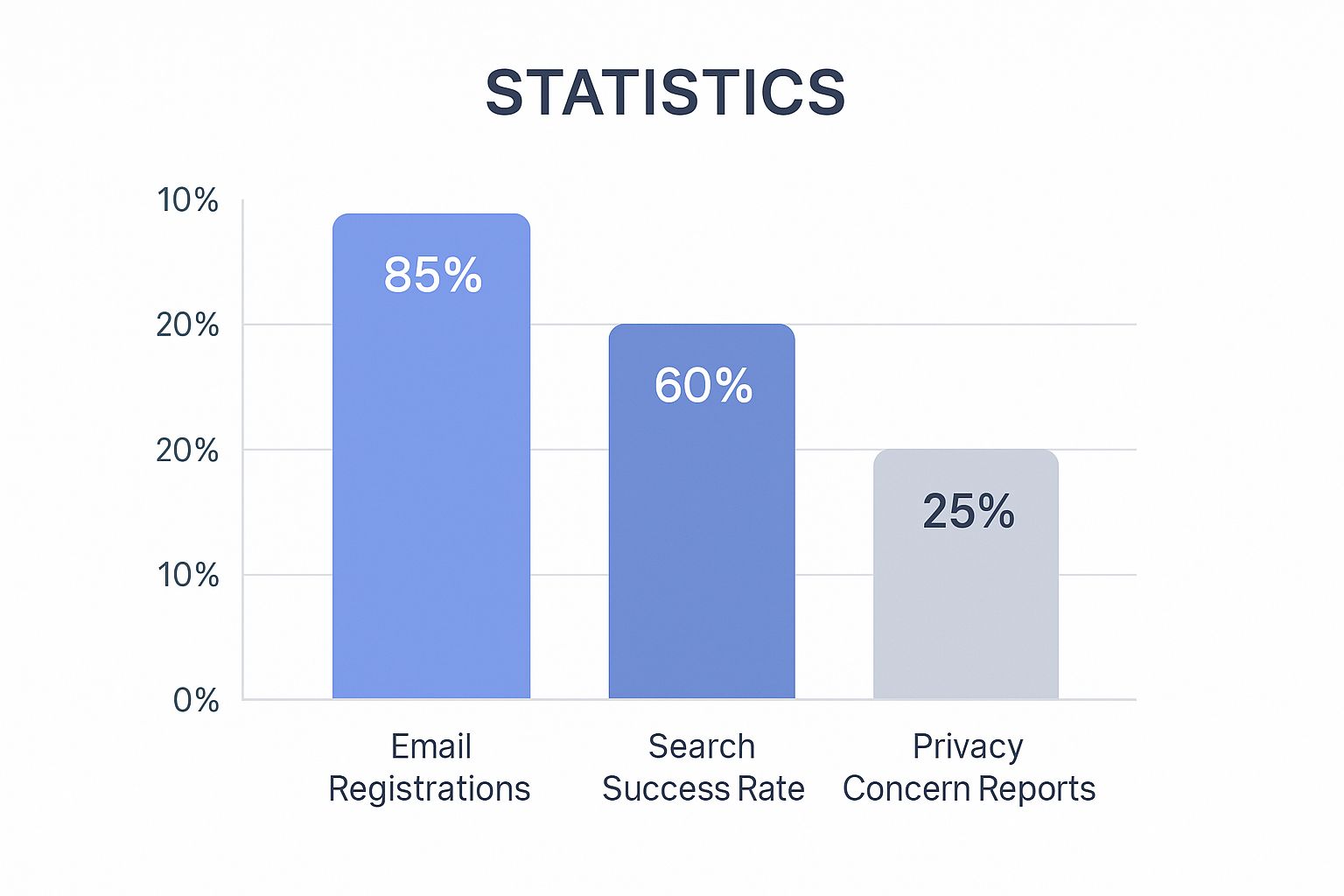
As you can see, while nearly 100% of creators use an email to sign up, the chances of finding them through that email are extremely low without the right tools. This highlights the "privacy gap" that makes third-party search methods so necessary.
Effectiveness of Different OnlyFans Search Methods
When you only have an email, your options vary quite a bit in terms of effectiveness and privacy. Here's a quick comparison of the most common approaches.
| Search Method | Effectiveness | Privacy Level | Typical Use Case |
|---|---|---|---|
| Google Search | Low | High | Finding public social media profiles linked to the email. |
| Social Media Search | Low-Medium | High | Checking if the email is used for a public IG or Twitter. |
| Reverse Email Lookup Tools | Medium | Medium | Uncovering associated usernames and online footprints. |
| Specialized Fan Finders | High | High | Directly searching databases built to link data to OF profiles. |
Ultimately, finding an OnlyFans profile with an email requires a bit of detective work. While direct searches on the platform are a non-starter, combining reverse lookup tools with smart social media sleuthing can often get you the results you're looking for. The key is to be persistent and try a few different angles.
Using Reverse Email Lookup Services
So, you have an email address and you're trying to find an OnlyFans profile. One of the most effective first moves is to turn to a reverse email lookup service. These tools act like digital sleuths, methodically scouring the public internet for any breadcrumbs connected to that email.
They aren’t hacking into OnlyFans. Instead, they’re digging through publicly accessible information from social media, forums, personal websites, and data breaches to piece together a person's online identity.
The real magic here isn't just in running the search, but in how you interpret what you find. A lookup service will almost never hand you a direct link to an OnlyFans account. What it will often give you is something even more useful: a username.
From Email to Username
Many creators, for the sake of simple branding, use the same username across all their platforms. A reverse email search might not point to OnlyFans, but it could very well pop up a Twitter handle, an Instagram name, or a Reddit profile associated with that email. That username is the key you need.
Let’s say you run a search on [email protected]. The report might come back empty for OnlyFans, but it could link that email to a Twitter account with the handle @Creator_123. Bingo. That’s your golden ticket.
Key Takeaway: The goal with a reverse email lookup isn't to find the OnlyFans profile in one shot. It's to find the username associated with the email. That's the piece of information you'll use to search directly on OnlyFans and Google.
Once you have that potential username, your whole approach changes. You're no longer shooting in the dark; you have a solid lead to follow.
Choosing the Right Service
Be warned: not all lookup services are built the same. Some are far more comprehensive than others, and picking a reputable tool is crucial for getting good results while protecting your own privacy.
When you're weighing your options, here’s what to look for:
- Data Sources: Does the service scan a wide net, including major social platforms and public records? The more sources, the better your odds.
- Report Clarity: Are the results easy to read? You need a report that clearly connects the dots for you, not a jumble of raw data.
- Privacy Policy: Make sure the service is upfront about what it does with your search queries and personal information.
This method of connecting digital dots is a fundamental tactic. For those who want to explore more specialized tools, you can check out your guide to using an OnlyFans model finder, which details services designed to bridge this gap more directly. Either way, starting with a reverse email lookup is a smart, powerful first step in your search.
Connecting an Email to a Profile on Social Media
Got an email address? Great. Your next stop is the world of social media. Most creators aren't just on OnlyFans; they're actively promoting their content on platforms like X (formerly Twitter) and Instagram to pull in subscribers. The goal here is to connect that email address to one of their public-facing promotional accounts.

Sometimes, the simplest tricks work best. You can try using the "find friends" or "account recovery" functions on major social networks. By plugging in the email, you might get a direct hit if an associated account pops up. Privacy settings can block this, so it’s not a sure thing, but it’s so quick that it's always worth a shot.
Becoming a Digital Detective
If you do manage to link the email to a social profile, it’s time to put on your detective hat. Don't just give the profile a quick scroll. You need to meticulously comb through it for clues that point back to their OnlyFans page.
I've found the most success by focusing on these specific areas:
- The Bio: This is prime real estate. Creators often drop hints here, using phrases like "spicy account," "exclusive content," or even a suggestive emoji like a chili pepper or a devil face.
- Link-in-Bio Services: Always, always check their Linktree, Beacons, or AllMyLinks page. In my experience, this is the single most common spot to find a direct link to their OnlyFans.
- Pinned Posts or Tweets: The most critical information—like a direct link or a special offer—is usually pinned to the top of their feed for everyone to see.
- Photo and Video Content: Scan images for watermarks or look for usernames tagged in video descriptions. It's an easy detail to overlook, but it can be a direct giveaway.
Think of it less as a direct search and more like assembling a digital puzzle. A creator's social media is their public billboard, and that's exactly where they'll hang their advertisements.
Pro Tip: Don't sleep on the comment sections or replies. I’ve often found a creator dropping a direct link to their page when a follower asks for it. It's a goldmine that many people ignore.
Following a social media trail definitely takes some patience, but it's one of the most reliable ways to find a direct link without shelling out for paid tools. This method works even better when you combine it with other search strategies. For instance, if you're also trying to find creators in a specific city, you can cross-reference your findings. We actually put together a whole guide on the best ways to find OnlyFans creators by location that can really boost your success rate.
Exploring Specialized OnlyFans Finder Tools
As the creator economy boomed, a whole new market of third-party finder tools popped up to do what OnlyFans itself won't: help you search for profiles. Think of them as massive, unofficial directories. They constantly scan the web, pulling in publicly available data about creators to build their own searchable databases.
So, when you use one of these tools, you aren't searching on OnlyFans. You're searching through their huge, curated index. The real magic is in their filtering capabilities. You can often slice and dice the results by keywords, location, or content type, making it much easier to connect the dots with the clues you already have.

From Username to Profile
Now, it's true that most of these finder tools don't let you search OnlyFans by email directly. But they become incredibly useful when you pair them with other methods. That username you dug up with a reverse lookup service? It’s the perfect key to unlock these specialized search engines. This is often the final piece of the puzzle that takes you from a small lead to the actual profile.
I can't stress this enough: stick to reputable, well-known finder tools. You’ll get better results, but more importantly, you’ll avoid scams and respect creator privacy by only working with information they've already shared publicly.
The sheer scale of OnlyFans is why these tools are in such high demand. The platform’s traffic hit nearly 478 million visits in January 2025 alone, and December saw over 468 million visits. With about 84% of that traffic coming from mobile phones, it's clear why external discovery tools have become a necessity for many. For a deeper dive into these numbers, pleazeme.com has some fascinating data.
Getting started with these platforms might seem a bit overwhelming at first, but they’re built to be pretty intuitive. To point you in the right direction, we've put together a guide on the 7 best OnlyFans finder tools for 2025. It breaks down what makes each one tick, so you can pick the best tool for the job.
Dig Deeper with Advanced Google Searching
If you're willing to get a bit more technical, Google itself can be an incredibly potent tool for this kind of detective work. We're talking about using specific search commands—what some people call "Google Dorking"—to uncover connections that a simple search would never find. It's all about telling Google exactly what to look for.

This method is most effective when a creator has inadvertently linked their promotional email to their OnlyFans page somewhere online. Maybe they dropped it in a Reddit thread, a forum signature, or a public social media bio where they also mention their OF. It happens more often than you'd think.
Building a Better Search Query
The trick is to combine the email address with special search operators and keywords. You're essentially forcing Google to find pages where both pieces of information appear together.
Here are a few combinations I've found to be effective:
Social Media Focus:
"[email protected]" site:twitter.com "my OF"
This is my first stop. It narrows the search exclusively to Twitter, looking for that exact email and the common phrase "my OF."Broader Web Search:
"[email protected]" ("onlyfans" OR "exclusive content")
This query searches the entire internet for the email address mentioned alongside either "onlyfans" or "exclusive content," casting a much wider net.Username Cross-Reference:
("suspected_username" AND "[email protected]")
If you have an idea of their username, this command can help confirm if it's tied to that specific email on any public site.
Expert Tip: Always wrap the email address in quotation marks (
" "). This is crucial. It tells Google to look for that exact string of characters, filtering out a ton of irrelevant noise and making your search results far more accurate.
This approach won't always yield a direct link, but it's a powerful and free way to find publicly available breadcrumbs. It requires a bit of patience and creativity, but when it pays off, it can reveal connections that are otherwise completely hidden. It's a great technique to have in your back pocket when you need to search OnlyFans by email.
Frequently Asked Questions
When you're trying to find someone on OnlyFans using just an email, a few common questions always pop up. Let's tackle them head-on, so you know exactly what you're dealing with regarding privacy, legality, and what to do if you hit a dead end.
Is It Actually Legal to Search for an OnlyFans Profile by Email?
Absolutely. There's nothing illegal about it. Every method we've discussed boils down to searching for information that's already out in the open. You're using clever search tactics to find data a creator has shared publicly somewhere on the internet, like in a social media bio, on a forum, or even in an old tweet.
Think of yourself as a digital detective, not a hacker. You aren't cracking into private accounts or bypassing security. Your search is limited to the public domain, which keeps everything on the right side of the law.
Will the Creator Get a Notification That I Searched for Them?
Nope, they won't have a clue. Whether you're using Google, a reverse email lookup tool, or a third-party finder, your search is completely anonymous as far as the creator is concerned. These tools operate independently and don't trigger any alerts within the OnlyFans platform.
Privacy Insight: Your search is entirely discreet. The creator receives no notification, no alert, and no digital footprint that leads back to you. You can look for a profile without them ever knowing.
This means you can conduct your search with complete peace of mind.
What if I've Tried Everything and Still Can't Find the Profile?
If you've gone through all these methods and come up empty-handed, that tells you something important. It's a strong sign the creator is serious about their privacy and has likely set up their OnlyFans account with a unique email that isn't connected to their public identity.
At this stage, the best and most respectful thing to do is simply stop looking. The lack of any connection is a clear signal that the creator has intentionally kept that email separate. If you want to explore more general search strategies, our guide on how to use OnlyFans search to find creators offers some broader tips.
Ready to discover your favorite creators without all the guesswork? Fanclan gives you a powerful, easy-to-use platform to explore over 100,000 profiles with advanced filters. Find exactly who you're looking for at https://fanclan.io.